Reset Password From Command Prompt Windows 7 Step by Step Guide To Resetting A Windows 7 Password How To Change A Windows User Account Password From Command Prompt Reset Windows 10 Password Command Prompt YouTube How To Hack Wifi Password Using Command Prompt Womenfasr 2021 Reset Best Command Prompt Hacks And Tricks Web Sep 2 2016 nbsp 0183 32 copy c windows system32 sethc exe c Then you ll copy the command prompt executable cmd exe over top of the sticky keys executable copy c windows system32 cmd exe c windows system32 sethc exe Now you can reboot the PC Resetting the Password
Web Jun 8 2021 nbsp 0183 32 In Windows 7 you can reset a user account s password using another Administrator account on the device If you have another admin account setup on your Windows 7 PC and you have access to this account then by using Command Prompt you will be able to reset the password for the desired account Web Method 2 Reset Password with Command Prompt in Safe Mode While starting the computer hold down the F8 key until the Advanced Boot Options screen appears Using the arrow keys You will see the hidden Administrator account available on the login screen Once logging in the system will Run the
Best Command Prompt Hacks And Tricks Find Passwords Of All Connected Wi Fi Networks Using CMD Tips And WINDOWS COMMAND PROMPT CMD COMMANDS IN TAMIL What Are Command Prompt Codes Prompts Command Coding How To Open Command Prompt Windows 11 10 8 7 Etc Reset Windows 7 Passwords A Field Report My2cents How To Change Your Account Password Using Command Prompt On Windows 10 List Of Windows 7 Command Prompt Commands System Image Recovery From Command Prompt Windows 10 Ulsdultimate
Reset Password From Command Prompt Windows 7
 Reset Password From Command Prompt Windows 7
https://fthmb.tqn.com/m_X3InKXC8IwMbHq9zkJ5o0Z4TU=/768x0/filters:no_upscale():max_bytes(150000):strip_icc()/net-user-windows-7-password-reset-5a7c7a59eb97de0037b82e91.PNG
Web Reset Windows 7 password Using command prompt in Safe Mode 1 To access the command prompt please start your computer and press quot F8 quot while the computer boots up The Advanced 2 Use the arrow keys to highlight the quot Safe Mode with Command Prompt quot and press quot Enter quot Your computer will start in
Pre-crafted templates use a time-saving solution for creating a varied range of files and files. These pre-designed formats and designs can be used for various personal and expert projects, including resumes, invites, leaflets, newsletters, reports, discussions, and more, streamlining the material production process.
Reset Password From Command Prompt Windows 7
Windows 7 Backup Command Line Dusupernal
Find Passwords Of All Connected Wi Fi Networks Using CMD Tips And

WINDOWS COMMAND PROMPT CMD COMMANDS IN TAMIL

What Are Command Prompt Codes Prompts Command Coding

Reset Windows 7 Passwords A Field Report My2cents
How To Change Your Account Password Using Command Prompt On Windows 10

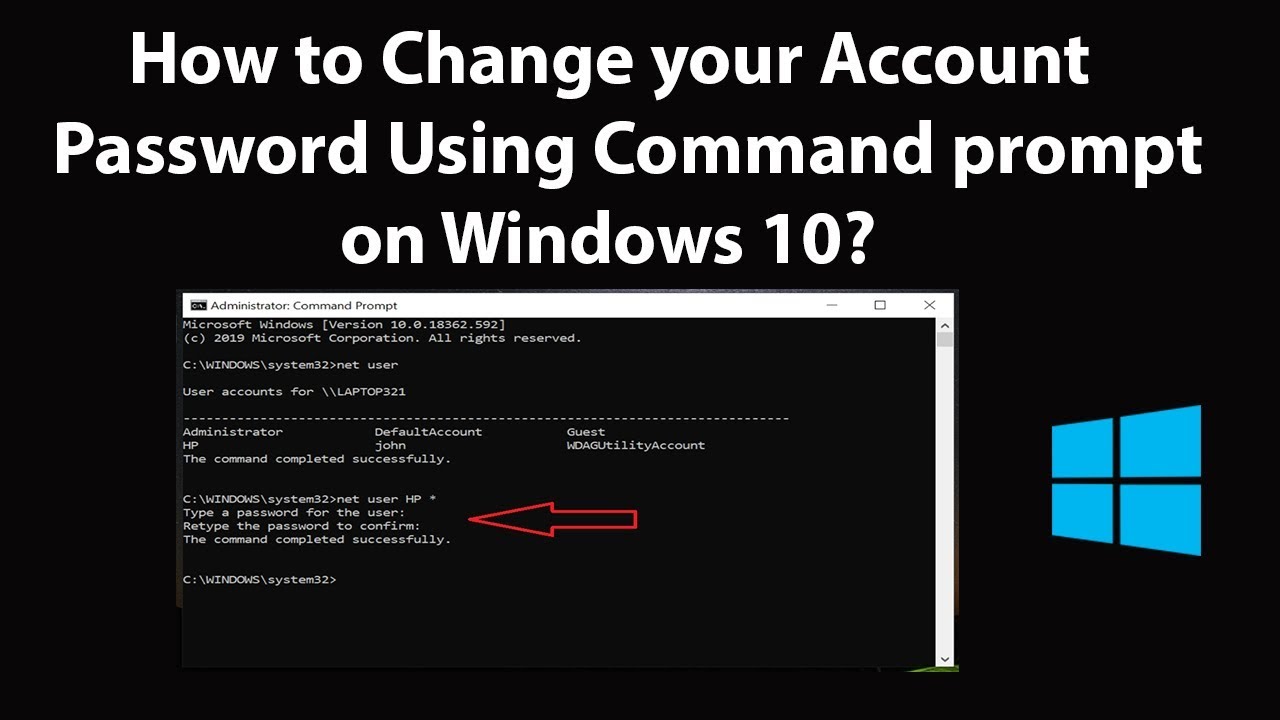
Web There are two ways of changing the password in Command Prompt The silent way Net User quot User s name quot quot New password quot The Interactive way Net User quot User s name quot Here asterisk prompts the user for password input making it invisible on the screen and unrecordable in Command Prompt s cmd exe history Notes

Web Way 3 Reset Windows 7 password with command prompt on login screen Step 1 Force power off your computer Start your computer and when you see it saying Starting Windows Hold down the Step 2 Restart computer and choose quot Launch Startup Repair Recommended quot Next time when you power on your

Web Feb 10 2023 nbsp 0183 32 Tim Fisher Updated on February 10 2023 Reviewed by Ryan Perian What to Know Run Repair your computer from the Windows 7 installation disc and run an overwrite command in Command Prompt Remove the disc and restart the computer execute the net user command with a new username and password

Web Apr 26 2023 nbsp 0183 32 For a quicker but less discreet option type net user username new password into the Command Prompt and press Enter Replace quot username quot with the account name you wish to change the password for and replace quot new password quot with the password you want to set You can also find your Wi Fi password using the

Web Mar 27 2023 nbsp 0183 32 Select Run as administrator In the Command Prompt type net user and hit the Enter key You will see all the accounts on this computer Type net user username password where username is the account you want to reset and password is the new password you want to use
Web Tip 1 Use an Available Admin Account to Reset Windows 7 Password with CMD Tip 2 Reset Windows 7 Admin Password with Command Prompt in Safe Mode Tip 3 Use an Install Disk to Open Command Prompt and Reset Windows 7 Web Dec 2 2020 nbsp 0183 32 First boot from a W7 Setup disc or flash drive At the first screen select Next followed by Repair your computer Note the Windows drive letter on the System Recovery Options screen and then press Next Select Command Prompt and then execute two copy commands involving utilman exe
Web After seeing the list of accounts type net user user name new password This command is explained in first part to reset the password Now it is completed process of how to reset Windows 7 password using cmd in safe mode Part 3 Reset Windows 7 Password with Command Prompt on Login Screen