Reset Computer Password Powershell How To Change Local Domain Admin Password Using Windows PowerShell Set Password To Never Expire Using PowerShell On Windows Server 2016 Palliser s Early Learning Palliser School Division OPEN HOUSE New Coaldale High School Palliser School Division Creating A Password Reset Tool With PowerShell Part 1 4sysops This cmdlet can reset the password of a local user account Note The Microsoft PowerShell LocalAccounts module is not available in 32 bit PowerShell on a 64 bit system Examples Example 1 Change a description of a user account PowerShell Set LocalUser Name Admin07 Description Description of this account
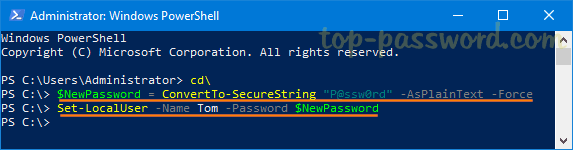
The Reset ComputerMachinePassword cmdlet changes the computer account password that the computers use to authenticate to the domain controllers in the domain You can use it to reset the password of the local computer Parameters Confirm SwitchParameter Default value is False Accepts pipeline input False To change a local account password with PowerShell command on Windows 11 use these steps Open Start Search for PowerShell right click the top result and select Run as administrator Type the following command to list all the available accounts and press Enter Type the following command to create and store the new password in a variable
Creating A Password Reset Tool With PowerShell Part 1 4sysops Ram s Technical Blog Changing Password In SharePoint 2013 By Powershell Creating A Password Reset Tool With PowerShell GUI VGeek Tales From Resovled Issue With PowerShell Trust Relationship Rejoin Computers In STAFFING ANNOUNCEMENT PAYROLL SPECIALIST CERTIFICATED STAFF Retrieve Password Last Set And Expiration Date PowerShell HeelpBook APPOINTMENT OF VICE PRINCIPAL TO KATE ANDREWS HIGH SCHOOL Palliser Password Reset Across Your Company Use PowerShell To Trigger Password Reset The Local Account Password Using PowerShell In Windows 10
Reset Computer Password Powershell
 Reset Computer Password Powershell
https://www.top-password.com/blog/wp-content/uploads/2019/04/change-local-account-password-with-powershell.png
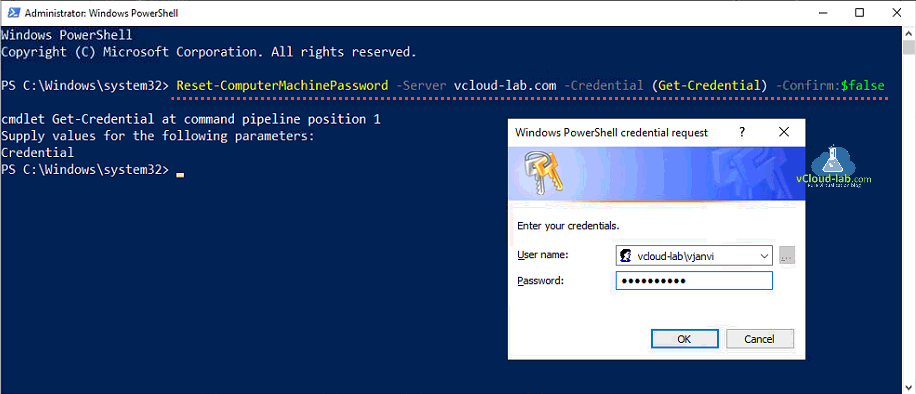
The Reset ComputerMachinePassword cmdlet changes the machine account password that the computers use to authenticate to the domain controllers in the domain You can use it to reset the password of the local computer Parameters Server string Specifies the name of a domain controller to use when setting the machine account password
Pre-crafted templates offer a time-saving solution for producing a varied variety of documents and files. These pre-designed formats and layouts can be used for different individual and expert projects, including resumes, invites, leaflets, newsletters, reports, presentations, and more, improving the content production procedure.
Reset Computer Password Powershell
5 Top Local Administrator Password Solution LAPS Tips

Ram s Technical Blog Changing Password In SharePoint 2013 By Powershell
Creating A Password Reset Tool With PowerShell GUI VGeek Tales From
Resovled Issue With PowerShell Trust Relationship Rejoin Computers In

Retrieve Password Last Set And Expiration Date PowerShell HeelpBook

APPOINTMENT OF VICE PRINCIPAL TO KATE ANDREWS HIGH SCHOOL Palliser
You can use Reset ComputerMachinePassword cmdlet in PowerShell to reset the computer password for the local computer or remote computer in the domain Syntax Reset ComputerMachinePassword Server String Credential PSCredential WhatIf Confirm CommonParameters Parameters Server This parameter is optional

Type the following command and press Enter on each line to apply the new password to the local account UserAccount Get LocalUser Name admin UserAccount Set LocalUser Password Password In the second command make sure to replace admin with the name of the account to reset its password

Reset ComputerMachinePassword changes the machine account password that the computers use to authenticate to the domain controllers in the domain You can use it to reset the password of the local computer Examples Reset the machine password for the local computer using the credentials of the current user PS C Reset ComputerMachinePassword

User must change password at next logon Do it for many The beauty of PowerShell is that if you can do something for one object such as a user account you can do it for many I already have code that works for resetting the password and forcing the user to change a password at the next logon

The default is the current nuser p n p dir auto Type a user name such as User01 or Domain01 User01 or enter a PSCredential object such as one ngenerated by the code Get Credential code cmdlet
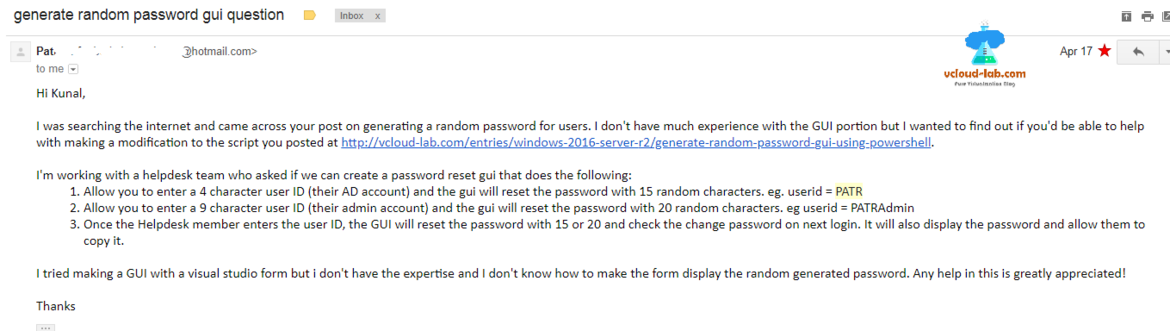
In a previous article I demonstrated how to use the Microsoft Active Directory module in PowerShell to reset a user account password Because this is a task you might delegate it might be nicer to provide a script or tool to simplify the process There are a number of ways you might go and I ll walk you through a couple Apparently the machine password expired and automatically renewed while testing so this was lost when I reverted to the old snapshot Rather than disconnect and rejoin the computer from the domain I found a Powershell command to reset the machine password Details about this command are at
3 Answers Sorted by 1 This can be done from the command prompt Open a command prompt as administrator Now run the following command net user This will list all users Find out the user you want to change the password of Now type net user username