Replace Text In All Files Intellij Remove Text Pattern From The Text File Using PowerShell Stack Overflow Intellij Idea 1 File And Code Templates Replace Text In All Files In A Project Linux George Mastro Intellij Reformat Code All Files How To Find In All Files In Folder Sublime What Is Mark Down Web Mar 17 2020 nbsp 0183 32 14K views Streamed 1 month ago findandreplace intellij searchandreplaceThis video is a visual representation of replacing any word with other words in an IntelliJ IDE project Replacing
Web Jan 11 2024 nbsp 0183 32 To find text in our current file we use Edit Find Find Ctrl F Cmd F To replace text in our current file we use Edit Find Replace Ctrl R Cmd R In both cases we move through the search results with Edit Find Find Next Occurrence F3 Cmd G and Edit Find Find Previous Occurrence Shift Web IntelliJ replace variable names in multiple lines I am wondering is there a shortcut that can replace a variable name with a new name on multiple lines in the current Java file for IntelliJ Is it just simply doing a find and replace operation but it can t really solve the problem obviously
How To Find In All Files In Folder Sublime What Is Mark Down IntelliJ Showing Source And Test Files In Same Package Stack Overflow Solved Idea Project Error Java Compilation Failed Internal Java Find And Replace Text In All WordPress Posts ITAdminGuide Intellij Reformat Code All Files Screenshots Of HandyFile Find And Replace Text Workbench BumperSoft How To Batch Find Replace Specific Words In All Outlook Folder Names Compare Files Folders And Text Sources IntelliJ IDEA Editor Basics IntelliJ IDEA Documentation
Replace Text In All Files Intellij
 Replace Text In All Files Intellij
https://i.stack.imgur.com/BIufH.jpg
Web Nov 19 2023 nbsp 0183 32 To replace text press Ctrl R Cmd R on macOS This opens a similar interface with an additional field for the replacement text After typing the replacement text you can replace occurrences one by one using the Replace button or all at once with Replace All Using Regular Expressions
Pre-crafted templates offer a time-saving option for developing a diverse range of files and files. These pre-designed formats and designs can be used for various individual and professional tasks, including resumes, invites, flyers, newsletters, reports, presentations, and more, enhancing the material creation process.
Replace Text In All Files Intellij

How To Find And Replace Text In Microsoft Word

IntelliJ Showing Source And Test Files In Same Package Stack Overflow
Solved Idea Project Error Java Compilation Failed Internal Java

Find And Replace Text In All WordPress Posts ITAdminGuide
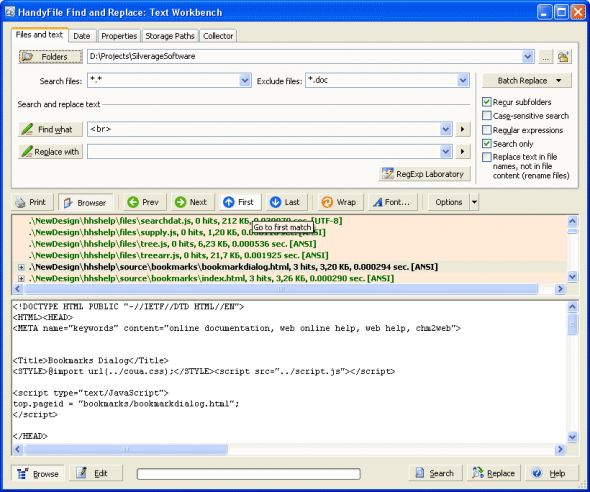
Screenshots Of HandyFile Find And Replace Text Workbench BumperSoft

How To Batch Find Replace Specific Words In All Outlook Folder Names

Web Jan 11 2024 nbsp 0183 32 Learn how to search for text strings in IntelliJ IDEA filter results find usages replace and configure automatic highlighting

Web Jul 13 2016 nbsp 0183 32 Replacing a piece of text in all the files within the specified path do one of the following On the main menu choose Edit Find Replace in Path Press Ctrl Shift R You can try Ctrl Shift F And if you are using Eclipse keymap for

Web Jan 11 2024 nbsp 0183 32 Replace the search string in a file Press Control R or select Edit Find Replace from the main menu to open the Replace in File window In the top field enter your search string In the bottom field enter your replacement string If you need to preserve the case click located in the replace field Click for a multi line replace For

Web if it is in one file ctrl r check the tick box Regex and look for Name String quot quot quot this should match what you want Then replace it with whatever you want If it is in multiple file use ctrl shift r

Web Feb 7 2024 nbsp 0183 32 Replace text in the current file Press Control R or choose Edit Find Replace from the main menu The search and replace pane appears on top of the active editor If necessary specify the search and replace options In the search field start typing the search string
Web Aug 12 2012 nbsp 0183 32 Apparently devs do not find this useful for Java so it has to be implemented for PhpStorm only instead of being available to all IDEs see the last comment by Anna On another hand accordingly to screenshot made by Kirill such functionality is already present in Java IDE IntelliJ IDEA So possibly devs changed their mind about it and it Web Jan 2 2024 nbsp 0183 32 Overview Versions Reviews Rename multiple files at the same time Optionally use regex You can also select a directory to recursively rename all nested files folders GitHub Issue tracker Plugin page Usage Select multiple files Right click and select Replace text in file names Enter from and to texts and optionally use Regex
Web Feb 18 2023 nbsp 0183 32 There are two ways to open the search box first we can go through the main menu and then click on edit and inside the edit we have the Find option so click on find and select Find in Files otherwise we can use the shortcut key Ctrl Shift F