Rename Folder In Ubuntu How To Rename A File In Ubuntu Through Terminal Rename File Linux Kidsfasr Rename The File On Linux TerminalLab Rename A File From The Terminal Ubuntu YouTube Bitcoin Linux Folder Rename File Web Jul 21 2020 nbsp 0183 32 Renaming directories is one of the most basic operations you often need to perform on a Linux system You can rename directories from the GUI file manager with a couple of clicks or using the command line terminal 7 Apt Commands Every Ubuntu Linux User Should Know
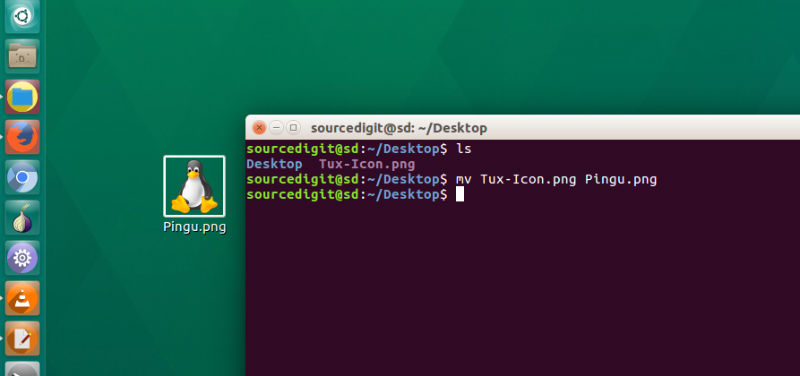
Web Jul 10 2021 nbsp 0183 32 There is no built in rename command in Ubuntu You can also use the mv command in the terminal to rename a file or directory Open up the terminal by using the shortcut Alt Ctrl T Once you have the terminal open type the following command mv lt original name gt lt new name gt Web You can use the mv command to rename a folder or directory via command line in Ubuntu For instance if you want to rename the directory current name to new name in your current working directory you can simply use the following command mv T current name new name
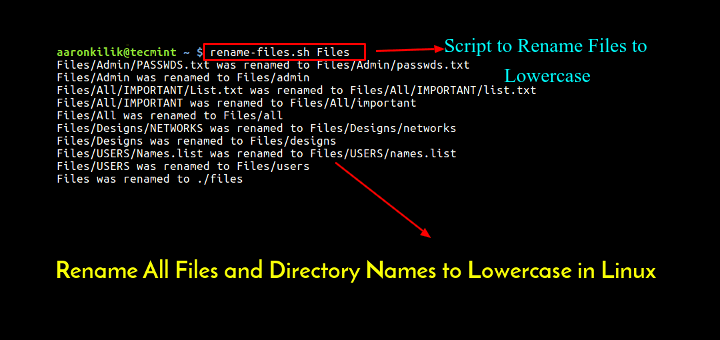
Bitcoin Linux Folder Rename File Rename All Files And Directory Names To Lowercase In Linux Delete Folder In Ubuntu Example How To Remove A Directory In Ubuntu Cara Rename File Atau Folder Di Linux Ubuntu TERAA NET How To Rename Files In Linux Make Tech Easier Ubuntu Linux Tutorial File Management Copy Move And Rename YouTube Rename Folder In Linux How To Rename Multiple Files In Linux Ubuntu With Single Command Create A Folder In Ubuntu Oultet Website Save 56 Jlcatj gob mx
Rename Folder In Ubuntu
 Rename Folder In Ubuntu
https://sourcedigit.com/wp-content/uploads/2016/07/rename-terminal.jpg
Web Jul 13 2021 nbsp 0183 32 Method 1 Renaming files using GUI We will be renaming a file named file txt Right click on the file that needs to be renamed A menu appears on the screen Click on the rename The name of the file will become editable Write the name of the new file and press enter The file will be renamed
Templates are pre-designed files or files that can be used for numerous purposes. They can save effort and time by supplying a ready-made format and design for producing different sort of material. Templates can be used for personal or expert projects, such as resumes, invites, leaflets, newsletters, reports, discussions, and more.
Rename Folder In Ubuntu
Rename All Files In A Folder In Linux LinuxTect
Rename All Files And Directory Names To Lowercase In Linux

Delete Folder In Ubuntu Example How To Remove A Directory In Ubuntu

Cara Rename File Atau Folder Di Linux Ubuntu TERAA NET

Ubuntu Linux Tutorial File Management Copy Move And Rename YouTube
Rename Folder In Linux

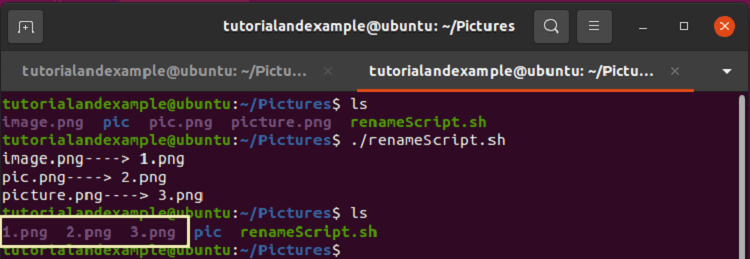
Web Jun 13 2022 nbsp 0183 32 On Ubuntu the rename and prename commands are both symbolic links that resolve to a binary called file rename So on Manjaro the command you ll need to use perl rename and on Fedora it is prename On Ubuntu you can use rename or prename To install Perl rename on Ubuntu you need to type sudo apt install rename

Web Sep 28 2021 nbsp 0183 32 For Ubuntu and Debian use sudo apt install rename For CentOS and Fedora use sudo yum install prename For Arch Linux use sudo pacman S rename Renaming a Single Directory With the rename Command The rename command uses the following syntax rename options s expression replacement file name
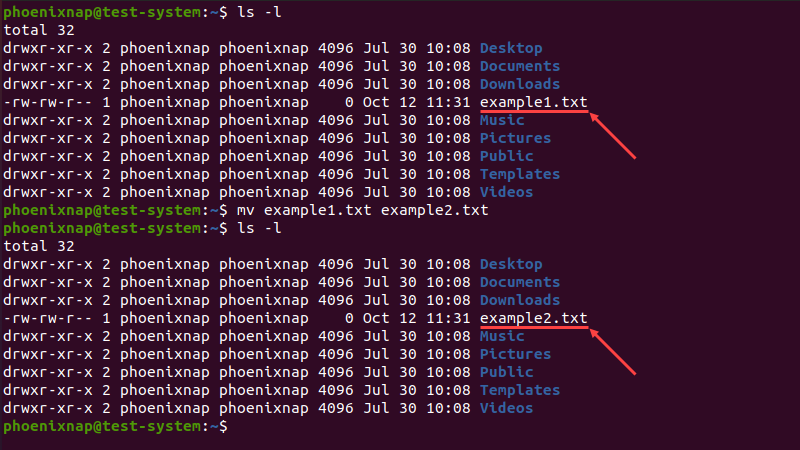
Web Jun 1 2022 Table of Contents Renaming a file is easy when you are using a mouse in a graphical explorer But if you are new to the Linux command line and stuck to the terminal things could be overwhelming In the terminal you can use the mv command to rename a file in Ubuntu mv OLD NAME NEW NAME
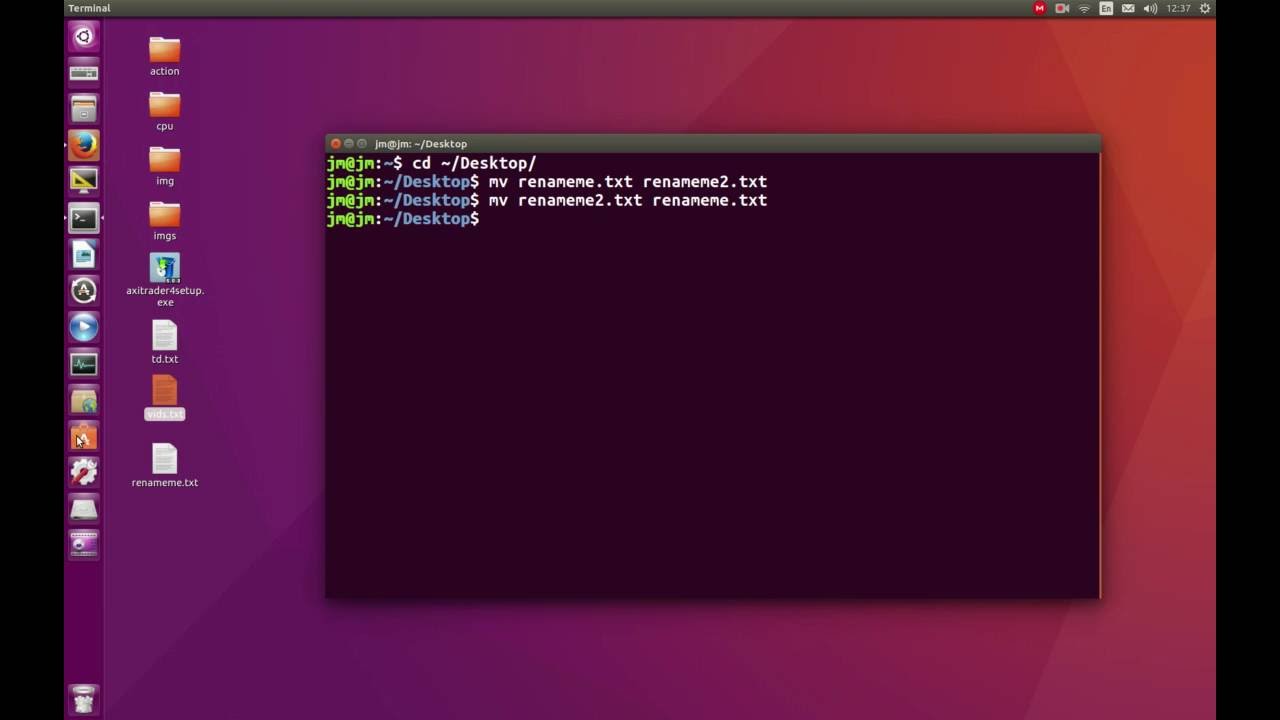
Web A simple way to rename files and folders is with the mv command shortened from move Its primary purpose is moving files and folders but it can also rename them since the act of renaming a file is interpreted by the filesystem as moving it

Web To rename a file or folder Right click on the item and select Rename or select the file and press F2 Type the new name and press Enter or click Rename You can also rename a file from the properties window When you rename a file only the first part of the name of the file is selected not the file extension the part after the last
Web Jan 21 2020 nbsp 0183 32 Open the Terminal application Type the following command to rename foo folder to bar mv foo bar You can use full path too mv home vivek oldfolder home vivek newfolder Let us see examples and syntax in details How to rename folders in Linux The pwd command shows current working directory pwd Sample outputs Web Jul 26 2023 nbsp 0183 32 For example to rename a folder named old folder to new folder only if the new folder name does not already exist you would type the following command mv T old folder new folder Conclusion Renaming a folder in Ubuntu using the command line is a simple process By following the steps in this blog post you can easily rename any
Web Feb 11 2017 nbsp 0183 32 Simplest way would be to use rename or prename which is a Perl script if you re a ksh or mksh user that shell has rename built in function which is different so for the sake of consistency I ll use prename when referring to that Perl script alternatively you could call usr bin rename full path to the executable