Rename File Command Rename Command Examples Options Switches More Comando Per Rinominare Nel Prompt Dei Comandi Di Windows DOS Geek How To Rename File Or Folder With Powershell YouTube A Comprehensive Guide To Using The rename Command In Linux Systran Box How To Rename A File Or Directory In Unix YouTube Web Feb 24 2023 nbsp 0183 32 The simplest way to rename files in Command Prompt is by going to that specific file s directory and using the ren rename command Its syntax is rename filename newname When using it practically replace the filename with the file s actual name and newname with the name you want to set
Web Feb 27 2023 nbsp 0183 32 You can rename a file or folder using the ren command on your Command prompt Here s how Head to the Start menu search bar type in cmd and select the best match On your Command Web Feb 20 2021 nbsp 0183 32 Type the rename command in cmd To rename a folder in CMD type the following replacing y our path to file txt with the path to your file or folder and NewName with your desired name ren quot y
How To Rename A File Or Directory In Unix YouTube How To Batch Rename Multiple Files On Windows 10 Windows Central Rename A Text File With The Unix Mv Command YouTube How To Batch Rename Multiple Files On Windows 10 Windows Central Cara Rename Banyak File Folder Sekaligus Pada OS Windows 10 TeknosID How To Batch Rename Files In Windows 10 Ms Dos Rename Command In Dos Super User How To Batch Rename Multiple Files On Windows 10 Windows Central How To Rename Folder In CMD Command Line Get IT Solutions
Rename File Command
 Rename File Command
https://www.lifewire.com/thmb/dhPgl9DR914jL0lEn-zkiBQyeso=/1002x668/filters:fill(auto,1)/ren-command-windows-10-c60d4449ab104ec38e3183e74999f97c.png
Web Nov 30 2021 nbsp 0183 32 Using Command Prompt go to a file folder enter ren filename jpg and press Enter This article explains how to batch rename files in Windows Instructions apply to Windows 10 Batch Rename Files in Windows 10 Using File Explorer Renaming a file on Windows 10 is simple You just right click and select Rename
Pre-crafted templates use a time-saving option for developing a varied variety of files and files. These pre-designed formats and layouts can be made use of for numerous individual and expert projects, including resumes, invites, flyers, newsletters, reports, presentations, and more, simplifying the material production process.
Rename File Command

Batch Rename Files Command Prompt YouTube

How To Batch Rename Multiple Files On Windows 10 Windows Central

Rename A Text File With The Unix Mv Command YouTube

How To Batch Rename Multiple Files On Windows 10 Windows Central

How To Batch Rename Files In Windows 10

Ms Dos Rename Command In Dos Super User

Web Sep 12 2023 nbsp 0183 32 Rename Command Options Item Explanation drive This is the drive containing the file you want
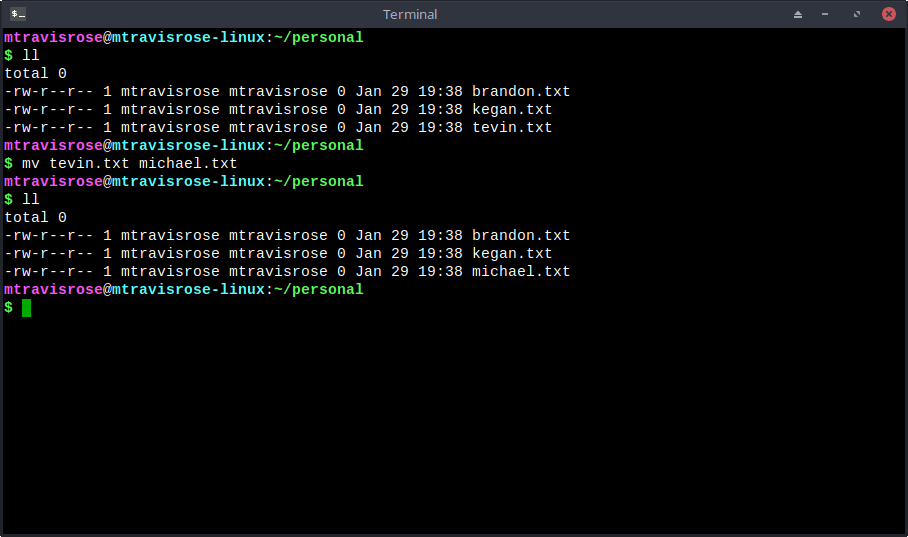
Web Apr 10 2020 nbsp 0183 32 To rename a file or folder you can use the following command if you re renaming a folder just omit the file extension ren quot current filename ext quot quot new filename ext quot Although the quotes aren t mandatory they re required if either of the current or new names has a space in them

Web Feb 3 2023 nbsp 0183 32 Renames files or directories Note This command is the same as the ren command Syntax rename lt drive gt lt path gt lt filename1 gt lt filename2 gt Parameters Remarks You can t specify a new drive or path when renaming files You also can t use this command to rename files across drives or to move files to a different directory

Web Jun 11 2014 nbsp 0183 32 We can use the command rename to rename files from windows command prompt CMD Find below syntax of the command with examples Syntax of rename command rename file path new name Example rename d data file1 doc file2 doc After executing the above command we ll have file2 doc in the folder d data

Web Use REN Command Ren is for rename ren where the file is located the new name example ren C Users amp username Desktop aaa txt bbb txt it will change aaa txt to bbb txt Your code will be ren file located AAA a001 jpg a001 AAA jpg ren file located BBB a002 jpg a002 BBB jpg ren file located CCC a003 jpg a003 CCC jpg and
Web Nov 1 2016 nbsp 0183 32 You can Click to select the file and then click the quot Rename quot button on the Home menu Click to select file and then click the name of the selected file Right click the file and then select quot Rename quot on the context menu Web Jun 2 2020 nbsp 0183 32 The ren and rename commands change the name of files and directories Tip In earlier releases of MS DOS instead of using ren or rename you need to use the move command to rename directories or files Availability Ren and rename syntax Ren and rename examples Availability
[desc-13]