Remove White Background From Image Paint All Ways To Remove White Background From Image Comment Supprimer Le Fond Blanc Dans Microsoft Paint How To Remove White Background In Paint How To Remove White Background Jpeg Removing Background Color In Paint Super User All Ways To Remove White Background From Image WEB Jul 5 2022 nbsp 0183 32 Here s how to make the background of an image transparent in Paint Open up Paint Now go ahead and click on File gt Open and choose the image you d like to remove the background from Once you see the image show up go ahead and click on gt Select gt Transparent selection Now use the gt Free form selection tool to select the area
WEB Dec 16 2023 nbsp 0183 32 1 1 Using Remove Background Open the Microsoft Paint app on your PC by searching for it in the Start Menu Opening Microsoft Paint Open your image in the Paint window using either a drag and drop method or the File gt Open menu Opening File in Paint Once your image is open in Paint select the Remove Background feature WEB Dec 20 2023 nbsp 0183 32 Open Menu at the top right corner and click Save as and choose Image and then click PNG type Make sure to tick the Transparent checkbox and click Save Also you can insert the object you cut out in another image right click the destination image go to Open with and click Paint 3D Drag the cut out object and place it on the image
All Ways To Remove White Background From Image How To Remove White Background From Image Online Free In 2020 Remove How To Remove White Background From Image Photoshop For Free Fotor How To Convert White Background To Transparent In Paint How To Filter Remove Background From Logo Free In 2020 How To Remove White Background From Image Online For FREE 2022 Remove White Background Microsoft Word Words Horse How To Remove Background In Photoshop How To Remove White Background From Image Online For FREE 2022
Remove White Background From Image Paint
 Remove White Background From Image Paint
https://photo.wondershare.com/images/en/edit-photos/remove-white-background-corel.jpg
WEB Sep 26 2023 nbsp 0183 32 Firstly open your image or drag and drop it in Paint Alternatively right click on your image hover over Open with and click Paint Now under the Image section of the toolbar click on the background removal option It looks like a square icon with a subject in front of a checkered background If you re in windowed mode click on
Pre-crafted templates offer a time-saving service for developing a diverse series of files and files. These pre-designed formats and designs can be utilized for numerous individual and expert projects, including resumes, invites, leaflets, newsletters, reports, presentations, and more, enhancing the material development procedure.
Remove White Background From Image Paint

Remove Background Png From Any Image In Paint Itself YouTube

How To Remove White Background From Image Online Free In 2020 Remove
How To Remove White Background From Image Photoshop For Free Fotor

How To Convert White Background To Transparent In Paint How To Filter

How To Remove White Background From Image Online For FREE 2022

Remove White Background Microsoft Word Words Horse
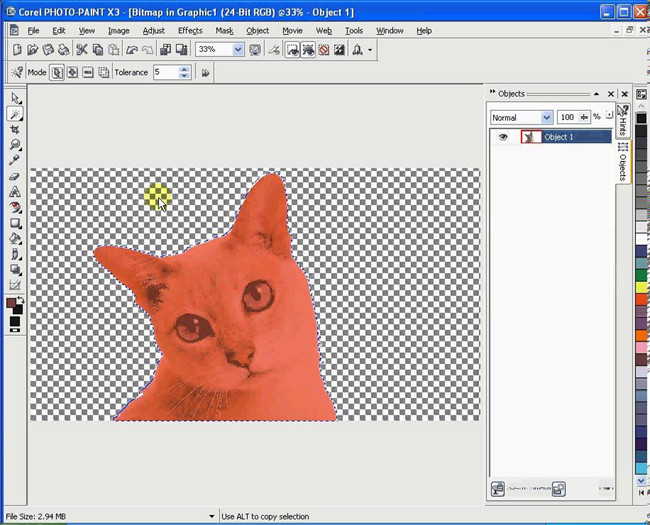
WEB Oct 1 2023 nbsp 0183 32 Alternatively navigate to the image in File Explorer right click on it and select Open with gt Paint Once the image is loaded into the Paint window simply click on the Remove Background button an icon of a person with striped lines located in the Image section on the toolbar

WEB On the toolbar select Magic Select Adjust the focus area to fit around the area of the image you want to keep Select Next Look closely to see whether the tool accurately isolated your target image from the background Some adjustments may be necessary Use the Add and Remove options to change what areas are isolated by the tool

WEB Apr 8 2022 nbsp 0183 32 Find out how to remove background in Paint alternative by reading the steps below Step 1 Visit the online app s official site To reach the official page of the online app open your preferred computer web browser From the address bar type the tool s name and hit the Enter key Step 2

WEB Jan 8 2024 nbsp 0183 32 To remove the background from an image with the Paint app use these steps Open Paint on Windows 11 Click on File and select the Open option Choose the image with the background to remove Click the Open button Click the Remove background button from the Image section in the ribbon Optional Use the Zoom
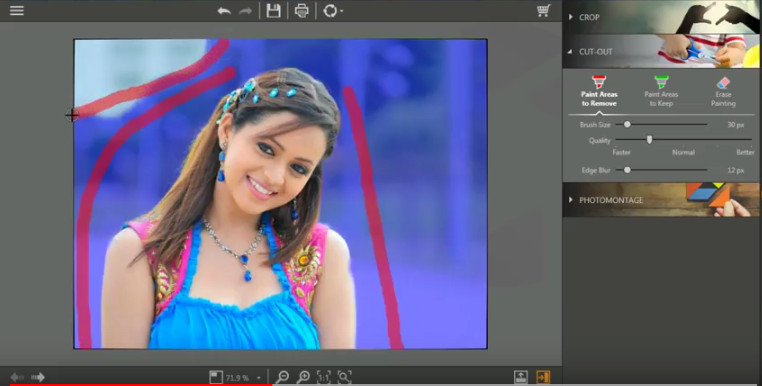
WEB May 17 2022 nbsp 0183 32 Remove white backgrounds from images in Paint 3D Open Paint 3D by typing quot Paint 3D quot into the Start Menu Open the image you want to use by selecting Open then Browse Files from the Welcome Screen
[desc-11] [desc-12]
[desc-13]