Remove Unused References Visual Studio Code Remove Unused References Visual Studio Windows Microsoft Learn How To Remove References In Visual Studio Code Coding Campus Visual Studio Code Introduction overview Youtube Seamless Teaching And Visual Studio Code Visual Studio Code Mengenal Lebih Jauh Aplikasi Ini Teknosio Similarly if you are using a VB template you can use the References Property page to remove unused references from the project To do so right click the VB
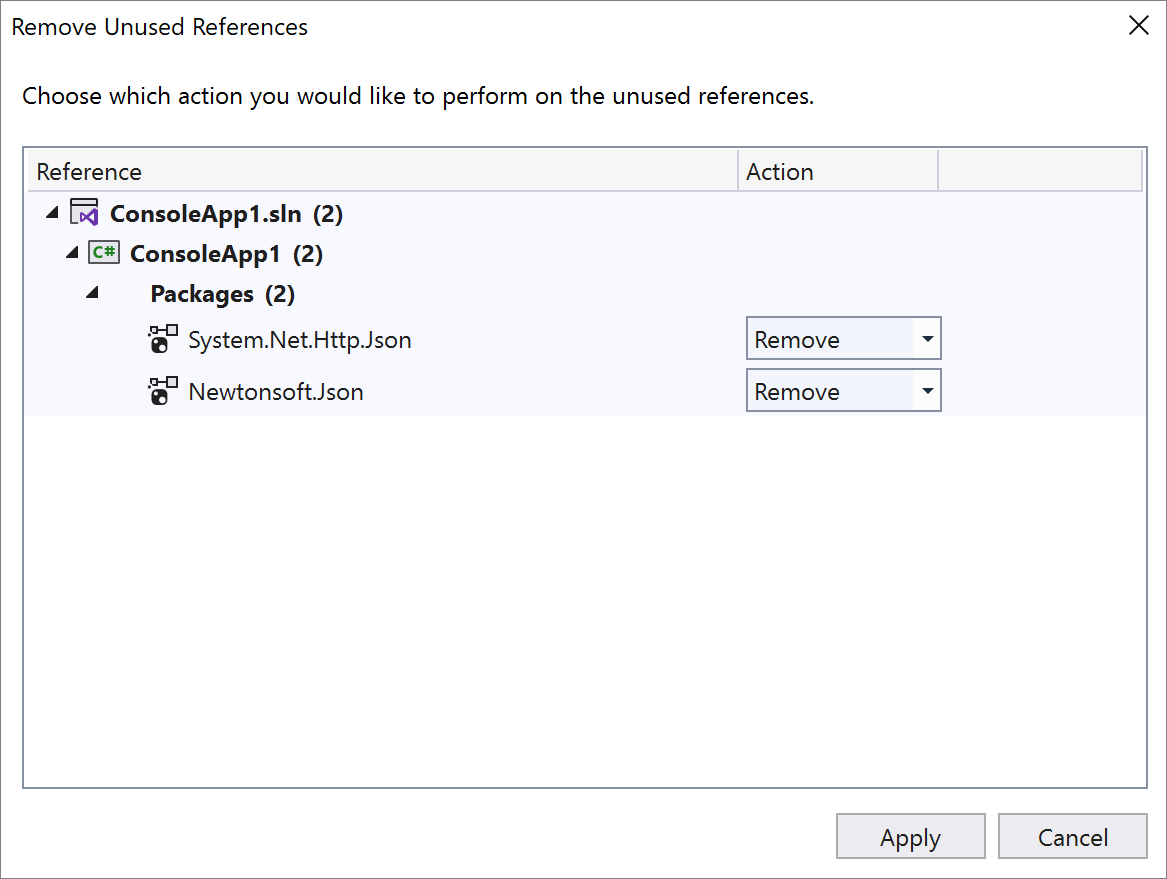
Firstly Right Click on the Project and select Remove Unused References This will bring up the Remove Unused References Dialog that shows First is putting your cursor on one of the grayed out lines and clicking the light bulb then clicking Remove Unnecessary Usings NOTE The
Visual Studio Code Mengenal Lebih Jauh Aplikasi Ini Teknosio Remove Unused References Visual Studio Windows Microsoft Learn Getting Started With Visual Studio Code VS Code DigitalOcean How To Run JavaScript In Visual Studio Code Visual Studio Code 1 8 Mango Umbrella 7 Visual Studio Code Alternatives For Better Coding Programming Cube Top Visual Studio Code Extensions For Svelte Developers What s Your Favorite Font With Visual Studio Code Hashnode Getting Started With Visual Studio Code Matthew Setter
Remove Unused References Visual Studio Code
 Remove Unused References Visual Studio Code
https://learn.microsoft.com/en-us/visualstudio/ide/reference/media/remove-unused-references-command.png?view=vs-2022
You can expand the References node in the Solution Explorer select the references you want to remove and invoke the Safe Delete refactoring
Pre-crafted templates use a time-saving service for developing a diverse range of files and files. These pre-designed formats and layouts can be made use of for different individual and professional tasks, consisting of resumes, invites, leaflets, newsletters, reports, presentations, and more, simplifying the material creation procedure.
Remove Unused References Visual Studio Code
Best Visual Studio Code Extensions Korearety
Remove Unused References Visual Studio Windows Microsoft Learn

Getting Started With Visual Studio Code VS Code DigitalOcean
How To Run JavaScript In Visual Studio Code
7 Visual Studio Code Alternatives For Better Coding Programming Cube

Top Visual Studio Code Extensions For Svelte Developers

In VS go to DevExpress Editor Code Cleanup Under Rules check Remove unused namespace references Click OK Right click on the solution and choose

Just right click on a project or solution and choose Remove Unused References from the menu and this extension will go to work while you
you will need to enable it in Tools Options Text Editor C Advanced and select Show remove Unused References command in Solution Explorer

When writing code we often add NuGet Packages Sometimes these packages remain unused

How to Right click on a project name or dependencies node in Solution Explorer Select Remove Unused References Remove Unused References command The Remove
Then select JustCode Remove Unused References SECommand A window will show up providing all unused references and the ability to pick the ones for removing In MAC It is Ctrl Option O also for some it is Option Shift O that will organize and remove all unnecessary imports from the
Another benefit of removing any unused references is that you will reduce the risk of conflicts with namespaces For example if you have both