Remove Permissions Password From Pdf How To Remove Permissions Password From PDF File 2 Ways To Remove Permissions Password From PDF Without Password 3 Ways To Remove Permissions Password From PDF 2 Ways To Remove Permissions Password From PDF Without Password 2 Ways To Remove Permissions Password From PDF Without Password PDF Unlocker Online is a free online PDF permission removal tool which unlocks secured PDF Files to standard PDFs fast and easily on your Browser Or Download the PDF Password Remover Win Mac Version to Unlock PDF PDF Unlocker Online read the PDF data in your Browser and then you can hit the Unlock button to remove the restrictions
Select your protected files that you want to remove the password from or drop them into the file box and start the process A few seconds later you can download your unlocked PDF files Password for unlocking The password enables our system to read the protected PDF file and to convert it to an unlocked one Removing PDF password security allows you to share your PDF with someone without using your password but the file can be modified Change permissions Once you have removed password protections and edited your document you can use our Soda PDF Protection tool from our full online application to add a new password or change permissions
2 Ways To Remove Permissions Password From PDF Without Password 3 Ways To Remove Permissions Password From PDF 2 Ways To Remove Permissions Password From PDF Without Password 3 Ways To Remove Permissions Password From PDF 2 Ways To Remove Permissions Password From PDF Without Password 3 Ways To Remove Permissions Password From PDF 3 Ways To Remove Permissions Password From PDF 3 Ways To Unlock Or Remove PDF Permissions Password With Ease How Do You Remove Permissions From A PDF File YouTube
Remove Permissions Password From Pdf
 Remove Permissions Password From Pdf
http://www.doremisoft.com/pdf-password-remover/remove-pdf-permissions/pdf-password-remover-mac.png
Use the Unlock tool Choose Tools Protect Encrypt Remove Security Remove Security The options vary depending on the type of password security attached to the document If the document has a Document Open password click OK to remove it from the document
Pre-crafted templates provide a time-saving option for developing a varied series of files and files. These pre-designed formats and designs can be used for numerous individual and expert projects, including resumes, invitations, leaflets, newsletters, reports, presentations, and more, enhancing the material production procedure.
Remove Permissions Password From Pdf
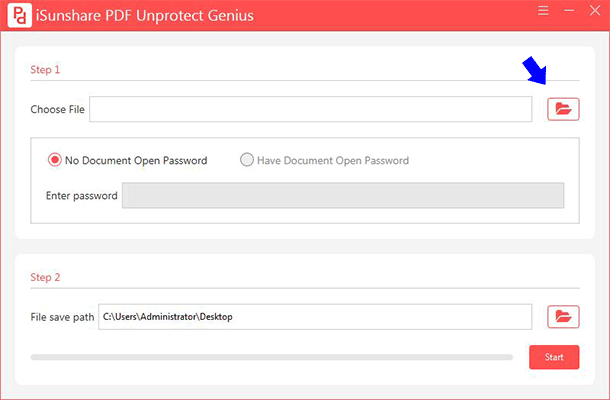
2 Ways To Remove Permissions Password From PDF Without Password
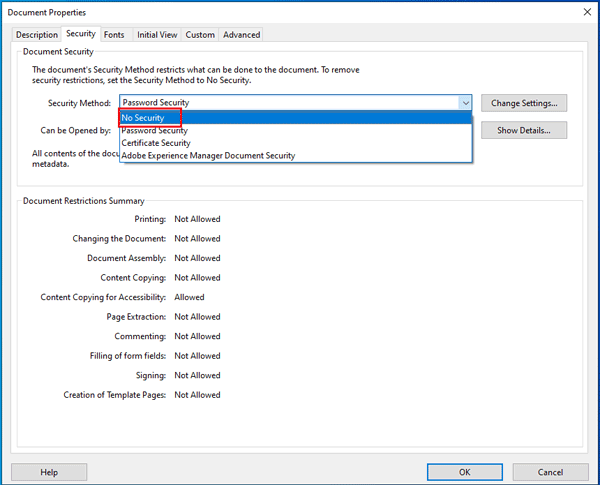
3 Ways To Remove Permissions Password From PDF
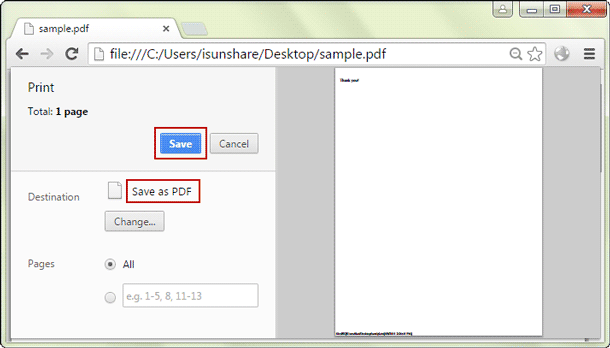
2 Ways To Remove Permissions Password From PDF Without Password
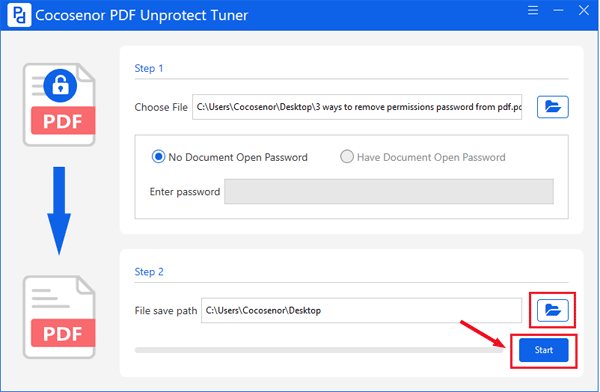
3 Ways To Remove Permissions Password From PDF
3 Ways To Remove Permissions Password From PDF
3 Ways To Remove Permissions Password From PDF

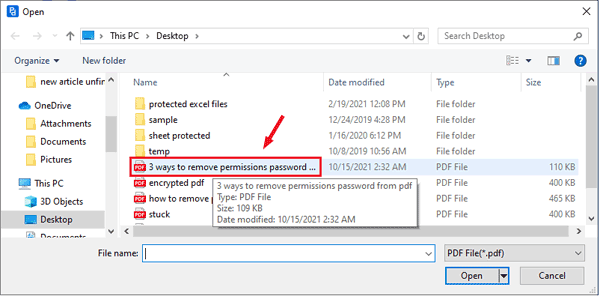
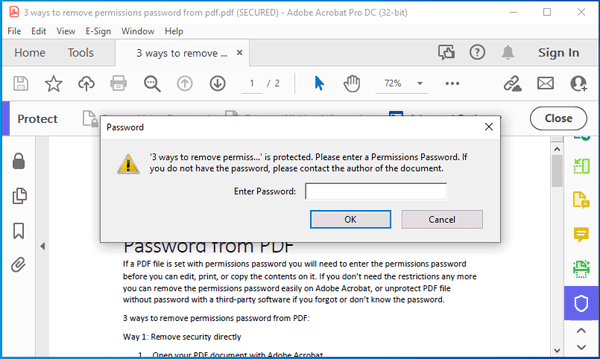
The official way to remove PDF password is to use the Adobe Acrobat Pro tool If you can remember the original permissions password you can unlock and remove all types of security restrictions on your PDF document in several simple steps Open your secured PDF document with Acrobat Pro Click the File menu and then select Properties

Choose Tools Protect Encrypt Remove Security Remove Security The options vary depending on the type of password security attached to the document If the document has a Document Open password click OK to remove it from the document If the document has a permissions password type it in the Enter Password box then click OK

1 Click the Choose Files button to select multiple PDF files on your computer or click the URL button to choose an online file from URL Google Drive or Dropbox 2 Enter either PDF user password or owner password Either password will work 3 Click the Submit button to start processing

Unlock PDF Online Remove restrictions and password from PDF files Online no installation or registration required It s free quick and easy to use

Acrobat DC Resources How to remove pdf password ACROBAT When and why to remove a password from PDFs Learn how to unlock your docs when a PDF password outlives its usefulness Explore Adobe Acrobat JUMP TO SECTION Why remove a password How to remove passwords Editing restrictions for PDFs Passwords protect encrypted PDF files
First open the PDF document and provide the password it requires Click the Print button on the PDF toolbar while viewing the password protected document Click the Change button under Destination and select Save as PDF Click the Save button and you ll be prompted to provide a name and location for your new PDF Way 1 Remove PDF Permissions password in Adobe Acrobat Way 2 Remove PDF permissions password using Google Drive Way 3 Remove PDF permissions password using iSumsoft UnprotectPDF Way 1 Remove PDF Permissions password in Adobe Acrobat If you know the PDF Permissions owner password you can remove it in Adobe Acrobat
46 This question already has answers here Removing the password from a PDF file 6 answers Closed 7 years ago I have made usage restrictions to a PDF file and protected it with a password Now I would like to remove the protection to allow my self to do more with the document