Remove Pdf Password Without Adobe Pro REMOVE PASSWORD FROM A PDF FILE YouTube Pricing And Plans For AJoysoft PDF Password Remover How To Save A PDF File Without A Password Simply WPS PDF Blog How To Remove Password From PDF On Google Chrome Android IPhone Latest News From PDF News Today About PDF How To Unlock PDF Remove PDF password security giving you the freedom to use your PDFs as you want Select PDF files or drop PDFs here Remove PDF password online Remove security from password protected PDF files
Easy PDF Password Removal Online Just upload your file and the password will be removed from your PDF You can receive the unlocked PDF by simply clicking download and you are good to go A Cloud Based PDF Unlocker All files are processed in the cloud and there is no need to download or install any software Convenient right 1 Open the PDF in Acrobat Pro on Windows or Mac 2 Choose Tools Encrypt Remove Security 3 If the document has a Document Open password click OK to remove it 4 If the document has a permissions password type the correct password in the Enter Password box and then click OK
Latest News From PDF News Today About PDF How To Remove PDF Password Two Applications Will Help You SaveDelete Solved How To Remove Digital Signature Adobe Community 11567555 How To Remove Password From PDF GeeksforGeeks How To Reset Macbook Pro Without Password Associatesrewa How To Remove A Password From A PDF Without Adobe Pro Quora How To Remove A Password From A PDF Without Adobe Pro Quora How To Remove A Password From PDF File YouTube How To Remove Password From PDF In Windows 11 Gear Up Windows
Remove Pdf Password Without Adobe Pro
 Remove Pdf Password Without Adobe Pro
https://i.ytimg.com/vi/G1DuAjPRrIs/maxresdefault.jpg
How to unlock a PDF to remove password security Open the PDF in Acrobat Use the Unlock tool Choose Tools Protect Encrypt Remove Security Remove Security The options vary depending on the type of password security attached to the document If the document has a Document Open password click OK to remove it from the document
Templates are pre-designed files or files that can be used for various functions. They can conserve effort and time by supplying a ready-made format and layout for creating various sort of material. Templates can be used for individual or professional jobs, such as resumes, invitations, leaflets, newsletters, reports, discussions, and more.
Remove Pdf Password Without Adobe Pro
PDF Password Remover Tool On The App Store

Remove PDF Password Two Applications Will Help You SaveDelete
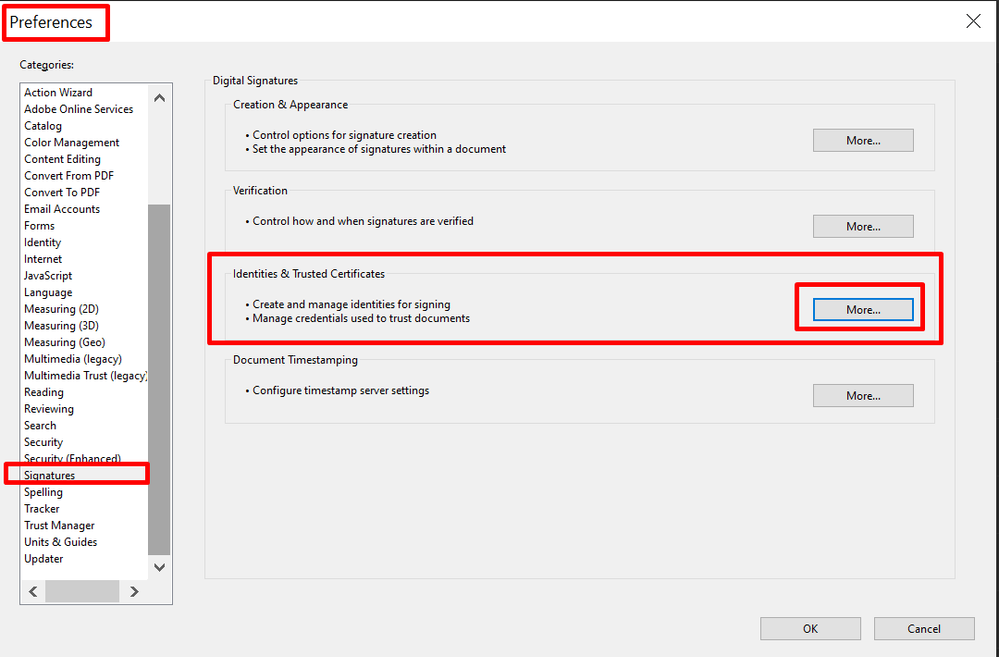
Solved How To Remove Digital Signature Adobe Community 11567555

How To Remove Password From PDF GeeksforGeeks
How To Remove A Password From A PDF Without Adobe Pro Quora
How To Remove A Password From A PDF Without Adobe Pro Quora

Open up your web browser Chrome Mozilla Edge etc Find the PDF whose password you wish to remove Drag and drop the PDF on your browser Type in the PDF s password Click on the Print button located in the top right hand corner Click Save Wait a few seconds for the PDF to download Done

Use the Unlock tool Choose Tools Protect Encrypt Remove Security Remove Security The options vary depending on the type of password security attached to the document If the document has a Document Open password click OK to remove it from the document

If you own a copy of Adobe Acrobat Pro or have a subscription to Adobe Acrobat Pro DC then it s easy to change the settings of a PDF file removing the password in the process 1 Open the

Press Ctrl P or click the Print button then ensure that Print to PDF Save as PDF or something similarly named is selected as your printing device You can also use Adobe Acrobat Pro to remove a PDF s password Some PDFs are encrypted with a password which you ll need to enter each time you want to view the document

Step 1 Download iSumsoft PDF Password Refixer and install it on your system After installing launch iSumsoft PDF Password Refixer Step 2 Click on the Open button Browse for the password protected PDF document and add it to the tool Step 3 Select a suitable password attack type from the drop down menu
Open the PDF in Adobe Acrobat Pro on your Windows PC or Mac Choose Tools Protect Advanced Options Remove Security If the document has a Document Open password click OK to remove it If the document has a permissions password type the correct password in the Enter Password box and then click OK Removing a password from a PDF file without Adobe Pro is a relatively simple process With the right steps you can quickly and easily remove the password from any PDF file The Benefits of Removing a Password from a PDF File Without Adobe Pro Removing a password from a PDF file without Adobe Pro can be a great way to save time and effort
How to Remove a Password from a PDF 4 Different Ways Use Adobe Acrobat Pro Adobe Acrobat Pro is the premium version of Adobe s popular PDF software suite It offers many features like reading creating and editing files among many other things One of those other features is the ability to remove password protection from a PDF file