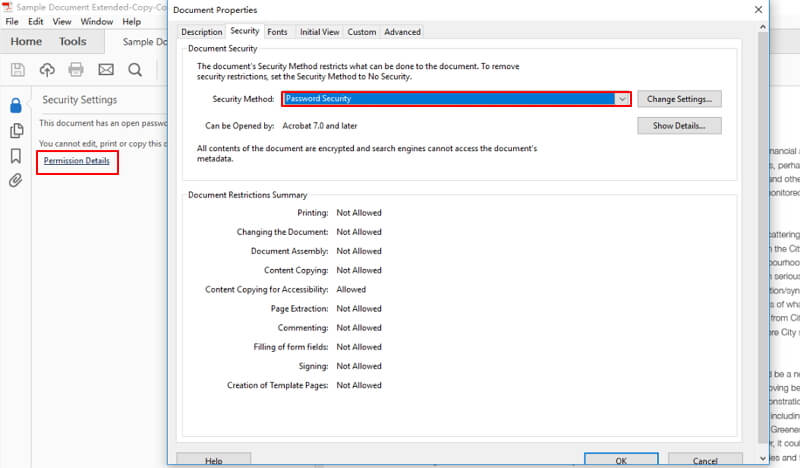
Remove Password From Pdf Document REMOVE PASSWORD FROM A PDF FILE YouTube How To Remove A Password From A PDF In Windows 10 Microsoft Word How To Remove Password From A Pdf File YouTube How To Permanently Delete Files From Dropbox CNET How To Remove Password From PDF File Updated For 2019 Web 1 Open the password protected PDF in Adobe Acrobat Enter the password when directed 2 Click File in the menu bar then choose Properties 3 In the Document Properties window click the
Web PDF24 makes it as easy as possible for you to remove the password from PDF files No installation is required Simply select your files and start the unlocking Web Choose Tools gt Protect gt Advanced Options gt Remove Security If the document has a Document Open password click OK to remove it If the document has a permissions password type the correct password in the Enter Password box and then click OK Once you ve done these steps your PDF will be unlocked and no longer require a
How To Remove Password From PDF File Updated For 2019 How To Remove Password From PDF File No App Easy YouTube How To Remove Passwords From Adobe PDF Files Using Simple Hacks How To Remove Password From PDF File Nobitas World How Do I Remove Password From PDF Document Easily IPS Inter Press How To Remove Password From PDF File Updated For 2019 How To Remove Password Protection From PDFFiles In Just 1 Minute How To Remove Password From Pdf On Microsoft Edge HOWTOREMVO 3 Best Ways To Remove Password Protection From PDF On Mac
Remove Password From Pdf Document
 Remove Password From Pdf Document
https://i.ytimg.com/vi/G1DuAjPRrIs/maxresdefault.jpg
Web Open the PDF in Acrobat Use the Unlock tool Choose Tools gt Protect gt Encrypt gt Remove Security Remove Security The options vary depending on the type of password security attached to the document If the document has a Document Open password click OK to remove it from the document
Templates are pre-designed documents or files that can be used for numerous functions. They can conserve time and effort by offering a ready-made format and design for producing different kinds of content. Templates can be utilized for personal or expert jobs, such as resumes, invites, leaflets, newsletters, reports, presentations, and more.
Remove Password From Pdf Document

How To Remove Password From A PDF File YouTube

How To Remove Password From PDF File No App Easy YouTube

How To Remove Passwords From Adobe PDF Files Using Simple Hacks
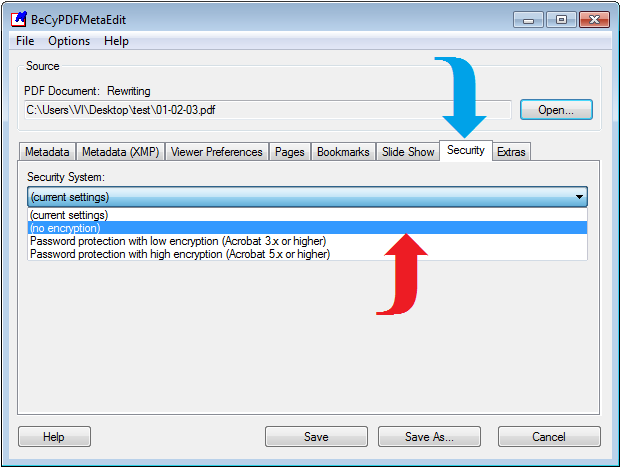
How To Remove Password From PDF File Nobitas World
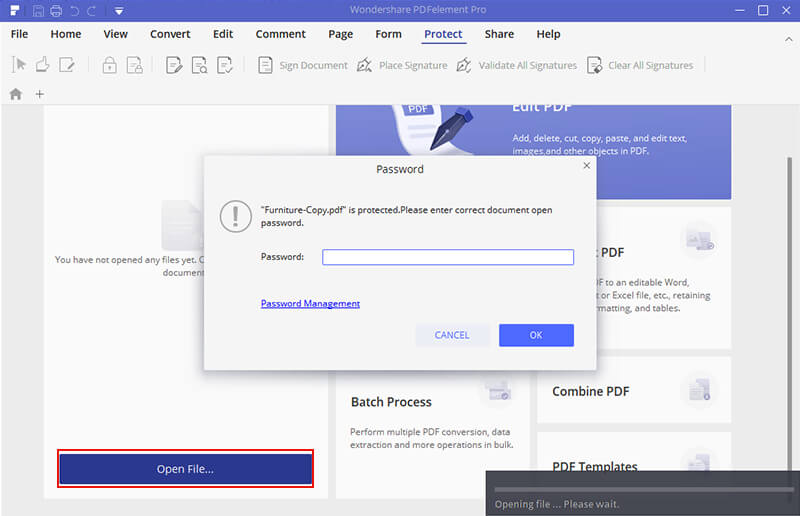
How To Remove Password From PDF File Updated For 2019
How To Remove Password Protection From PDFFiles In Just 1 Minute

Web How to remove password from PDF files Drag and drop your document in the PDF Password Remover Confirm that you have the right to the file and click Unlock PDF The decryption process should start right away Modify your PDF further or click Download File to save the unlocked PDF

Web Oct 25 2022 nbsp 0183 32 Open the PDF file in Adobe Acrobat Pro and provide its password to view it Click the lock icon at the left side of the window and click quot Permission Details quot You can also click File gt Properties and click the quot Security quot tab Click the quot Security Method quot box select quot No Security quot and click quot OK quot to remove the password

Web How to unlock a PDF to remove password security Open the PDF in Acrobat Use the Unlock tool Choose Tools gt Protect gt Encrypt gt Remove Security Remove Security The options vary depending on the type of password security attached to the document If the document If the document has a
Web Then follow these steps 1 Open the PDF in Acrobat Pro on Windows or Mac 2 Choose Tools Encrypt Remove Security 3 If the document has a Document Open password click OK to remove it 4 If the document has a permissions password type the correct password in the Enter Password box and then
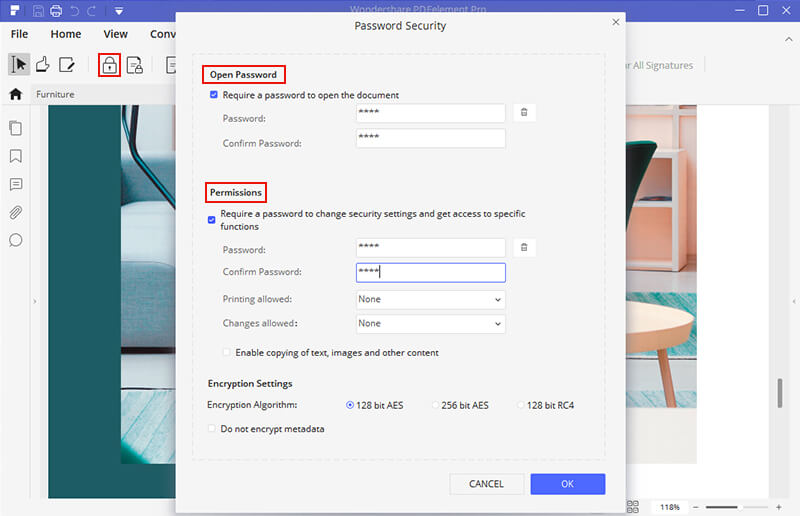
Web You want to remove a password from a PDF but you are concerned about the safety of your document Don t worry PDF2Go will make sure to keep your file safe Secure upload and no manual checking of the file are guaranteed
Web If the document has a Document Open password click OK to remove it 4 If the document has a permissions password type the correct password in the Enter Password box and then click OK After those steps congratulations you ll have an unlocked PDF Web Try Sejda Desktop Contact Support Remove restrictions and password from PDF files Online no installation or registration required It s free quick and easy to use
Web 1 Drag amp Drop a PDF file into the box or upload a file by clicking the Add file button Another option is to add it from your Google Drive or Dropbox 2 Click the Unlock PDF button The tool will remove password from PDF automatically 3 Once completed click Download file share via URL or QR code or save your PDF to