Remove Line Breaks Notepad Gtknj Do Not Remove Credits Tumblr Pics Madhu s Blog Removing Line Breaks In Notepad Remove Duplicate Lines Using Notepad Code2care Remove Contact Solids From Display Option Remove Line Breaks In Excel For Mac How to remove linebreaks in Notepad the Problem is that im trying to do a DML throught Excel to Notepad and when i copy the cells from excel to notepad it look like like this Input Insert into table line 1 line 2 line 3 Insert into table line 1 line 2 line 3 Output Insert into table line1 line2
To get rid of leading space s and all empty lines even if the empty line contains spaces or tabs Go to Search Replace Select Regular expression under Search mode Use s for Find what and leave Replace with blank Click Replace all Regex explanation means beginning of the line s means any number even 0 of Line breaks can be frustrating especially when you need to remove them from your text Fortunately Notepad provides several ways to remove line breaks quickly and easily The first method to remove line breaks in Notepad is by using the Find and Replace feature
Remove Line Breaks In Excel For Mac Notepad Remove Blank Lines Quick Easy Digi Dank 3 Ways To Remove Lines From A File Using Notepad What Is Mark Down How Do I Remove Line Breaks For HTML Body Text Line Breaks In Notepad Notepad Aakriti 360 Kemas Kini Baharu Windows 11 Ada Bing Dengan AI Snipping Tools Mampu How To Add Page Breaks In Notepad What Is Mark Down Remove Line Breaks Remove Empty Lines With Regex In Notepad Dirask
Remove Line Breaks Notepad
 Remove Line Breaks Notepad
https://64.media.tumblr.com/0bc418d60b61ca7ebf5a875181a5c5ac/tumblr_nrxbmwGB3j1tx7szbo1_1280.jpg
0 As already mentioned in the other answer you need to change r to r n This because Windows uses a combination of Carriage Return CR in Notepad or r and Line Feed LF in Notepad or n to signal new lines Regarding your issue Notepad treats the replacement of r literally so your final replacement is actually space n
Templates are pre-designed documents or files that can be used for different functions. They can save time and effort by supplying a ready-made format and layout for producing various sort of content. Templates can be used for individual or professional tasks, such as resumes, invites, leaflets, newsletters, reports, discussions, and more.
Remove Line Breaks Notepad
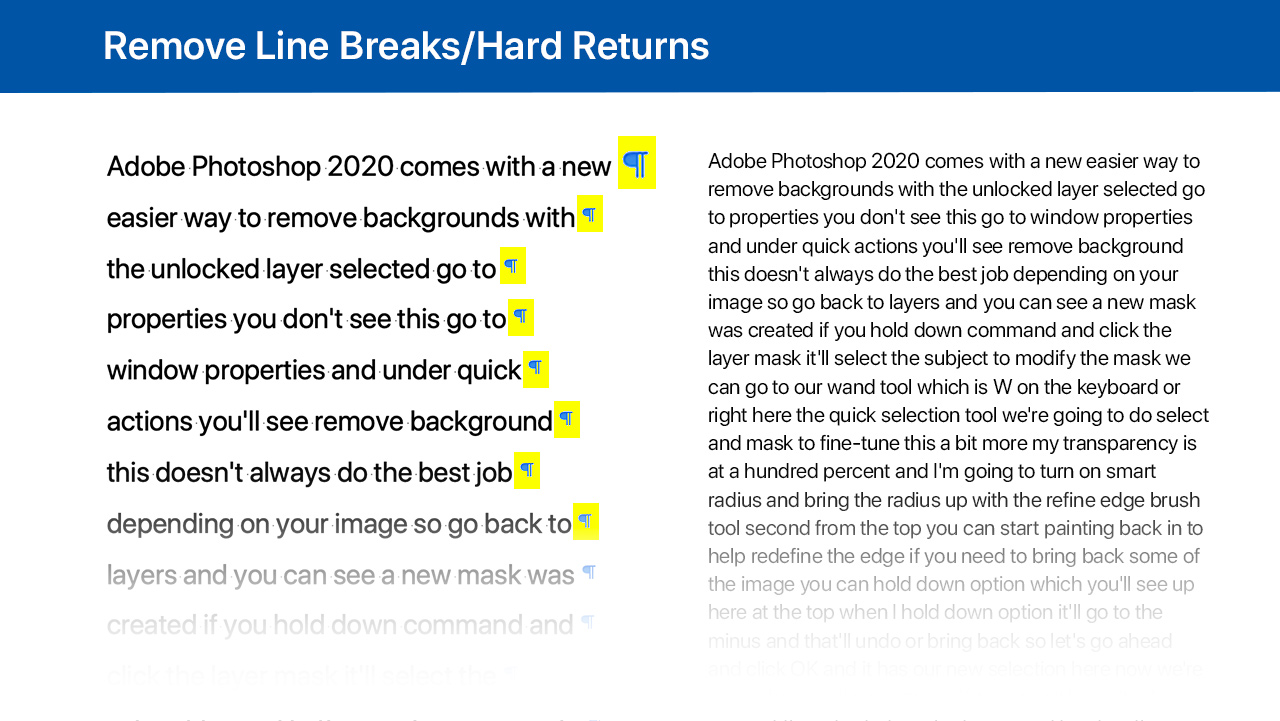
How To Remove Line Breaks Or Hard Returns In Text Using MS Word

Notepad Remove Blank Lines Quick Easy Digi Dank

3 Ways To Remove Lines From A File Using Notepad What Is Mark Down

How Do I Remove Line Breaks For HTML Body Text Line Breaks In Notepad

Kemas Kini Baharu Windows 11 Ada Bing Dengan AI Snipping Tools Mampu

How To Add Page Breaks In Notepad What Is Mark Down

First click on the symbol in the toolbar you can see if you have CRLF line endings or just LF Click on the Replace button and put r n or n depending on the kind of line ending In the Search Mode section of the dialog check Extended radio button interpret n and such Then replace all occurrences with nothing empty string
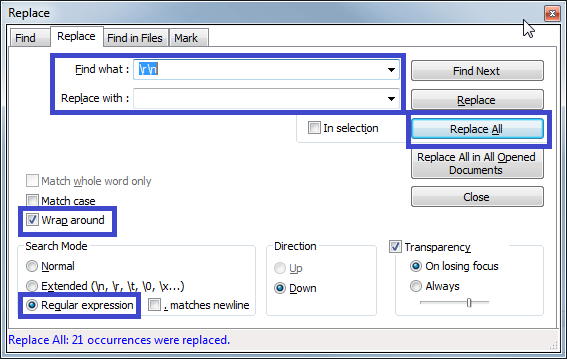
How I want it remove breakpoints and replace them with a comma and a blank space aaaaa bbbb cccccc I was told that I can do it by checking Regular expression and matches newline and Find what r n Replace with Replace All However I can t find the matches newline in my Replace window

Open Replace Dialog Find What n r R Replace With 1 check regular expression click Replace or Replace All It matches OS linebreaks R that are not preceded by a or r or n Should work with any EOL convention Share Follow answered Aug 4 2016 at 20 02 Lars Fischer 9 275 3 27 35

May I just suggest that the 2 most usual line endings are either CRLF or LF If you remove the LF you will end up with line endings of just CR This is non standard This depending on your usage can break a bunch of things For example windows hosts file will break if you do this just spent a bunch of time on a support call about this issue
In Notepad select from the end of a line clicking SHIFT Right arrow key you can t see it but the newline character is now selected Now go to Replace and replace with nothing The newline characters will all be replaced with nothing
[desc-11] [desc-12]
[desc-13]