Remove First N Rows From Dataframe Pandas Worksheets For Python Pandas Dataframe Column Worksheets For Drop First N Rows Pandas Dataframe Riset Drop First Last N Rows From Pandas DataFrame In Python 2 Examples Python Remove The First N Characters From A String Datagy Pandas Combine Two Columns Of Text In DataFrame Spark By Examples How to Drop The First N Rows of Pandas DataFrame in Python Method 1 Use iloc to Drop The First Two Rows of Pandas DataFrame in Python Method 2 Use The drop Function to Drop The First Two Rows of a Pandas DataFrame Method 3 Use The tail Function to Drop The First Two Rows of a Pandas Data Frame
In this example I ll explain how to delete the first N rows from a pandas DataFrame For this we can use the iloc indexer as shown below data drop first data iloc 3 Using iloc indexer print data drop first Print updated DataFrame Delete rows from pandas DataFrame Specify by row name label Specify by row number Notes on when the index is not set Delete columns from pandas DataFrame Specify by column name label Specify by column number Delete multiple rows and columns simultaneously
Pandas Combine Two Columns Of Text In DataFrame Spark By Examples Pandas Drop Rows From DataFrame Examples Spark By Examples Worksheets For Drop First N Rows Pandas Dataframe Riset Get First N Rows Of A Dataframe In R Data Science Parichay Pandas DataFrame astype Examples Spark By Examples Odab jik Valakihez Szemeszter Biztos How To Skip Last Rows In Panda Nagyk vet Ige Royalty C Program To Remove First N Characters From A String CodeVsColor Pandas Drop First N Rows From DataFrame Spark By Examples Worksheets For Get Unique Rows From Pandas Dataframe
Remove First N Rows From Dataframe Pandas
 Remove First N Rows From Dataframe Pandas
https://www.datacourses.com/wp-content/uploads/2019/08/Screen-Shot-2019-08-08-at-6.02.28-PM-1024x286.png
Here tail is used to remove the last n rows to remove the first row we have to use the shape function with 1 index Syntax data tail data shape 0 1 where data is the input dataframe Example Drop the first row
Pre-crafted templates provide a time-saving option for developing a diverse variety of files and files. These pre-designed formats and designs can be made use of for numerous individual and expert projects, including resumes, invites, leaflets, newsletters, reports, discussions, and more, enhancing the content creation process.
Remove First N Rows From Dataframe Pandas

Pandas Select First N Rows Of A DataFrame Data Science Parichay

Pandas Drop Rows From DataFrame Examples Spark By Examples

Worksheets For Drop First N Rows Pandas Dataframe Riset
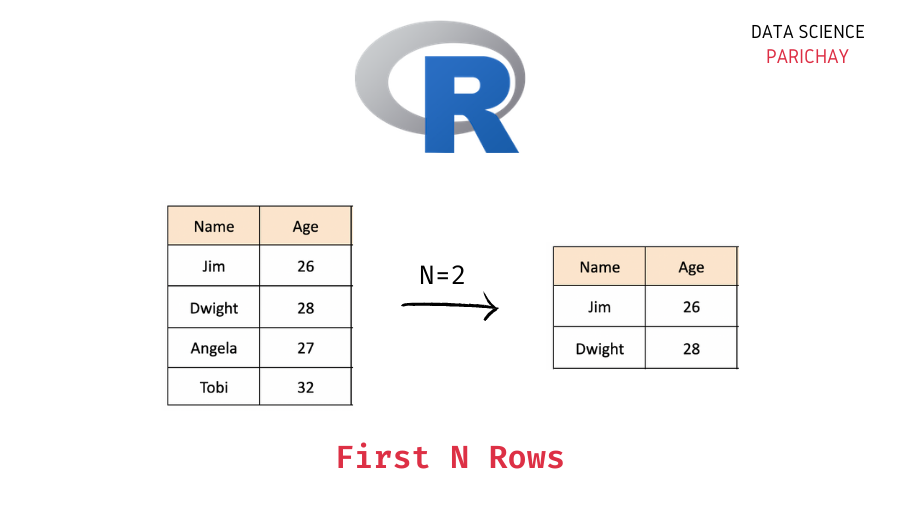
Get First N Rows Of A Dataframe In R Data Science Parichay
Odab jik Valakihez Szemeszter Biztos How To Skip Last Rows In Panda Nagyk vet Ige Royalty

C Program To Remove First N Characters From A String CodeVsColor
You may use the following syntax to remove the first row s in Pandas DataFrame 1 Remove the first row in a DataFrame df df iloc 1 2 Remove the first n rows in a DataFrame df df iloc n Next you ll see how to apply the above syntax using practical examples Examples of Removing the First Rows in a DataFrame Example 1 Remove the

Pandas November 10 2023 Use iloc drop and tail methods to drop the top first n rows from the pandas DataFrame In this article I will explain how to drop delete the first n rows from Pandas DataFrame with examples Related You can also drop the last N rows from DataFrame

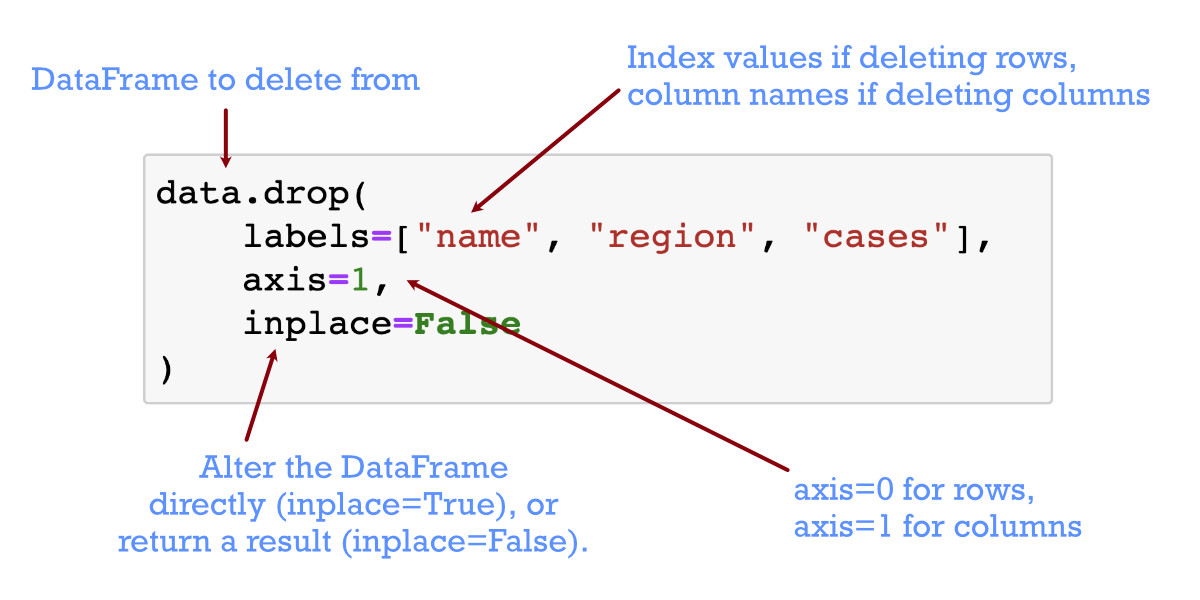
Use drop to remove first N rows of pandas dataframe In pandas the dataframe s drop function accepts a sequence of row names that it needs to delete from the dataframe To make sure that it removes the rows only use argument axis 0 and to make changes in place i e in calling dataframe object pass argument inplace True

DataFrame drop labels None axis 0 index None columns None level None inplace False errors raise source Drop specified labels from rows or columns Remove rows or columns by specifying label names and corresponding axis or by directly specifying index or column names

Pandas provide data analysts with a way to delete and filter data frames using dataframe drop method Rows or columns can be removed using an index label or column name using this method Syntax DataFrame drop labels None axis 0 index None columns None level None inplace False errors raise Parameters
You can use one of the following methods to drop the first row in a pandas DataFrame Method 1 Use drop df drop index df index 0 axis 0 inplace True Method 2 Use iloc df df iloc 1 Each method produces the same result The following examples show how to use each method in practice with the following pandas DataFrame 1 Basic Drop Method 2 Dropping rows with specific conditions 3 Dropping rows with missing data 4 Dropping Rows Based on Duplicate Values 5 Dropping Rows by Index Range 6 Inplace Dropping 7 Dropping rows based on a column s datatype Performance Considerations Error Handling Subsetting vs Dropping Summary Further Reading
Use tail function to drop first row of pandas dataframe In python dataframe provides a function tail n it returns the last n rows of dataframe So to delete first row of dataframe just select the last n 1 rows of dataframe using tail function where n is the total rows of dataframe Then assign these selected rows back to the same