Remove Extension From Filename Python Fichier Python Molurus Bivittatus 1 jpg Wikip dia How To Get File Extension In Python ItsMyCode The Best Ways To Separate Filename And Extension In Python How To Get File Extension In Python DigitalOcean Extracting Filename Without Extension From A File Path In Python Web 15 mei 2023 nbsp 0183 32 Solution 1 To remove the extension from a filename in Python we can use the os path splitext function This function splits the filename into a tuple containing the filename and the extension We can then simply return the filename without the extension Here is an example code snippet
Web 14 mrt 2014 nbsp 0183 32 1 Answer Sorted by 8 Try something like this csv os path splitext each 0 for each in csv Alternatively if you need to further process the modified filename e g print it like in the code above access the list by indexing its elements for index each in enumerate csv new os path splitext each 0 csv index new print new Web Remove the Extension from a Filename In Python you can extract the extension from a filename using the os path splitext function Here s an example Python import os filename example txt extension os path splitext filename
Extracting Filename Without Extension From A File Path In Python Top 10 VSCode Extensions For More Productive Python Development Bas Codes How To Save Python Code In Notepad What Is Mark Down How To Get File Extension From Filename In Python Python Obtener Un Nombre De Archivo Sin Extensi n De La Ruta Delft Stack Remove The Extension From A Filename In Python Bobbyhadz Python Developer How To Remove File Extension From Filename ExcelKid Remove The Extension From A Filename In Python Bobbyhadz
Remove Extension From Filename Python
 Remove Extension From Filename Python
http://upload.wikimedia.org/wikipedia/commons/b/bd/Python_molurus_bivittatus_(1).jpg
Web 9 mei 2014 nbsp 0183 32 3 Answers Sorted by 8 You can use os path splitext os path splitext filename 0
Pre-crafted templates offer a time-saving service for creating a varied series of documents and files. These pre-designed formats and designs can be used for different personal and professional projects, consisting of resumes, invites, leaflets, newsletters, reports, presentations, and more, enhancing the content production process.
Remove Extension From Filename Python

How To Remove Extension From Filename In Python YouTube
Top 10 VSCode Extensions For More Productive Python Development Bas Codes

How To Save Python Code In Notepad What Is Mark Down

How To Get File Extension From Filename In Python
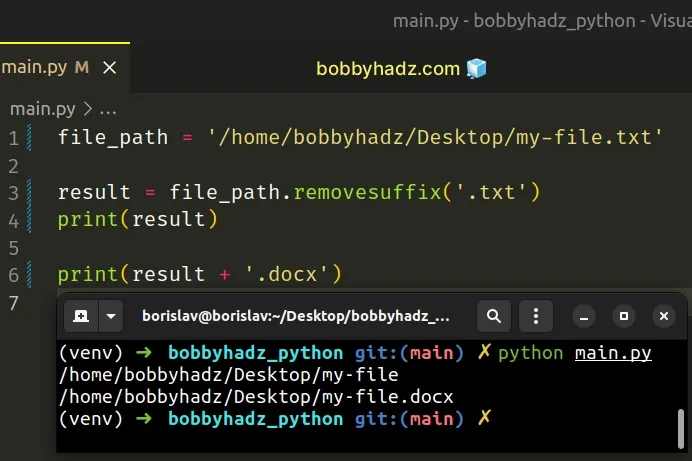
Remove The Extension From A Filename In Python Bobbyhadz

Python Developer

Web 9 apr 2022 nbsp 0183 32 This is the best python 3 solution for the generic case of removing the extension from a full path Using stem also removes the parent path In case you are expecting a double extension such as bla tar gz then you can even use it twice p with suffix with suffix

Web 9 mei 2022 nbsp 0183 32 To remove the extension from a filename using Python the easiest way is with the os module path basename and path splitext functions path basename gets the complete filename and path splitext splits

Web 20 feb 2023 nbsp 0183 32 Remove the extension from a Filename using str rsplit This is a three step process Use the str rsplit method to split the filename on a period once from the right Access the list item at index 0 The list item at

Web 3 jan 2015 nbsp 0183 32 This is the safest way in Python to remove the extension from a filename There is no function in the os path module dedicated to this task and handcrafting a solution with str split or something would be error prone

Web 12 feb 2009 nbsp 0183 32 Extracting extension from filename in Python Python os module splitext splitext function splits the file path into a tuple having two values root and extension import os unpacking the tuple file name file extension os path splitext quot Users Username abc txt quot print file name print file extension Get
Web 11 nov 2017 nbsp 0183 32 2 Answers Sorted by 4 If you just want the file s name and extension import os path C Users Me some file tar gz temp os path splitext path var os path basename temp 0 temp 1 print var some file tar gz Its worth noting that files with quot dual quot extensions will need to be recursed if you want Web filename with extension quot filename txt quot filename without extension filename with extension filename with extension rfind quot quot print filename without extension Output filename Both methods are equally effective so choose the one that aligns with your coding style or specific requirements More
Web To get the filename without the extension from a file path in Python you can use the os path splitext function This function returns a tuple containing the file name and the file extension You can then use string slicing to get just the file name Here s an example