Reduce Pdf Size Command Line Windows How To Get Help In Windows 10 Command Prompt Lates Windows 10 Update 5 Reasons To Use The Command Line Systran Box Download Windows Command Line Cheat Sheet PDF Lab 4 Comparing Windows 10 File Systems Lab 4 Comparing Windows How To Open Microsoft Edge Using Command Line On Windows 10 Vrogue Web Simply drag some PDF or Word or Publisher files you d like compressed to PDF and it will spit out compressed versions in the same directory as the originals See below You can also press the Open button to browse for files using the regular Open File Dialog Requirements You ll need Ghostscript installed
Web Jul 1 2020 nbsp 0183 32 1 Upvote Translate Jump to answer Dean Utian Community Expert Jul 01 2020 You can do batch conversion using Actions In Acrobat Pro DC go to Tools Search for Actions and click the Action Wizard You an then click New Action Under Document Processing choose Reduce File Size Pick settings under Files to be Processed 3 Web 5 days ago nbsp 0183 32 Step 1 Open Adobe Acrobat on Windows Step 2 Import one of your PDF files from the PC storage For demonstration we opened a PDF file of 1 1 MB in size We will use the compress tool to
How To Open Microsoft Edge Using Command Line On Windows 10 Vrogue The Windows Command Line Interface Quiz Quizizz Www vrogue co Solved How Do I Enable Scrolling In Windows Command 9to5Answer Windows OS Basic CLI Commands Cheat Sheet By Steps Via Cheatography Com II Computing A For Some A 0 When Solving The Chegg How To Reduce Page Size In Command Prompt Trackingmain Windows Command To Create A File Contoh Sistem Operasi Windows Imagesee Riset Msiexec Command Line Options Cheat Sheet By Bzowk 2 Pages software
Reduce Pdf Size Command Line Windows
 Reduce Pdf Size Command Line Windows
https://i.pcmag.com/imagery/articles/03j4SkzpdViqNKl1bWPpQlX-12.fit_lim.size_1050x.png
Web Dec 17 2021 nbsp 0183 32 I m looking for a way to batch compress PDFs but also keep the folder structures Currently we re using Acrobat but it doesn t keep the folder structure when outputting Is there a way to configure this option in Acrobat or another program
Pre-crafted templates provide a time-saving option for creating a varied series of documents and files. These pre-designed formats and layouts can be made use of for different personal and professional projects, including resumes, invites, leaflets, newsletters, reports, discussions, and more, improving the material creation procedure.
Reduce Pdf Size Command Line Windows

Solved How To Delete All Folder Shortcuts And File 9to5Answer

The Windows Command Line Interface Quiz Quizizz Www vrogue co

Solved How Do I Enable Scrolling In Windows Command 9to5Answer
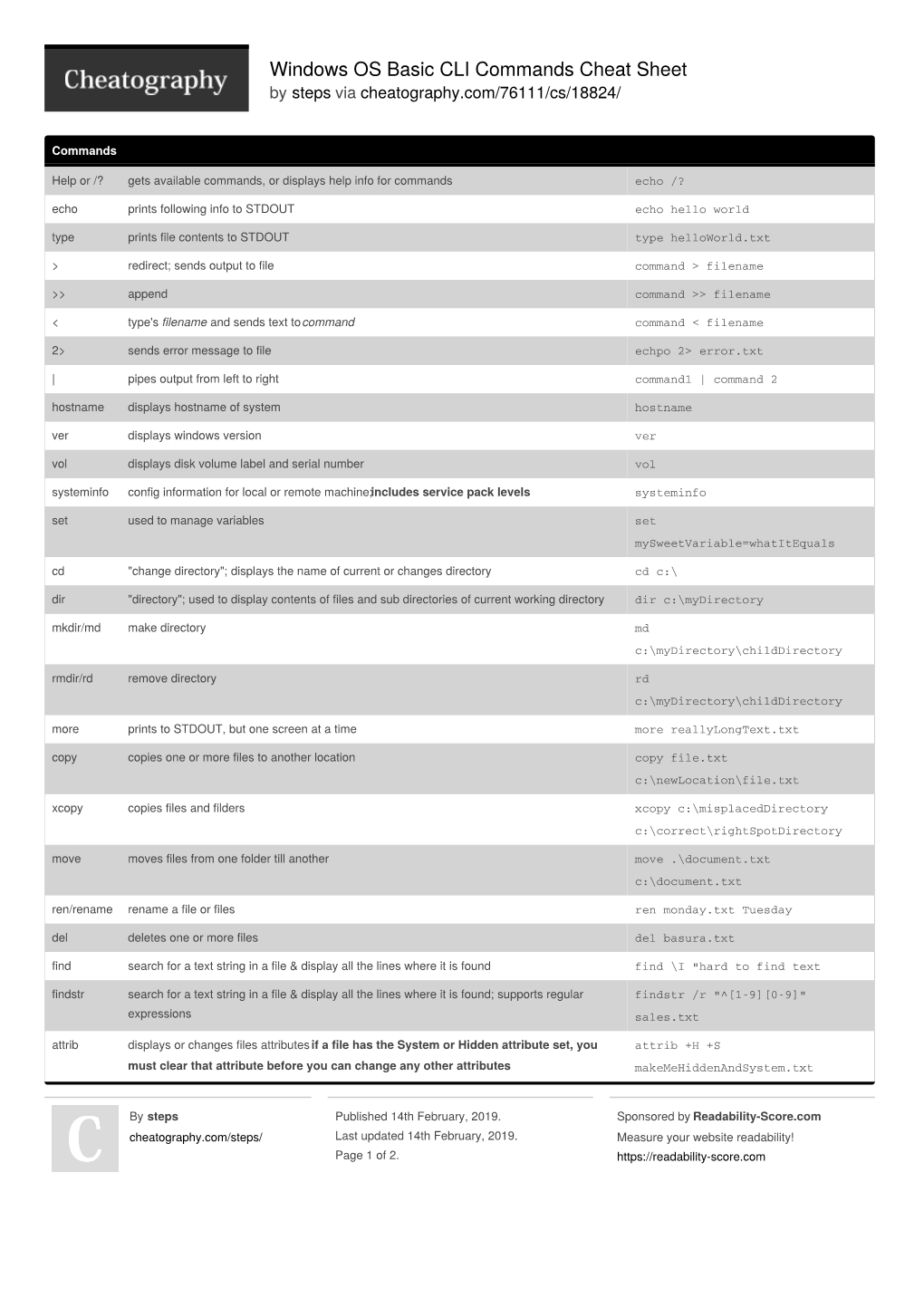
Windows OS Basic CLI Commands Cheat Sheet By Steps Via Cheatography Com

How To Reduce Page Size In Command Prompt Trackingmain

Windows Command To Create A File

Web 1 Answer Sorted by 3 You need to use delayed expansion echo off setlocal enabledelayedexpansion for R quot 1 quot f in pdf do SET outfile 2 nf xf gswin32c exe sDEVICE pdfwrite dMaxSubsetPct 100 dPDFSETTINGS ebook sOutputFile outfile dNOPAUSE dBATCH quot f quot

Web Feb 15 2023 nbsp 0183 32 There is no installer you need to run some commands in the command line black Command Prompt window to download and install pdfsizeopt is a command line only application there is no GUI pdfizeopt is a Python script It works with Python 2 4 2 5 2 6 and 2 7 but it doesn t work with Python 3 x So please install Python first

Web Sep 13 2017 nbsp 0183 32 Found GitHub ghostscript command to reduce pdf size This can reduce files to 15 of their size 2 3M to 345K in one case with no obvious degradation of quality ghostscript sDEVICE pdfwrite dCompatibilityLevel 1 4 dPDFSETTINGS printer dNOPAUSE dQUIET dBATCH sOutputFile output pdf input pdf
Web 13 Answers Sorted by 147 I had the same problem and found two different solutions see this thread for more details Both reduced the size of my uncompressed PDF dramatically Pixelated lossy convert input pdf compress Zip output pdf Unpixelated lossless but may display slightly differently

Web Jan 21 2022 nbsp 0183 32 1 Launch Adobe Acrobat Reader 2 Press Ctrl O and choose the PDF file to be opened 3 Once the file is opened click on the File menu 4 Select the option Save as Other In the submenu that opens click on Reduced Size PDF 5 You will see the Reduce File Size window
Web PDF Optimizer Command Line can compress stream objects of a PDF to reduce the storage size of the PDF Then you can easily share the PDF online or send to other people The commands for compressing a PDF are pdftoolbox in pdf outfile out pdf pack Web Jan 1 2021 nbsp 0183 32 How Do I Reduce the Size of a PDF File in Windows 10 For this tutorial we ll be focusing on three tools in particular TechJunkie s PDF Tools 4dots Free PDF Compressor and iLovePDF
Web Open Microsoft Edge or any other internet browser Navigate to the Acrobat online PDF compressor Click Select a File and locate your PDF or simply drag and drop it to the Compress PDF field Once your file is compressed download your file and be sure to see how many bytes the compressor shaved off