Raspberry Pi Check Internet Connection Command Line How To Directly Connect To A Raspberry Pi Without Internet Raspberry Pi Serial Terminal Program Hopdestream GitHub Antavelos terminews Manage RSS Sources And Display News Feed Interface Description Powered By MinDoc Interface Description Powered By MinDoc Jun 23 2025 nbsp 0183 32 Young coders shine at Coolest Projects Belgium 2025 with 52 innovative STEM and coding creations from AI tools to robotics and digital art
Our new Certificate in Applied Computing equips students with essential digital skills that prepare them for further study or the modern workforce Free resources to teach learn and make with Raspberry Pi a tiny and affordable computer Created by the Raspberry Pi Foundation
Interface Description Powered By MinDoc Using Windows Command Prompt To Test Internet Connection 7 Steps Interface Description Powered By MinDoc Gonsystem WINDOWS PS What Is My Public IP Check Internet Adafruit Learning System How To Check The Operating System Version In Raspberry Pi From Command Getting Connected How To Check Internet Connectivity On Linux VM Raspberry Pi 2 Connexion Internet WiFi MCHobby Le Blog Interface Description Powered By MinDoc
Raspberry Pi Check Internet Connection Command Line
 Raspberry Pi Check Internet Connection Command Line
https://static2.makeuseofimages.com/wp-content/uploads/2017/01/Raspberry-Pi-PC-Connection-Featured.jpg
Learn Python for free with the Raspberry Pi Foundation Take an online computing class in Python and learn how to code your own programs today
Templates are pre-designed files or files that can be used for various purposes. They can save effort and time by providing a ready-made format and design for creating different sort of content. Templates can be utilized for individual or expert tasks, such as resumes, invites, leaflets, newsletters, reports, presentations, and more.
Raspberry Pi Check Internet Connection Command Line

Trickytricks Check Your Internet Connection Speed
Using Windows Command Prompt To Test Internet Connection 7 Steps

Interface Description Powered By MinDoc
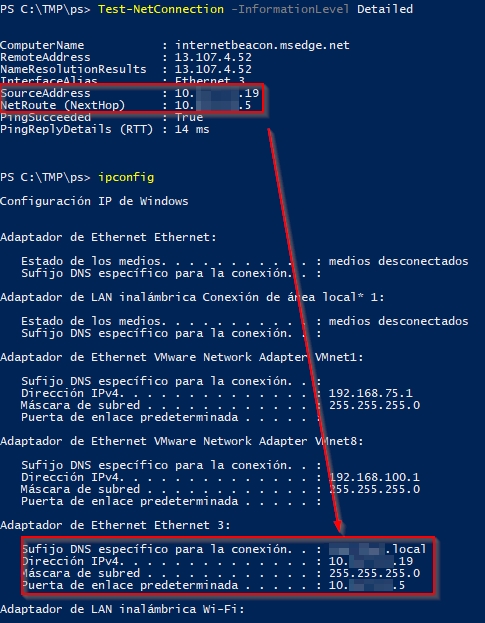
Gonsystem WINDOWS PS What Is My Public IP Check Internet

How To Check The Operating System Version In Raspberry Pi From Command

Getting Connected How To Check Internet Connectivity On Linux VM

Learn coding for kids teenagers and young adults The Raspberry Pi Foundation provides access to online coding resources and challenges that are free for everyone anywhere

Raspberry Pi OS is our official operating system Continuously updated by our in house software engineering team it offers backwards compatibility for all our computers so you can benefit

Get started with your Raspberry Pi computer for free Write powerful programs and build exciting physical computing projects with our team of expert educators

Jul 2 2025 nbsp 0183 32 At the Raspberry Pi Foundation we believe ensuring every child knows how to code will equip them with the skills to thrive in the future

RPi Connect Enable or disable Raspberry Pi Connect which provides the ability to access your Raspberry Pi remotely with no manual network configuration
[desc-11] [desc-12]
[desc-13]