Python Subprocess Returned Non Zero Exit Status 127 CalledProcessError Command dot Tsvg Returned Non zero Exit PYTHON Subprocess Check output Returned Non zero Exit Status 1 YouTube PYTHON Pyvenv 3 4 Returned Non zero Exit Status 1 YouTube Subprocess CalledProcessError Command git Tag Returned Non zero Exit Subprocess CalledProcessError Command git Tag Returned Non zero Exit Docker buildx subprocess CalledProcessError Command uname rs returned non zero exit status 1 11616 djkcyl opened this issue Nov 22 2022 1 comment Labels
This all works great for commands like ls dir pwd ps etc Commands that return a zero exit status during the subprocess check output shell True step I assume process args subprocess CalledProcessError Command ping returned non zero exit status 127 My question is how do I handle non zero exit status using subprocess check output I have the problem subprocess CalledProcessError Command python utils get pretrained checkpoints py model ResNet101 returned non zero exit status 1 4 Debangsha1992 soheilAppear jiajingchen113322 and luochenyan rgb reacted with thumbs up emoji
Subprocess CalledProcessError Command git Tag Returned Non zero Exit Solved Python Error Subprocess CalledProcessError 9to5Answer Subprocess CalledProcessError Command mogrify resize 50 0 format Mac PyCharm subprocess CalledProcessError Command ps ww Subprocess CalledProcessError Command where cl Returned Non Solved subprocess CalledProcessError Command git describe Yolov7 subprocess CalledProcessError Command git Tag Returned Non Command dot Tsvg Returned Non zero Exit Status 1 Syntax pip DEPRECATION The Default Format Will Switch To Columns In The
Python Subprocess Returned Non Zero Exit Status 127
 Python Subprocess Returned Non Zero Exit Status 127
https://www.pianshen.com/images/571/2a5d4472b3aba35ca0d2203c11f6db73.png
This commands works perfectly on the terminal but when I try to run the same command using subprocess check output it just gives me subprocess CalledProcessError stating the command returned non zero exit status 1 Can something tell me what am I doing wrong
Templates are pre-designed files or files that can be used for various purposes. They can save effort and time by supplying a ready-made format and layout for creating various kinds of material. Templates can be utilized for personal or expert projects, such as resumes, invitations, leaflets, newsletters, reports, discussions, and more.
Python Subprocess Returned Non Zero Exit Status 127

subprocess CalledProcessError Command git describe

Solved Python Error Subprocess CalledProcessError 9to5Answer

Subprocess CalledProcessError Command mogrify resize 50 0 format

Mac PyCharm subprocess CalledProcessError Command ps ww

Solved subprocess CalledProcessError Command git describe

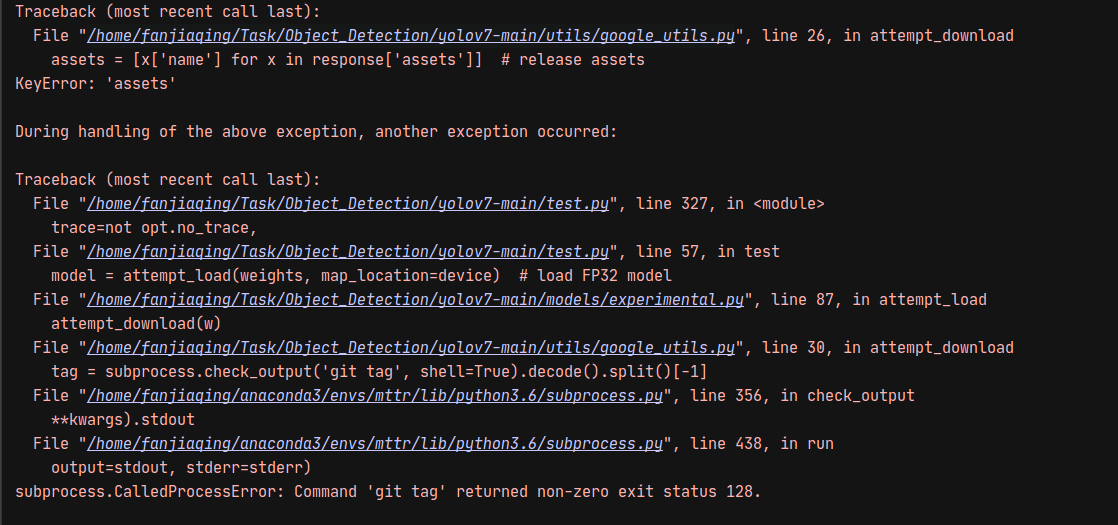
Yolov7 subprocess CalledProcessError Command git Tag Returned Non

The Python documentation says the following On Windows with shell True the COMSPEC environment variable specifies the default shell That means that you re likely trying invoke cmd instead of sh or bash Your best bet here is going to be avoiding shell True and instead setting your cmd variable to something like the following cmd sh

This is my python code import subprocess subprocess check output ls shell True stderr subprocess STDOUT import subprocess subprocess check output yum shell True stderr subprocess STDOUT The subprocess CalledProcessError Command yum returned non zero exit status 1 If the command that you want to run may return non zero status

Get Exit Status Code When running a command using subprocess run the exit status code of the command is available as the returncode property in the CompletedProcess object returned by run
CalledProcessError returned non zero exit status 127 2748 CalledProcessError returned non zero exit status 127 2748 Closed avissens opened this issue on Feb 8 2020 4 comments

Class subprocess CompletedProcess The return value from run representing a process that has finished args The arguments used to launch the process This may be a list or a string returncode Exit status of the child process Typically an exit status of 0 indicates that it ran successfully
From my experience and Google fu the exit status of 127 generally indicates command not found I tried replacing the executable with a different software binary and it works fine I tried replacing the executable with a different software binary and it works fine Saved searches Use saved searches to filter your results more quickly
You can use the subprocess run function to run an external program from your Python code First though you need to import the subprocess and sys modules into your program import subprocess import sys result subprocess run sys executable c print ocean If you run this you will receive output like the following Output ocean