Python Delete A Folder And Its Contents Python Delete A File Or Directory A Complete Guide Datagy Amazon Urged To Remove Antisemitic Book Movie Pushed By Kyrie Irving How To Delete A File Or Directory In Linux Command To Remove A Folder Sad Flood Caption And Quotes For Instagram Long Live The Queen Perspective Magazine In Python os remove allows you to delete remove a file and shutil rmtree allows you to delete a directory folder along with all its files and subdirectories You can also use os rmdir and os removedirs to remove only empty directories Please note that in all cases files or directories are permanently deleted and will not be
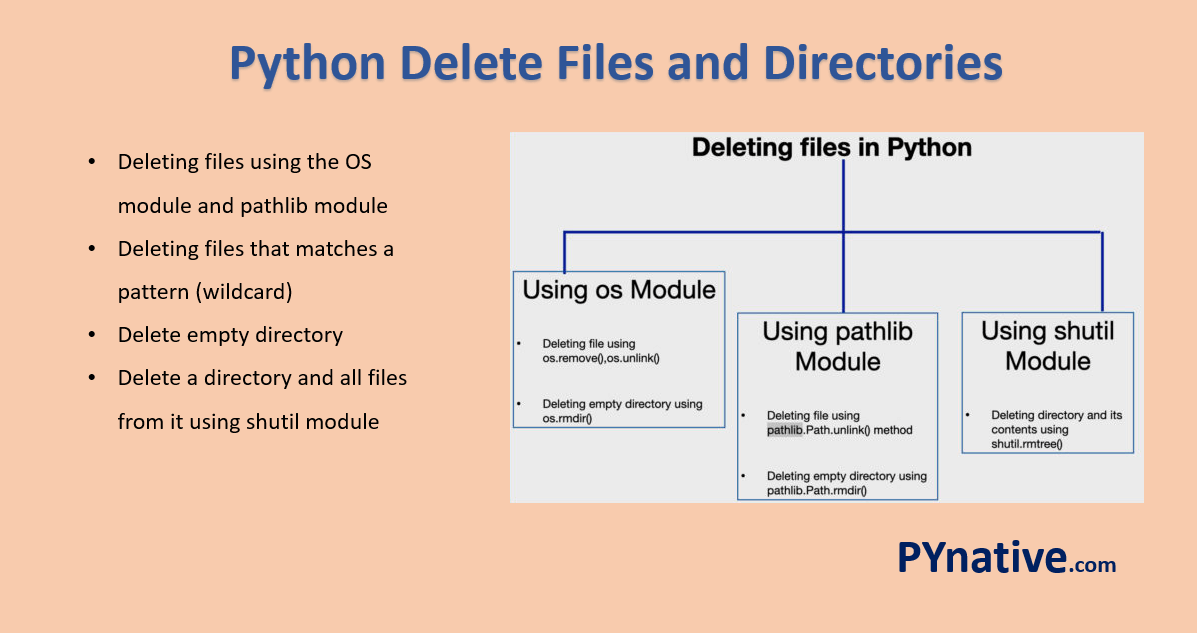
Use pathlib Path unlink to delete a file if you use Python version 3 4 and application runs on different operating systems To delete Directories Use os rmdir or pathlib Path rmdir to delete an empty directory use the shutil rmtree to recursively delete a directory and all files from it This will get all files in a directory and remove them import os BASE DIR os path dirname os path abspath file dir os path join BASE DIR foldername for root dirs files in os walk dir for file in files path os path join dir file os remove path star is expanded by Unix shell
Long Live The Queen Perspective Magazine Python Delete Files And Directories 5 Ways PYnative How To Create And Delete Files And Directories From Windows Command Prompt Celeste Bonnier For QUO Cosmetics Lunar Campaign 2022 Sutherland Models Multichain NFT API Moralis Web3 Enterprise Grade Web3 APIs Python Delete A File YouTube Python Delete A File Or Directory A Complete Guide Datagy Studies In The Arts An Artistic Scientific Doctorate What Is SEO And How Does It Work
Python Delete A Folder And Its Contents
 Python Delete A Folder And Its Contents
https://datagy.io/wp-content/uploads/2021/09/Quick-Answer-Python-Delete-File-or-Directory-1024x646.png
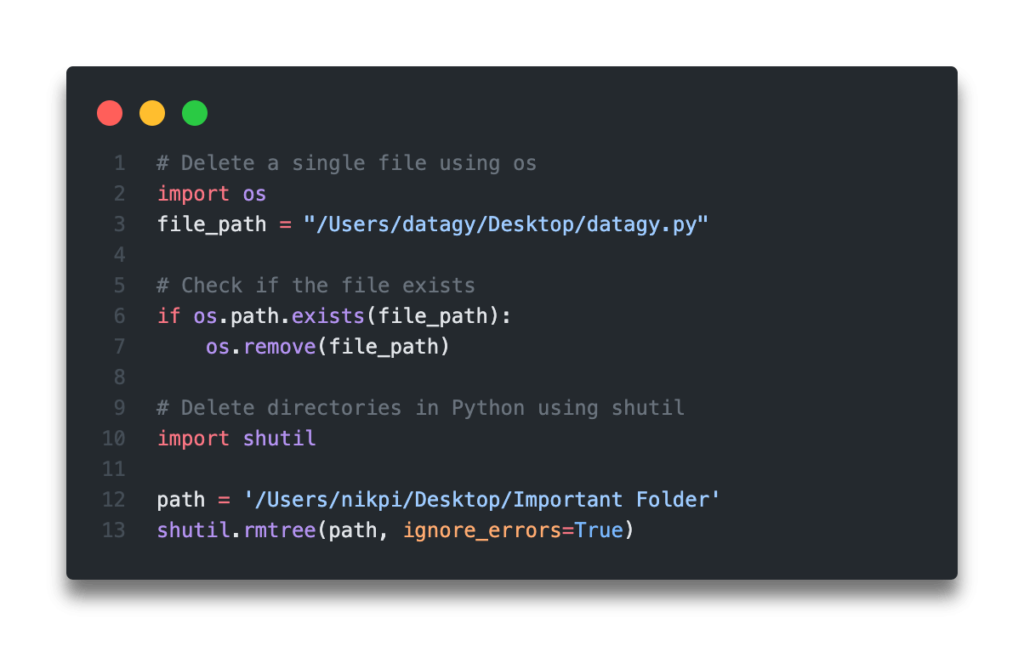
The process of removing a file or folder in Python is straightforward using the os module os remove Deletes a file os rmdir Deletes a folder shutil rmtree Deletes a directory and all its contents 1 Deletes a file First we will see a method to delete a file from a directory using the os remove 2 Deletes a folder
Templates are pre-designed files or files that can be used for various purposes. They can save time and effort by providing a ready-made format and design for developing different sort of material. Templates can be utilized for individual or expert tasks, such as resumes, invites, leaflets, newsletters, reports, discussions, and more.
Python Delete A Folder And Its Contents

Ethereum Logs And Events What Are Event Logs On The Ethereum Network
Python Delete Files And Directories 5 Ways PYnative
How To Create And Delete Files And Directories From Windows Command Prompt

Celeste Bonnier For QUO Cosmetics Lunar Campaign 2022 Sutherland Models

Python Delete A File YouTube

Python Delete A File Or Directory A Complete Guide Datagy
To copy move and delete files and directories are a few functions provided by this module Below are a few commonly used functions of shutil module shutil copy src dst Copies the file from src to dst shutil move src dst Moves the file from src to dst shutil rmtree path Deletes the directory and all its contents at the given address

Deleting Files In Python you can use os remove os unlink pathlib Path unlink to delete a single file The os module provides a portable way of interacting with the operating system The module is available for both Python 2 and 3 To delete a single file with os remove pass the path to the file as an argument

Python provides different methods and functions for removing files and directories One can remove the file according to their need Various methods provided by Python are Using os remove Using os rmdir Using shutil rmtree

Deleting a Folder with Contents To delete a folder with its contents use the shutil rmtree function The shutil rmtree function deletes the specified folder and its contents including subfolders and files This function is useful when you want to delete a folder and all its contents recursively

Touch temporary txt echo new file temporary txt Now I have the temporary txt file with the new file text When I run my Python above this file will be removed python test py file now deleted Another way to improve your code is to first check if the file exists before calling the remove method
Sure here are the steps on how to delete a folder and its contents in Python 1 Import the os and shutil modules 2 Get the path of the folder you want to delete 3 Use the os rmdir function to delete the folder if it is empty 4 Use the shutil rmtree function to delete the folder and its contents if it is not empty How to Delete Files with the OS Module To delete any file with the OS module you can use it s remove method You then need to specify the path to the particular file inside the remove method But first you need to bring in the OS module by importing it import os os remove path to file This code removes the file questions py in the
The os module in Python provides a method called os remove that can be used to delete a file Here s a simple example import os specify the file name file name test file txt delete the file os remove file name In the above example we first import the os module Then we specify the name of the file to be deleted