Python Canvas Create Text Example Tkinter Canvas To Add Items Like Line Text Rectangle Oval Polygon Canvas Tkinter Python 3 StackHowTo Python GUI tkinter PythonTechWorld Tkinter canvas canvas captain CSDN Tkinter canvas canvas captain CSDN The method create text can be applied to a canvas object to write text on it The first two parameters are the x and the y positions of the text object By default the text is centred on this position You can override this with the anchor option
Create a canvas widget for drawing graphics It inherits all the common widget methods of Widget XView and YView master is the parent widget of this canvas If None tkinter will attempt to use the default root cnf and kw are both used to specify widget options see below Reference Manual A canvas widget manages a 2D collection of graphical objects lines circles text images other widgets and more Tk s canvas is an incredibly powerful and flexible widget and truly one of Tk s highlights It is suitable for a wide range of uses including drawing or diagramming CAD tools displaying or monitoring
Tkinter canvas canvas captain CSDN Pin On Tkinter canvas canvas captain CSDN Tkinter canvas canvas captain CSDN Python GUI Tutorial 14 Canvas Create Line Tkinter YouTube Tkinter canvas canvas captain CSDN Python tkinter 3 Drawing Lines And Rectangle Using Tkinter Canvas Widget Tkinter Python GUI Tutorial 18 Canvas Create Oval Tkinter YouTube
Python Canvas Create Text Example
 Python Canvas Create Text Example
https://i.ytimg.com/vi/d_ylFWf-D9o/maxresdefault.jpg
Canvas create text x y font Helvetica 12 text foo However this may not work when run in your computer the result would completely ignore the font parameter Aparently the font parameter is ignored if there is any incorrect value in it In order to check if the font family is valid how can I list all available in my system python
Pre-crafted templates use a time-saving option for developing a varied series of files and files. These pre-designed formats and designs can be utilized for various personal and expert projects, including resumes, invites, leaflets, newsletters, reports, presentations, and more, simplifying the material production procedure.
Python Canvas Create Text Example
Python

Pin On

Tkinter canvas canvas captain CSDN

Tkinter canvas canvas captain CSDN

Tkinter canvas canvas captain CSDN
Python tkinter

The canvas widget is a blank area on which you can draw figures create text and place images To create a canvas widget you create a new instance of the Canvas class from the tkinter module For example the following creates a canvas on a window
1 Answer Sorted by 1 You can make use of canvas itemconfig canvas itemconfigure to change the properties of items on canvas minimal example

The create text x y font text function can be used to write text to our Tkinter Canvas The create text function takes many parameters but we are only interested in the first 4 parameters for now The first 2 parameters x and y are the coordinates

To create a rectangle create rectangle method is used This method accepts 4 parameters x1 y1 x2 y2 Here x1 and y1 are the coordinates for the top left corner and x2 and y2 are the coordinates for the bottom right corner Code Here is the code with explanation to create python tkinter rectangle using canvas

You can display one or more lines of text on a canvas by creating a text object create text This returns the object ID of the text object on canvas Options include Table 14 Canvas text options The text color to be used when the text is active that is when the mouse is over it For option values see
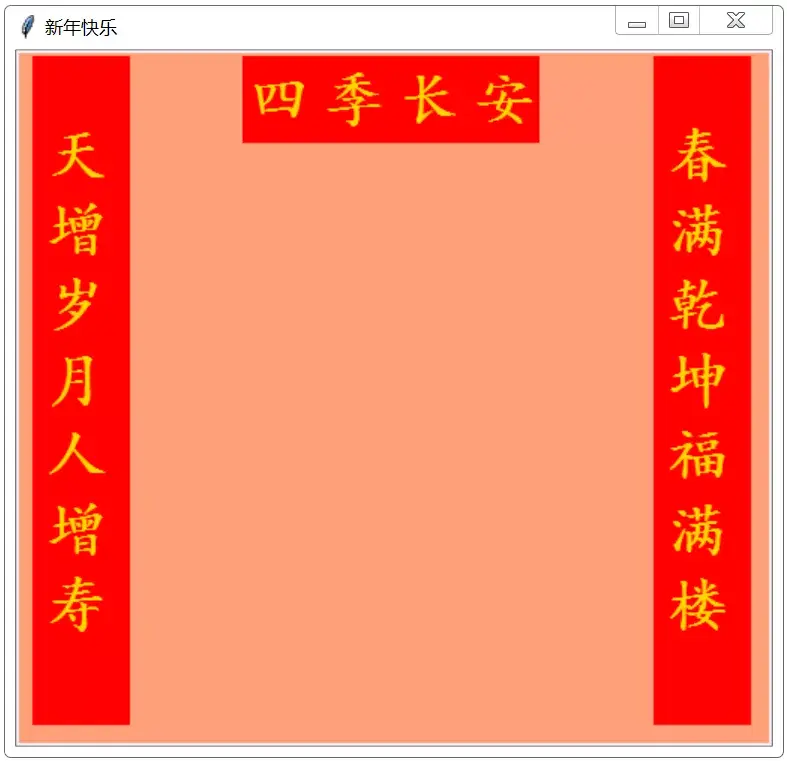
Drawing in Tkinter last modified January 10 2023 In this part of the Tkinter tutorial we will do some drawing Drawing in Tkinter is done on the Canvas widget Canvas is a high level facility for doing graphics in Tkinter It can be used to create charts custom widgets or create games Tkinter canvas With Canvas we can create shapes texts animate stuff modeling 3D shapes modeling simulations and many more In order to add text inside a tkinter frame we can use the create text method We can define create text by adding values of font text and other options such as create text x y font text options Running the above
The Canvas is a rectangular area intended for drawing pictures or other complex layouts You can place graphics text widgets or frames on a Canvas Syntax Here is the simple syntax to create this widget w Canvas master option value Parameters master This represents the parent window