Pycharm Install Package Non Zero Exit Code 2 Pycharm Non zero Exit Code 1 Pycharm Django python Non zero Exit Code 1 Pycharm Non zero Exit Code 2 Pycharm Non zero Exit Code 2 Pycharm Non zero Exit Code 2 Dec 12 2017 nbsp 0183 32 I use PyCharm and all the initial settings are okay Simple package installation is working Then why do I need to reinstall a package for each project Is there any way to install
PyCharm AI JetBrains Fleet VSCode Copilot 2024 AI 5 PyCharm since at least version 2017 remembers the parent directory of the last place where you created a project So create a junk project in the directory that you want to be your default
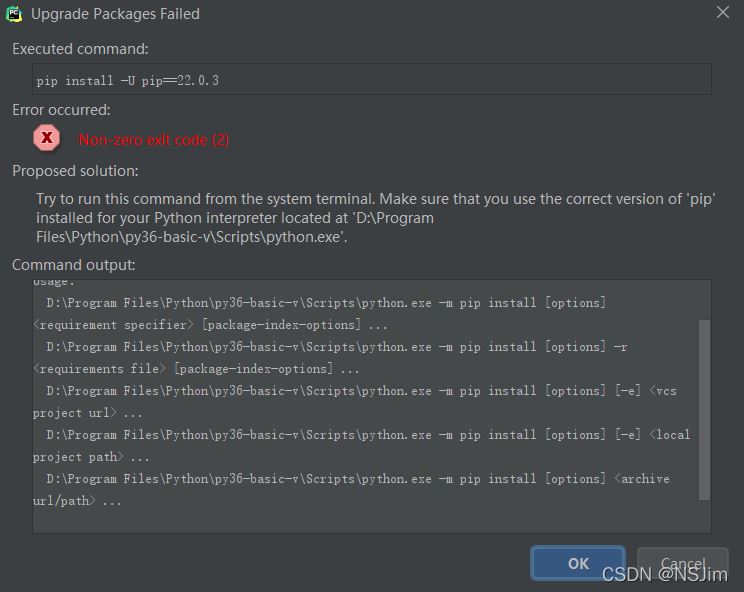
Pycharm Non zero Exit Code 2 Pycharm Non zero Exit Code 2 Pycharm pip Non zero Exit Code 2 Try To Run This Pycharm Non zero Exit Code 1 pip Pycharm 2020 2 4 Pip Install Flask Error Non zero Exit Code Pycharm Install Package Tourslena Pycharm Non zero Exit Code 2 Pycharm Non zero Exit Code 2 Pycharm Django python Non zero Exit Code 1
Pycharm Install Package Non Zero Exit Code 2
Pycharm Install Package Non Zero Exit Code 2
https://www.likecs.com/default/index/img?u=aHR0cHM6Ly9pbWcyMDE4LmNuYmxvZ3MuY29tL2ktYmV0YS8xNjIzNzcwLzIwMjAwMS8xNjIzNzcwLTIwMjAwMTI0MTcxMTE5NDM5LTE3ODcyMjQ4MzIucG5n
Jul 11 2019 nbsp 0183 32 In Pycharm there s quot code structurure quot side bar which provides a tree to navigate through the code but it is only useful when the code has classes and methods and objects If
Templates are pre-designed documents or files that can be used for various purposes. They can conserve effort and time by providing a ready-made format and design for developing different sort of content. Templates can be used for individual or professional jobs, such as resumes, invitations, flyers, newsletters, reports, presentations, and more.
Pycharm Install Package Non Zero Exit Code 2

Pycharm Non zero Exit Code 2

Pycharm Non zero Exit Code 2

Pycharm pip Non zero Exit Code 2 Try To Run This

Pycharm Non zero Exit Code 1 pip
Pycharm Install Package Tourslena

Pycharm Non zero Exit Code 2
Feb 8 2022 nbsp 0183 32 In Corey Schafer s Programming Terms Mutable vs Immutable at 3 06 he selected multiple lines and commented them out in PyCharm all in one action What is this action Is it a

Dec 17 2024 nbsp 0183 32 1 Using the Interpreter Dropdown Quick Access In PyCharm there is a quick access Python Interpreter selector in the bottom right corner of the IDE window Using the
Oct 28 2013 nbsp 0183 32 I m trying to learn Python and decided to use PyCharm When I try to start a new project I get a dialog that says quot No Python interpreter selected quot It has a drop down to select a

Jun 13 2017 nbsp 0183 32 I have two scripts server py and client py I want to be able to start them running in that order with one action How can achieve that in Pycharm Please note that I want to be

PyCharm PyCharm
[desc-11] [desc-12]
[desc-13]