Put 2 Formulas In One Cell Worksheet Function I Need To Apply Two Formulas In One Cell one How To Create Multiple Formulas For The Same Space In Excel Techwalla Index Multiple Result In Single Cell Excel Formula YouTube How To Put Multiple Formulas In One Cell In Excel MS Excel Multiple 14 Excel Formula To Sum Cells With Text Latest Formulas Riset Web To start the formula with the function click Insert Function on the formula bar Excel inserts the equal sign for you In the Or select a category box select All If you are familiar with the function categories you can also select a category
Web Lets learn how to put multiple functions and formulas in a single cell in Excel in order to build more complex formulas that will in the end make your life easier This is called nesting and it simply means putting functions inside of functions Web Multiple IF functions can be nested together to allow for multiple criteria The Excel IF function statement allows you to make a logical comparison between a value and what you expect by testing for a condition and returning a result if True or False
14 Excel Formula To Sum Cells With Text Latest Formulas Riset Can I Put Two Formulas In One Cell In Excel How To Add 2 Digit Numbers In Excel Lifescienceglobal How To Combine Multiple Rows To One Cell In Excel Combine Concatenate Multiple Rows Into One Cell In Excel Riset Excel 2010 Merging Two IF Functions In One Cell Super User How To Use Multiple Excel Formulas In One Cell with Easy Steps Can You Use Multiple Formulas In One Cell In Google Sheet Quora How To Add Two Cells Already Containing Sum Of Other Formulas
Put 2 Formulas In One Cell
 Put 2 Formulas In One Cell
https://i.stack.imgur.com/0UY0c.png
Web Sep 20 2020 nbsp 0183 32 423 15K views 3 years ago Excel Tips amp Tricks Learn how to apply multiple formulas in the same cell in Excel Pretty easy to do but not obvious 1 Multiple Formula in one cell using amp
Pre-crafted templates use a time-saving solution for creating a diverse range of documents and files. These pre-designed formats and designs can be made use of for numerous personal and professional tasks, consisting of resumes, invites, leaflets, newsletters, reports, presentations, and more, simplifying the content production procedure.
Put 2 Formulas In One Cell
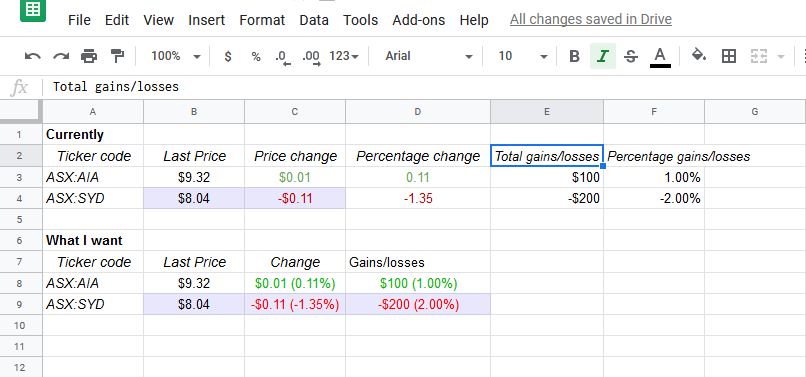
Displaying Two Separate Formulas In One Cell In Sheets Google Docs

Can I Put Two Formulas In One Cell In Excel

How To Add 2 Digit Numbers In Excel Lifescienceglobal

How To Combine Multiple Rows To One Cell In Excel

Excel 2010 Merging Two IF Functions In One Cell Super User
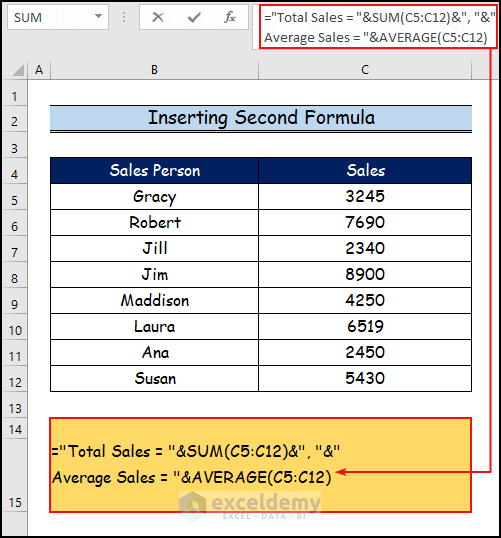
How To Use Multiple Excel Formulas In One Cell with Easy Steps

Web Jun 13 2023 nbsp 0183 32 You can use the ampersand amp symbol in Excel to write multiple formulas in one cell in Excel For example you could type the following into one cell quot Average sales is quot amp AVERAGE B2 B11 amp quot quot amp quot Sum of sales is quot amp SUM B2 B11
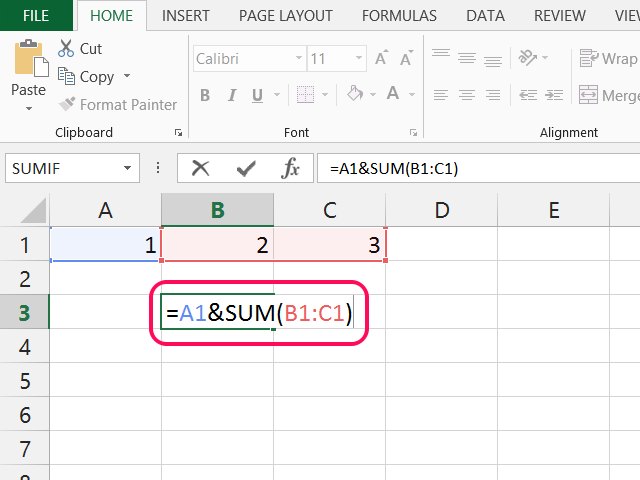
Web Apr 26 2018 nbsp 0183 32 1 You can do this with a formula IF SUM Weight Price Added 0 quot quot SUM Weight Price Added or by using a custom format for the cells containing your results Type quot General General quot without the quotes in the Custom Format dialog as shown below

Web You can t put multiple formulas in one cell in Excel but you can create a formula that performs multiple calculations and conditional tests by using built in functions and function nesting Excel allows nesting up to 64 levels deep and provides hundreds of

Web Jan 12 2015 nbsp 0183 32 microsoft excel How do I add multiple formulas into one cell Super User How do I add multiple formulas into one cell Ask Question Asked 8 years 11 months ago Modified 6 years 8 months ago Viewed 31k times 5 Here are the formulas I need but I can not figure out how to combine them
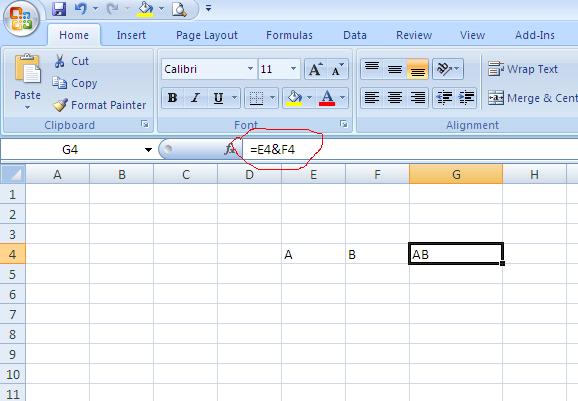
Web Aug 7 2023 nbsp 0183 32 Insert Multiple Formulas in One Cell We ll show you how to combine multiple formulas in one cell in Excel The goal is to show the minimum maximum average and total values of the sales figures in the output cell We ve merged the cell range D3 D6 and we ll refer to it as the output cell
Web Jun 21 2021 nbsp 0183 32 1 Open your worksheet 2 Choose the cell you want to combine the data with 3 Write the formula CONCAT 4 Select the cell you want to combine first You use commas to separate the cells you are combining and use quotation marks to add spaces commas or other text 5 Close the formula with a parenthesis and hit enter Web Jun 12 2023 nbsp 0183 32 In this article we ll go over how to put multiple formulas in one cell in Excel along with some examples to help illustrate the process Method 1 Using the Ampersand Operator One of the easiest ways to combine multiple formulas in a single cell is to use the ampersand amp symbol to join them together Here s an example
Web Mar 16 2023 nbsp 0183 32 Or simply input the From and To dates in two cells F 1 and F 2 in this example and quot pull quot them from those cells by using the already familiar IF AND formula IF AND B2 gt F 1 B2 lt F 2 quot x quot quot quot For more information please see Excel IF statement between two numbers or dates