Proxmox Network Configuration Firewall Proxmox Network Configuration Add Ethernet Bridge Sezer in Proxmox Network Interface Setup Via Command Line YouTube Proxmox Network Configuration Add Ethernet Bridge Sezer in Opnsense In A Proxmox VM Issue With Basic Firewall Configuration Your Proxmox VE Projects With DynFi To configure the firewall effectively in Proxmox consider the following steps Firewall Policy Define a firewall policy that outlines the allowed and denied traffic patterns for your Proxmox environment Consider factors such as required services protocols ports and source destination IP addresses Firewall Zones
To enable the firewall service you can use the following command on the CLI pve firewall enable This will start the firewall service and load the firewall configuration files Ports used by Proxmox Proxmox uses several ports for different services such as SSH HTTP and VNC To optimize network configuration in Proxmox consider the following best practices Network Planning Carefully plan your network architecture taking into account factors such as network bandwidth VLAN segmentation and security requirements Implement appropriate security measures including firewall rules network segmentation and
Your Proxmox VE Projects With DynFi Howto Proxmox VE Setup And Configuration Virtual Lab BENISNOUS Make Proxmox VLAN Aware Proxmox Network Interface Profoxi Network Configuration Proxmox VE How To Set Up Proxmox Network In Hybrid Mode Technologia Advice On Network Configuration I Can Now Run Apt But None Of My VM s How I Fixing A Proxmox Network Speed Problem YouTube Proxmox Network Setup On Hetzner Dedicated Server Pure Media
Proxmox Network Configuration Firewall
 Proxmox Network Configuration Firewall
https://sezer.in/wp-content/uploads/2022/02/ethernet-network-1024x538.jpg
Proxmox VE firewall is a firewall service that allows configuring firewall rules for filtering traffic to the Promox server containers and virtual machines It also provides the really cool capability of implementing cluster wide firewall rules Let s take a look at the Proxmox firewall rules configuration and see how these are implemented
Templates are pre-designed documents or files that can be used for numerous purposes. They can save time and effort by providing a ready-made format and design for creating various kinds of content. Templates can be utilized for personal or expert projects, such as resumes, invitations, leaflets, newsletters, reports, presentations, and more.
Proxmox Network Configuration Firewall

Proxmox Solved You Need Ifupdown2 To Reload Network Configuration

Howto Proxmox VE Setup And Configuration Virtual Lab BENISNOUS
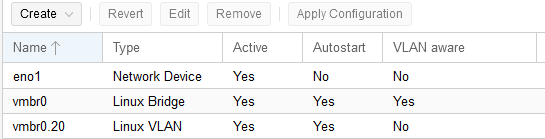
Make Proxmox VLAN Aware
Proxmox Network Interface Profoxi

How To Set Up Proxmox Network In Hybrid Mode Technologia

Advice On Network Configuration I Can Now Run Apt But None Of My VM s
VNC Web console 5900 5999 TCP WebSocket SPICE proxy 3128 TCP sshd used for cluster actions 22 TCP rpcbind 111 UDP sendmail 25 TCP outgoing

Proxmox Virtual Environment Proxmox VE Networking and Firewall T t b New Member Nov 4 2015 22 2 1 Nov 4 2015 1 Hi I m new to proxmox as well as advanced network configuration I have a KMV vServer which should host some lxc container This picture is the goal i want to reach postimg image 4cv00dh8v full Some additional informations
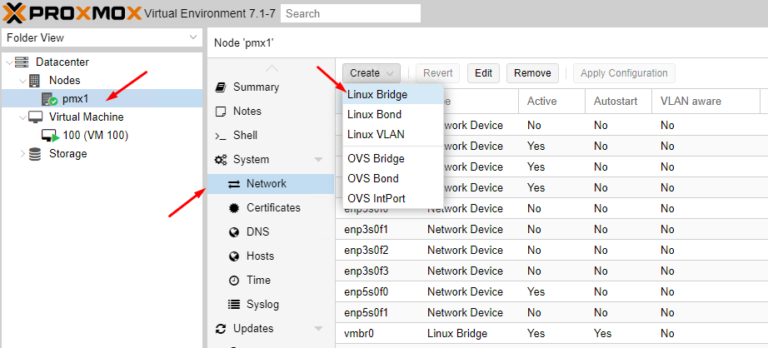
Proxmox VE is using the Linux network stack This provides a lot of flexibility on how to set up the network on the Proxmox VE nodes The configuration can be done either via the GUI or by manually editing the file etc network interfaces which contains the whole network configuration
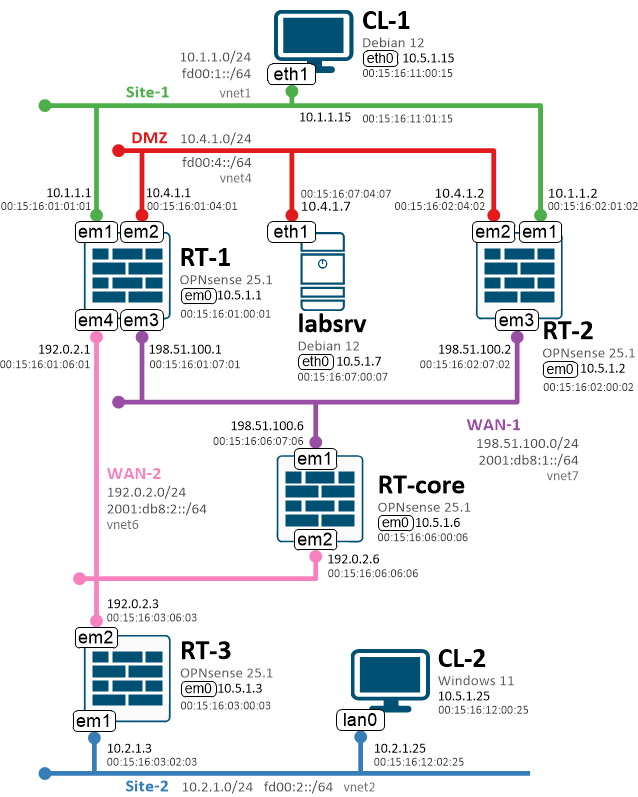
Network Bonding Configuration Configure network bonding on Proxmox host servers to aggregate multiple physical network interfaces into a bonded interface Choose the bonding mode based on your requirements such as load balancing or failover Firewall Configuration Define firewall rules and security groups to control inbound and outbound
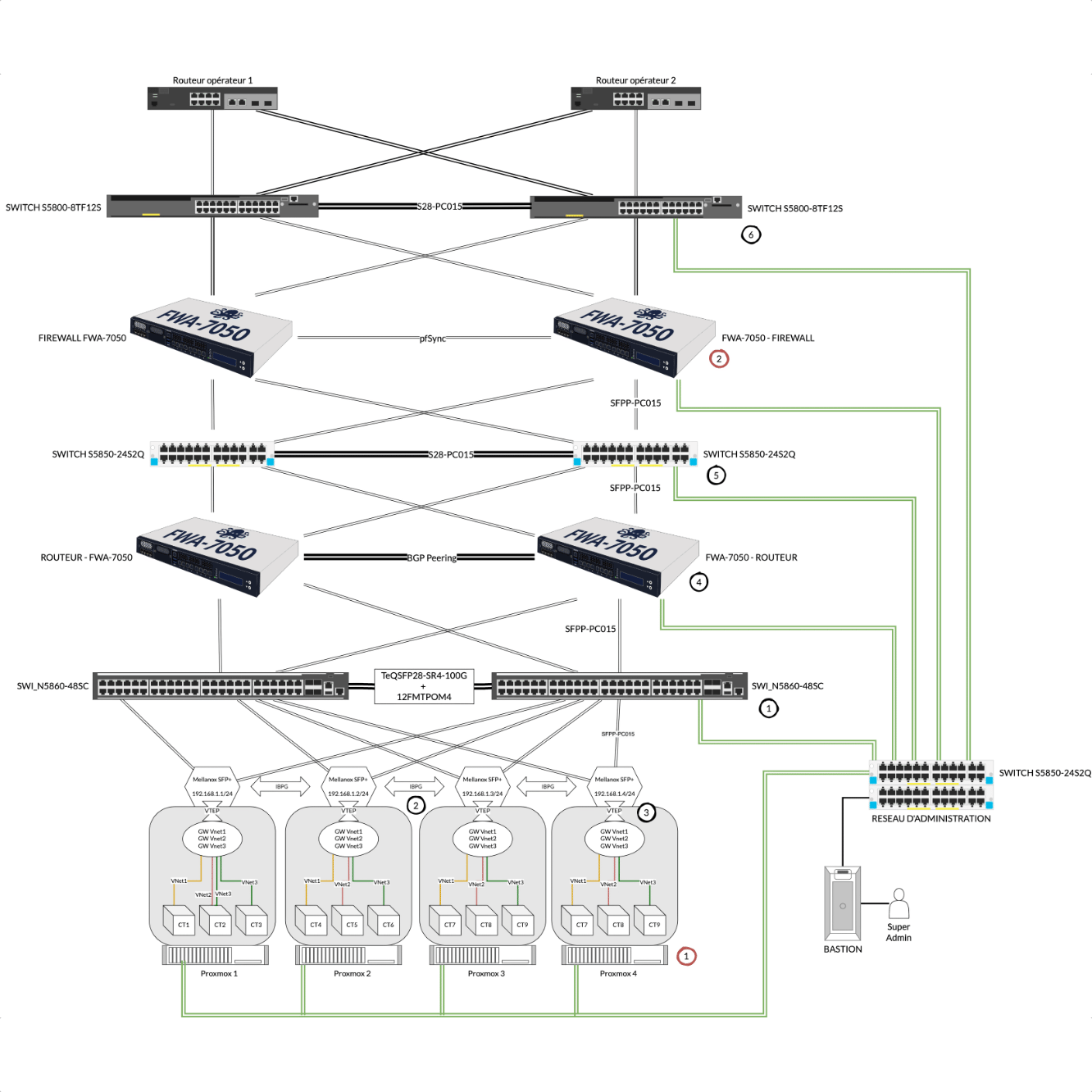
Aug 31 2009 By default Proxmox does not come with a firewall which may leave it and your virtual servers exposed to the elements of the Internet An additional issue arises when a hosting
In this video we will configure our Firewall to ensure greater security for our system but not only that you will understand where you should configure you Open your VM internet browser type https 192 168 1 1 in the address bar to access the firewall GUI Ignore the security warning In the login prompt enter the username as root and the password as OPNsense the same credentials we used at the CLI login screen The initial setup wizard will start in a few seconds
Firewall 1 in network device setup I have this setup on two VMs in Proxmox 6 2 4 I was wondering what that firewall 1 is exactly for Since I have pfsense as a VM in Proxmox which already filters traffic for any VMs and physical machines too in Proxmox can I disable that firewall setup in Network Device as shown above Thanks