Print Pdf Across Multiple Pages Mac Print Pdf Poster On Multiple Pages Mac Property Wealth Podcast Sales 2022 How To Print A Poster On Multiple Pages On Mac Effortlessly Easily Print Large Image To Multiple Pages Howtosolveit YouTube How To Print An Image Over Multiple Pages Mac Christopher Myersa s Print Pdf Poster On Multiple Pages Mac Property Wealth Podcast Sales WEB Jan 17 2024 nbsp 0183 32 If you want to print a large image on multiple pages on Mac you have a couple of options when it comes to the software Preview Adobe Acrobat Reader DC most convenient with multiple settings Safari the fastest amp simple Preview a bit cumbersome but the most customizable Numbers simple
WEB Oct 30 2023 nbsp 0183 32 In Adobe Acrobat you can print a large format document such as a poster or banner by splitting the page across multiple sheets of paper called tiling WEB Apr 2 2024 nbsp 0183 32 You can print more than one page of a PDF onto a single sheet of paper Printing multiple pages per sheet is also called N up printing such as 2 up or 6 up You can specify how the pages are ordered either horizontally across the page or
Print Pdf Poster On Multiple Pages Mac Property Wealth Podcast Sales Print Image Across Multiple Pages Imaegus Nacon Revolution Ps4 Mac Software Eve Baca How To Print Image On Multiple Pages On Mac Step by Step Guide How To Print A Picture In Multiple Pages Barry Morrises Coloring Pages How To Print Image On Multiple Pages On Mac Step by Step Guide How To CREATE A multiple PDF On MAC For FREE YouTube Wiki How To
Print Pdf Across Multiple Pages Mac
 Print Pdf Across Multiple Pages Mac
https://i.pinimg.com/originals/88/bc/49/88bc49dca8ad85794a07f8a96911b18c.png
WEB Apr 2 2024 nbsp 0183 32 You can print a large format document such as a poster or banner by splitting the page across multiple sheets of paper called quot tiling quot The tiling option calculates how many sheets of paper are needed
Templates are pre-designed files or files that can be utilized for different functions. They can save effort and time by providing a ready-made format and layout for producing various kinds of content. Templates can be utilized for individual or expert jobs, such as resumes, invitations, flyers, newsletters, reports, discussions, and more.
Print Pdf Across Multiple Pages Mac

How To Type On A Pdf Mac Preview ARVUVA

Print Image Across Multiple Pages Imaegus

Nacon Revolution Ps4 Mac Software

Eve Baca

How To Print A Picture In Multiple Pages Barry Morrises Coloring Pages
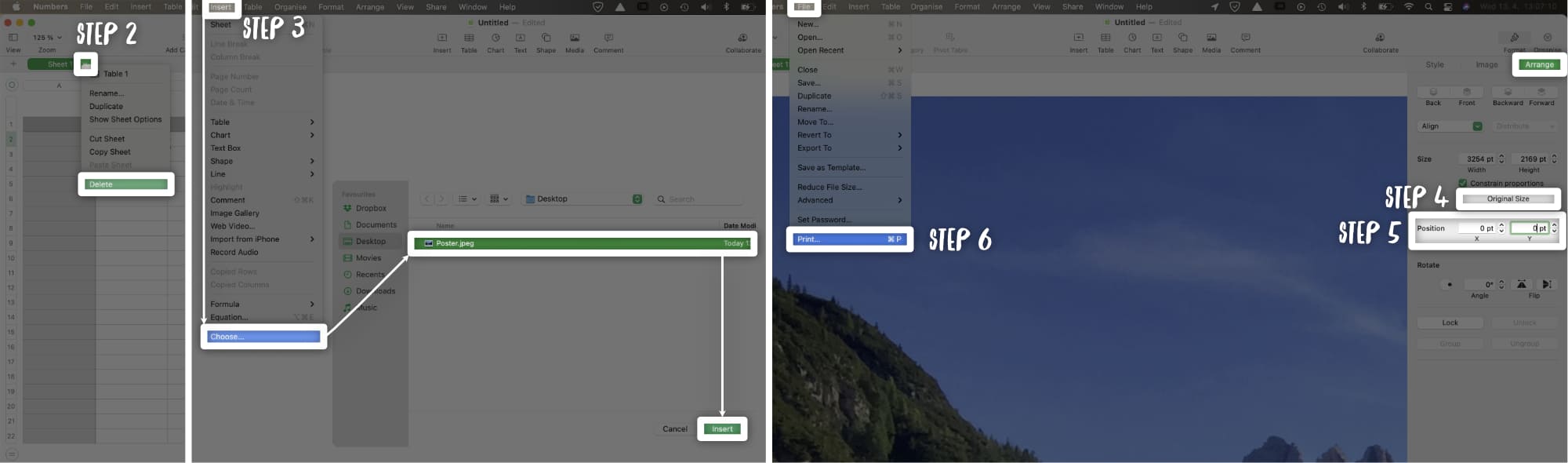
How To Print Image On Multiple Pages On Mac Step by Step Guide

WEB Oct 28 2015 nbsp 0183 32 Go to the Print dialog box and set Page Scaling to Tile all pages on v 10 1 4 of Acrobat Pro you may have to first select Page Size amp Handling gt Poster You can then adjust the Tile Scale to a suitable percentage
WEB If you want to print multiple files you can open them in one Preview window To print only some of the PDF or image pages choose View gt Thumbnails then Command click the thumbnails of the pages you want to print
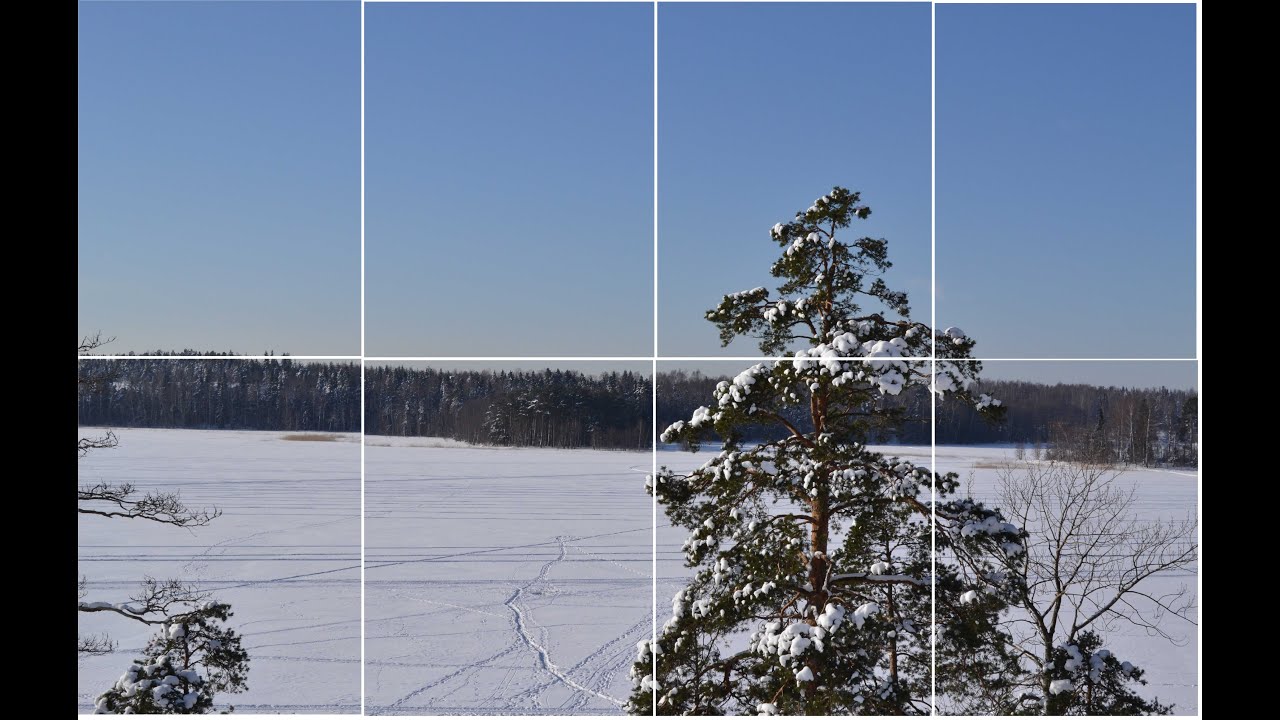
WEB Dec 10 2018 nbsp 0183 32 I want to print it to pdf with paper size 8 5x11 across multiple pages the image should be scaled up to fit the paper width and since the image is tall it should be split onto multiple pages I tried doing it in Preview but it

WEB May 6 2022 nbsp 0183 32 How to Print A Large Image Across Multiple Pages on an iMac The iMac itself does not have the functionality to print one image across multiple pages However there are some workarounds for this You can actually download apps

WEB At least on Mac OS X the Adobe Reader application version 10 has this feature in its print dialog There s an option to print as quot poster quot meaning 100 scale across multiple pages Share Improve this answer
WEB Is there an easy way in Preview or whatever to scale up and split a PDF file with a single page into multiple pages What I would like is to split say an A3 paper document into two A4 pages to print separately and then put together with tape WEB You can set up a document to print multiple pages on a single sheet of paper For example you can choose to print two pages per sheet similar to the left and right pages
WEB Aug 22 2022 nbsp 0183 32 To print multiple pages on Mac open System Preferences and click on General Tab In the section next to Prefer tab select Always from the drop down list Now open the PDF file and open it in Preview Head over to the menu bar on the top and open File Use the shortcut Command P to open Print settings