Powershell Set Password Expiration Date Password Change Notification When An AD User Password Is About To Get Password Expiration Date Using Powershell The Sysadmin Channel Set Password To Never Expire Using PowerShell On Windows Server 2016 Set Password Expiration Policy In Microsoft 365 Tenant Level Retrieve Password Last Set And Expiration Date PowerShell HeelpBook Web PowerShell Set LocalUser AccountExpires lt DateTime gt AccountNeverExpires Description lt String gt FullName lt String gt InputObject lt LocalUser gt Password lt SecureString gt PasswordNeverExpires lt Boolean gt UserMayChangePassword lt Boolean gt WhatIf Confirm lt CommonParameters gt PowerShell
Web Set LapsADPasswordExpirationTime Identity lapsClient WhenEffective DateTime Now AddDays 1 DistinguishedName Status CN LAPSCLIENT OU LapsTestOU DC laps DC com PasswordReset This examples show setting the LAPS password expiration time to one day in the future Web Jul 12 2023 nbsp 0183 32 To see if a single user s password is set to never expire run the following cmdlet by using the UPN for example user contoso onmicrosoft or the user ID of the user you want to check PowerShell Copy
Retrieve Password Last Set And Expiration Date PowerShell HeelpBook How To Set Password Expiration Date In Windows 10 Coding Curious Find Password Expiration Date For AD Users PowerShell Free Tools Powershell Get AD Users Password Expiry Date MorganTechSpace Set Password Never Expire For Office 365 Users With AzureAD PowerShell Get Password Expiration Date Of AD Users Using Powershell Get Password Expiration Date Using Powershell The Sysadmin Channel Set Password Never Expire For Office 365 Users With AzureAD PowerShell How To Set A Password Expiration Date In Windows 10 Saved Passwords
Powershell Set Password Expiration Date
 Powershell Set Password Expiration Date
http://woshub.com/wp-content/uploads/2020/11/how-to-get-ad-users-password-expiration-date-using.png
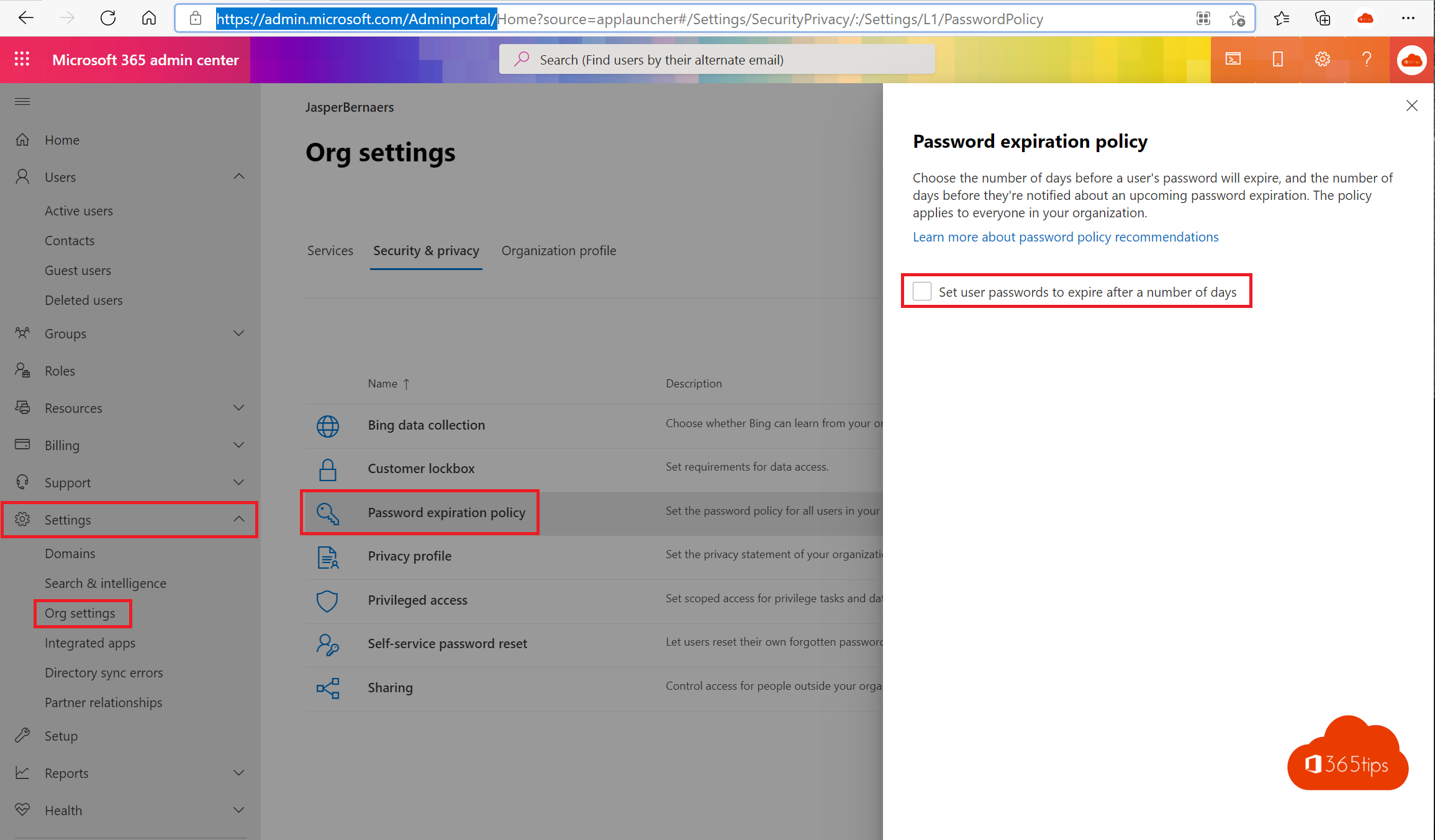
Web Jun 28 2023 nbsp 0183 32 In the Microsoft 365 admin center go to the Org Settings tab If you aren t a global admin or security admin you won t see this page On the Password expiration policy page uncheck the box to change the password policy Type how often passwords should expire Choose a number of days from 14 to 730 and select Save
Pre-crafted templates use a time-saving service for creating a diverse variety of documents and files. These pre-designed formats and designs can be utilized for different individual and professional jobs, consisting of resumes, invitations, flyers, newsletters, reports, presentations, and more, improving the content creation procedure.
Powershell Set Password Expiration Date

How To Set A Password Expiration Date For Your Microsoft Account YouTube

How To Set Password Expiration Date In Windows 10 Coding Curious
Find Password Expiration Date For AD Users PowerShell Free Tools

Powershell Get AD Users Password Expiry Date MorganTechSpace
Get Password Expiration Date Of AD Users Using Powershell
Get Password Expiration Date Using Powershell The Sysadmin Channel
Web Apr 3 2020 nbsp 0183 32 check 430 thumb up 800 Apr 3rd 2020 at 6 37 AM There is no such thing as quot password expiration date quot on an account there is only the date that the password was last set and the password policy effective on an account The password expires when gt CurrentDate gt PwdLastSet plus MaxPasswordAge

Web Dec 20 2019 nbsp 0183 32 Set the Maximum Password Age via Windows PowerShell If your computer runs Windows 10 Home you have to use the PowerShell or command prompt to set the maximum password age You can also use this as an alternative to the Local Group Policy Editor process on Windows 10 Pro Enterprise and Education

Web Sep 11 2014 nbsp 0183 32 AD will not let you change the date a password was last reset except to 0 which will force a password change at next login To do that you can t set the PwdLastSet manually you have to use something like the following snippet Set ADUser Identity JoeBlow ChangePasswordAtNextLogon true
Web Nov 27 2013 nbsp 0183 32 Looking at the SetADAccountControl cmdlet instructions suggests there is a quot PasswordExpired quot parameter in the description but there is no mention of that parameter in the rest of the text If I try it it doesn t exist Ideally I m hoping for a fairly simple Powershell command to do it I don t have any other scripting language on the server

Web Apr 4 2017 nbsp 0183 32 The simplest way to set an account expiration date is to use the net command amp net user username expires quot date ToString MM dd yyyy quot AFAIK password expiration of local users can t be set to a specific date or for individual accounts The expiration is controlled by the Maximum Password Age local security policy
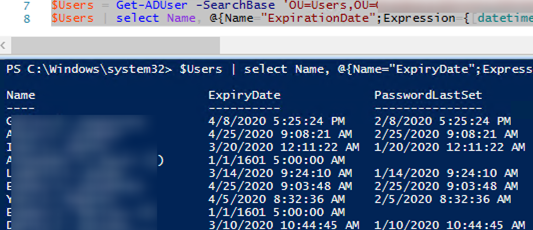
Web Displaying the password expiry date If you just want to generate a list of user names with their expiry dates and the times of the last password change you can run this command Users select Name Name quot ExpiryDate quot Expression datetime FromFileTime quot msDS Web PowerShell Set MsolPasswordPolicy DomainName lt String gt ValidityPeriod lt UInt32 gt NotificationDays lt UInt32 gt TenantId lt Guid gt lt CommonParameters gt Description The Set MsolPasswordPolicy cmdlet updates the password policy of a specified domain
Web How to change the Password never expires attribute and set a password expiration date using PowerShell The two scripts below can be used to set the Password never expires attribute to true and change the password expiration date in Active Directory AD Set the Password never expires attribute