Powershell Script To Get Last Reboot Time For Multiple Computers Powershell Get Last Boot Time Of Remote Computers Enterprise Daddy PowerShell Get The Last Modified File In The Directory ShellGeek Find Last Reboot Time In Windows With PowerShell PowerCram Blog Last Reboot Time Uptime Data Lake Intercept X Endpoint Sophos How To Check Last Reboot Time Linux Jundat95 I found some comands like Get WmiObject ClassName win32 operatingsystem ComputerName xxx select csname lastbootuptime but it s not what I need I would need a script because there are lots of computers I have no experience with PowerShell if someone could help me with some suggestions
Example 1 Show time since last boot PowerShell Get Uptime Days 9 Hours 0 Minutes 9 Seconds 45 Milliseconds 0 Ticks 7781850000000 TotalDays 9 00677083333333 TotalHours 216 1625 TotalMinutes 12969 75 TotalSeconds 778185 TotalMilliseconds 778185000 Example 2 Show the time of the last boot PowerShell Get LastReboot is a PowerShell function that can be use to retrieve a computer s last reboot time and why it rebooted It returns the following info Title Type Code String Comment String ComputerName String LastBoot DateTime Message String Process String Reason String Type String UpTime TimeSpan
How To Check Last Reboot Time Linux Jundat95 How To Check The Reboot History In Linux CertSimple Check Reboot History In Linux How To Check Last 10 Reboot In Linux How To Check Last Reboot Time Linux Jundat95 How To Check Who Rebooted The Server In Linux CertSimple Use PowerShell Function To Get Reboot Details Remotely Powershellbros When Was Your Linux Machine Last Rebooted Systran Box The Pill PowerCram Blog Powershell Edit File The 9 New Answer Brandiscrafts
Powershell Script To Get Last Reboot Time For Multiple Computers
 Powershell Script To Get Last Reboot Time For Multiple Computers
https://www.enterprisedaddy.com/wp-content/uploads/2015/04/Untitled4.png
There s lots of ways to find computer uptime or last restart time I wrote a couple of PowerShell scripts that I use at least monthly to do this for example when an overnight process fails the uptime script will quickly show whether a computer involved restarted Another use is to monitor restarts as part of Windows patching
Templates are pre-designed files or files that can be utilized for different purposes. They can conserve effort and time by supplying a ready-made format and layout for creating different sort of content. Templates can be used for personal or expert projects, such as resumes, invites, flyers, newsletters, reports, discussions, and more.
Powershell Script To Get Last Reboot Time For Multiple Computers

How To Check Last Reboot Time In Linux Unix Linux The Admins Tutorials

How To Check The Reboot History In Linux CertSimple
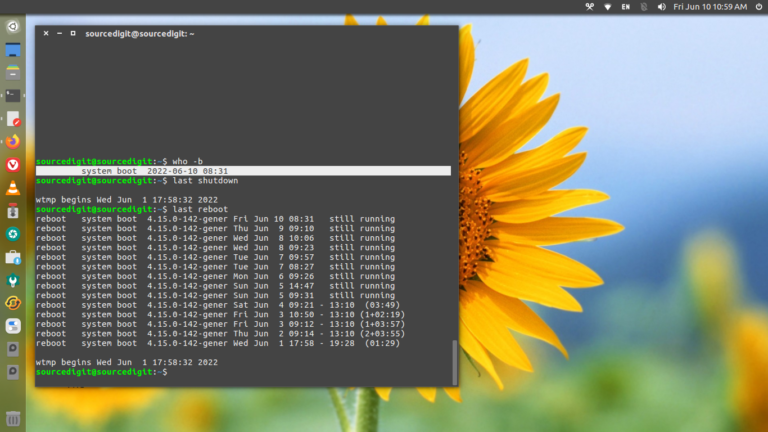
Check Reboot History In Linux How To Check Last 10 Reboot In Linux

How To Check Last Reboot Time Linux Jundat95

Use PowerShell Function To Get Reboot Details Remotely Powershellbros

When Was Your Linux Machine Last Rebooted Systran Box

You can get the last boot time of the computer or remote computers using the PowerShell script net stats systeminfo wmic windows management instrumentation and Get WmiObject is used to get the last boot time of the computer Get last boot time of computer
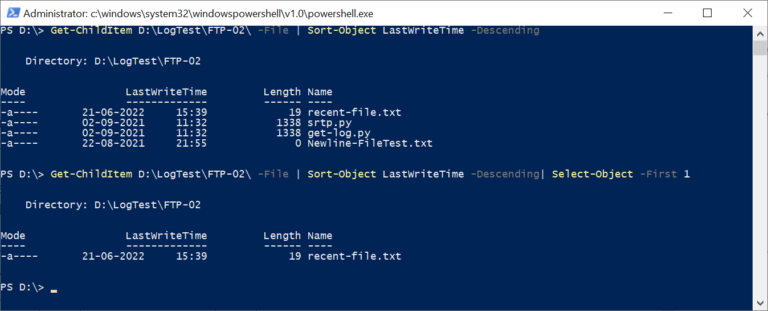
Powershell check for last time computers were restarted Ask Question Asked 3 years 3 months ago Modified 3 years 2 months ago Viewed 5k times 0 I need to make sure all computers are being restarted at least once a week and I ve been googling on it and I found something but it s rather something simple something 1 timer

To get last boot time using PowerShell we use either WMI or CIM classes Win32 OperatingSystem or CIM OperatingSystem respectively Table of Contents Toggle Get The Last Boot Time Solutions Get LastBootUpTime CmdLet Explained How To Use Get LastBootUpTime CmdLet Tips Useful PowerShell Last Boot Time Articles

The uptime script showed you when was the last time a machine was booted aka how long the system has been running but what if you wanted to pull a little more information What if you wanted to see the shutdown or reboot history and probably more importantly who was the actor that imposed that event

5 I have a PC on remote connected by network but it occasionally crashes or is restarted by remote users After the restart some services and applications have to be in running status So I would like to find out the reboot as soon as possible
It says here that it scans the event logs for times when the computer has been restarted so that would most likely be how it gathers multiple times a system has been restarted Otherwise I am sure it pulls the last uptime of a system from WMI Get WMIObject Win32 OperatingSystem LastBootUpTime 1 From a PowerShell window run the following the S in Statistics must be capitalized net statistics workstation select string Statistics You can shortcut it as well using net stats work select string Stat Result 2 This next method uses the command systeminfo
DranTrix 1 32K subscribers Subscribe 2 9K views 2 years ago PowerShell Makes your life easier This video will show you how to get last boot up reboot time of multiple servers and