Powershell Create Scheduled Task To Run Now Learn How To Create A Scheduled Task With PowerShell TechTarget Create Scheduled Task With PowerShell ALI TAJRAN Create Scheduled Task With PowerShell ALI TAJRAN Add A Scheduled Task To Your Flow Unit Salesforce Trailhead Trial And Error With Cloud Remember To Set Scheduled Task To Future To open PowerShell right click the Start Menu button and select PowerShell Admin from the power user menu If you don t see that option search for PowerShell in Windows Search and select Run as Administrator You need to create a variable to contain the task action
Below are the requirements to create PowerShell scheduled tasks using PowerShell The examples in this article use Windows 10 But Windows Server 2012 and newer can do the same Windows PowerShell 5 1 or PowerShell 7 It would help if you had a script editor such as Visual Studio Code Notepad or Windows PowerShell ISE Create settings Next create the scheduled task using the New ScheduledTask command This command requires a value for the Settings parameter even if you re not using any special This is why you run New ScheduledTaskSettingsSet to create an object to pass in here Settings New ScheduledTaskSettingsSet Create the scheduled task
Trial And Error With Cloud Remember To Set Scheduled Task To Future How To Run The PowerShell Script In Scheduled Task With Run As PowerShell Create A Scheduled Task YouTube Solved Powershell Create Scheduled Task To Run As 9to5Answer Powershell Script With Arguments As A Scheduled Task Tips From A Rx SHAREPOINT Create A Scheduled Task For PowerShell Script With Running Powershell Scripts As Scheduled Tasks Making IT Work PowerShell Scheduled Task How To Create PowerShell Scheduled Task Use PowerShell To Create Scheduled Tasks Scripting Blog
Powershell Create Scheduled Task To Run Now
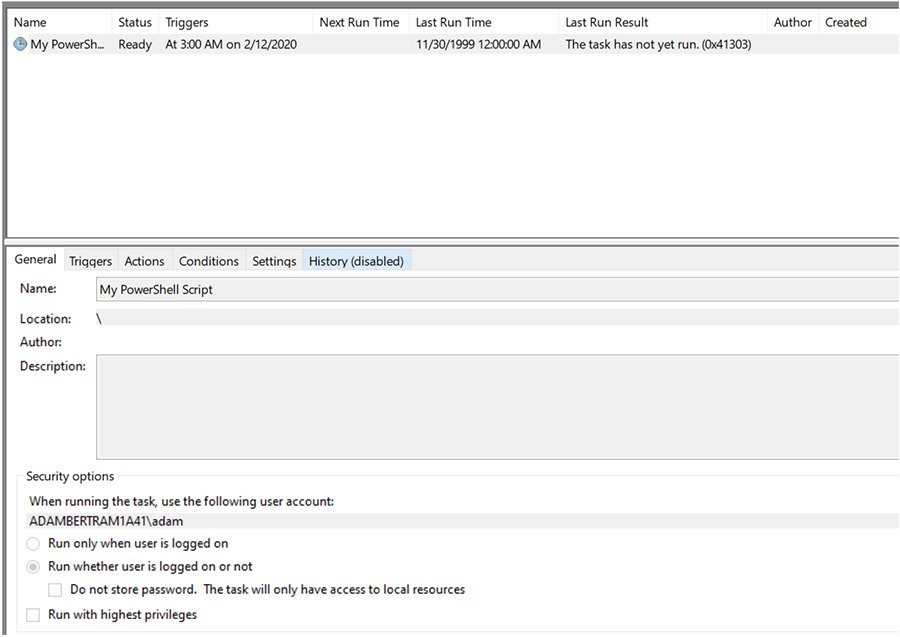 Powershell Create Scheduled Task To Run Now
https://cdn.ttgtmedia.com/rms/onlineImages/bertram_scheduled_tasks_052620.jpg
The New ScheduledTaskSettingsSet cmdlet creates an object that contains scheduled task settings Each scheduled task has one set of task settings Use this cmdlet to configure options to manage the behavior of the task upon completion to manage the behavior of the task if a problem occurs or to manage the behavior of the task if an instance
Templates are pre-designed documents or files that can be used for different purposes. They can save effort and time by offering a ready-made format and layout for producing various sort of content. Templates can be used for individual or professional projects, such as resumes, invitations, leaflets, newsletters, reports, discussions, and more.
Powershell Create Scheduled Task To Run Now

Run PowerShell Script With Windows Task Scheduler Diecknet

How To Run The PowerShell Script In Scheduled Task With Run As

PowerShell Create A Scheduled Task YouTube

Solved Powershell Create Scheduled Task To Run As 9to5Answer

Rx SHAREPOINT Create A Scheduled Task For PowerShell Script With

Running Powershell Scripts As Scheduled Tasks Making IT Work
This command uses the Get ScheduledTask cmdlet to get the full task path for the UpdateVirus folder and pipes that value to Start ScheduledTask which starts all tasks in the UpdateVirus folder Parameters AsJob Runs the cmdlet as a background job Use this parameter to run commands that take a long time to complete CimSession

91 I m not a fan of embedding my credentials into a script which a few other example here do and additionally you generally can t do this from something like Packer or some other system configuration automation or in a cloud provider with an pseudo randomly generated password

Step 1 Create a scheduled task trigger object Step 2 Create new scheduled task settings object Step 3 Create scheduled task action Step 4 Create scheduled task instance Step 5 Register scheduled task definition on local computer Run scheduled task in Task Scheduler Verify PowerShell script report Conclusion
Description The New ScheduledTaskTrigger cmdlet creates and returns a new scheduled task trigger object You can use a time based trigger or an event based trigger to start a task Time based triggers include starting a task at a specific time or starting a task multiple times on a daily or weekly schedule

To create a scheduled task with PowerShell on Windows 10 use these steps Open Start Search for PowerShell right click the top result and select the Run as administrator option
PowerShell code is pretty simple Example Create scheduled task to reboot computer in 30 minutes time DateTime Now AddMinutes 30 hourMinute time ToString HH mm SchTasks exe Create RU SYSTEM SC ONCE TN MyTask TR shutdown exe r t 120 ST hourMinute F Additional Examples Run a Scheduled Task in 2 hours Using PowerShell 7 3 1 so can t use Register ScheduledJob without having to directly modify scheduled task XML files since they are stored in 3 different places how can I create a scheduled task in Windows that runs every x hours or x minutes I ve done this in GUI and I want to do something like that in PowerShell
Description The New ScheduledTaskPrincipal cmdlet creates an object that contains a scheduled task principal Use a scheduled task principal to run a task under the security context of a specified account When you use a scheduled task principal Task Scheduler can run the task regardless of whether that account is logged on