Powershell Command To Set Password Never Expires Local User Using PowerShell Get All Users Are Password Never Expires In Domain Set Password To Never Expire Using PowerShell On Windows Server 2016 Kennwort So Einstellen Dass Es F r Dom nenkonten In Windows Server Retrieve Password Last Set And Expiration Date PowerShell HeelpBook 5 Ways To Set Password To Never Expire For Windows Local Account Go to Manage Add Roles Features Within Add Roles and Features Wizard on Features tab select Remote Server Administration Tools select Role Admininistration Tools Select AD DS and DF LDS Tools ActiveDirectory module is present by default in windows server 2008 R2 install it in this way
1 Update PasswordNeverExpiresFlag ps1 UserAccounts LabUser01 RemoveOption Set Password Never Expires option for multiple users 1 2 3 Users Get Content c temp users txt Update PasswordNeverExpiresFlag ps1 UserAccounts Users SetOption Remove Password Never Expires option for multiple users 1 2 3 Do the following steps to disable password expiry in user account console Execute the command lusrmgr msc from Run Click on users in the list displayed on the left side Double click on the user account you would like to update Select the check button Password never expires Click OK Net user command
5 Ways To Set Password To Never Expire For Windows Local Account Brief Summary Of Kerberos Kerberos Authentication Process By Retrieve Password Last Set And Expiration Date PowerShell HeelpBook Disabling Password Expiration In Windows Server 2012 Chrizen Set Passwords To Never Expire In Office 365 Using PowerShell Set Or Remove Password Never Expires Flag For Multiple Users Using Set Password Never Expire For Office 365 Users With AzureAD PowerShell Reset The Local Account Password Using PowerShell In Windows 10 Solved Net User Password Never Expires Not Working 2022
Powershell Command To Set Password Never Expires Local User
 Powershell Command To Set Password Never Expires Local User
https://i.ytimg.com/vi/x3uv9-Ig81c/maxresdefault.jpg
Create a local user with PowerShell on your Windows 10 or 11 device Make the new local user member of the correct group We have the option to set a password for the account or create an account without a password By default the new user account won t expire but with the New LocalUser cmdlet we can set an expiration date for the
Templates are pre-designed documents or files that can be used for numerous purposes. They can save time and effort by providing a ready-made format and design for creating various kinds of content. Templates can be used for personal or expert tasks, such as resumes, invites, flyers, newsletters, reports, presentations, and more.
Powershell Command To Set Password Never Expires Local User

Set Passwords To Never Expire In Office 365 Using PowerShell
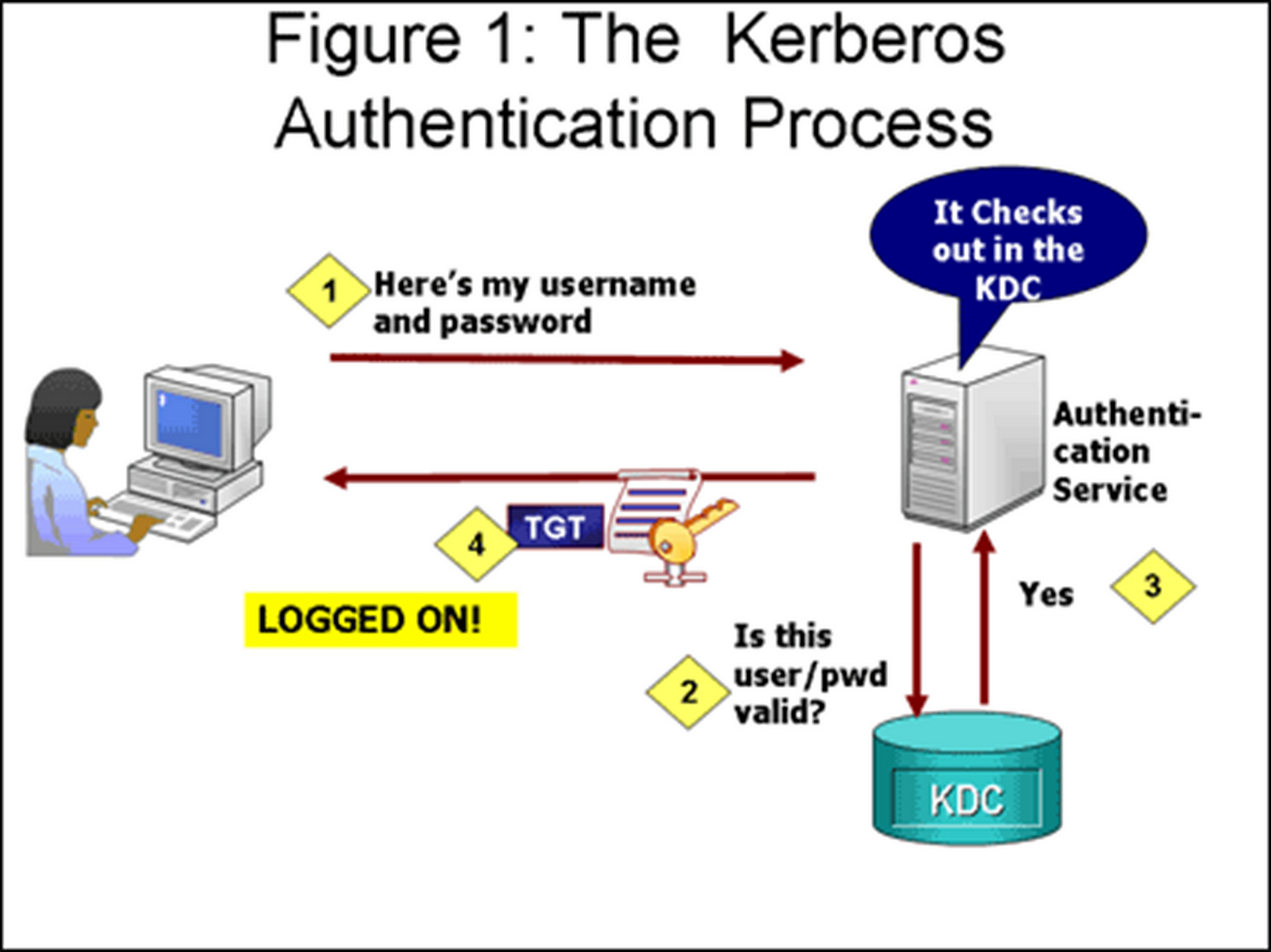
Brief Summary Of Kerberos Kerberos Authentication Process By

Retrieve Password Last Set And Expiration Date PowerShell HeelpBook

Disabling Password Expiration In Windows Server 2012 Chrizen

Set Or Remove Password Never Expires Flag For Multiple Users Using

Set Password Never Expire For Office 365 Users With AzureAD PowerShell

Syntax Set LocalUser AccountExpires DateTime AccountNeverExpires Description String FullName String Name String Password SecureString PasswordNeverExpires Boolean UserMayChangePassword Boolean WhatIf Confirm CommonParameters Set LocalUser

Run one of the following commands To see if a single user s password is set to never expire run the following cmdlet by using the UPN for example user contoso onmicrosoft or the user ID of the user you want to check PowerShell Copy
How to Enable or Disable Password Expiration for Local Accounts in Windows 10 Password expiration is a feature in Windows that forces a local account on the PC to change their passwords when a specified maximum 42 days by default and minimum 0 days by default password age has been reached

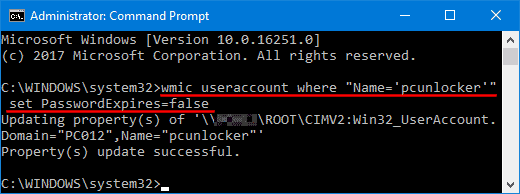
You can use the Set LocalUser cmdlet to modify a local user account and set its password to never expire Set LocalUser Name pcunlocker PasswordNeverExpires 1 Method 4 Set Password to Never Expire for All Accounts Using Group Policy Press the WIN R keys to open the Run command box
PowerShell New LocalUser AccountExpires DateTime AccountNeverExpires Description String Disabled FullName String Name String Password SecureString PasswordNeverExpires UserMayNotChangePassword WhatIf Confirm CommonParameters PowerShell
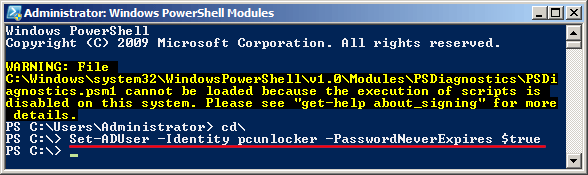
Powershell command to Configure Password Never Expires flag 1 Set ADUser Identity samAccountName PasswordNeverExpires true The Identity parameter specifies the Active Directory user to modify You can identify a user by its samAccountName distinguished name DN GUID and SID Modify AD Users from Specific OU How to Set Local User Account To Never Expire Use Computer Management to set your Windows password to Never Expire Use Windows Command Prompt to Set Windows Password to Never Expire Use PowerShell to Prevent Password from being Expired Use Group Policy to Set All Accounts Password to Never Expire Use a Boot CD to Set your Password to Never Expire
In this example I ll use get aduser cmdlet to get all AD users with password never expires Open PowerShell Copy and paste the script below get aduser filter properties Name PasswordNeverExpires where passwordNeverExpires eq true select SamAccountName DistinguishedName Enabled Review the list of accounts