Powershell Command To Check Service Start Time Raising Disciples Sprawdzanie Kondycji Us ugi Active Directory Za Pomoc Skrypt w Children Youth Ministry CrossPointe Healing House Church Funeral Notice For Mr Geoffrey Dennis Paffett Larry Lacewell Celebration Of Life Service Start Time Moved WEB The Get Service PowerShell cmdlet is an easy and powerful way to check the status of Windows services on local or remote computers It can easily replace the old school ways of managing services using the Services MMC snap in
WEB if you want to get the start time of a specific process use the following substituting quot process name quot with its name Get Process ProcessName select Name StartTime or to get all running processes start times Get Process select Name StartTime edited Mar WEB Dec 9 2022 nbsp 0183 32 With Windows PowerShell you can use the ComputerName parameter of the Get Service cmdlet to get the services on remote computers The ComputerName parameter accepts multiple values and wildcard characters so you can get the services on multiple computers with a single command
Larry Lacewell Celebration Of Life Service Start Time Moved Powershell Command For Microsoft Store Christmas Northminster Presbyterian Church Manage Machine Catalogs Citrix DaaS How To Monitor Windows Services Via Powershell Alert If Down Up Het Vinden Van Active Directory wachtwoorden Die Nooit Verlopen How To Check If Port Is Open On Remote Server Ds3 Tool Windows 10 net Framework Deltamedi How To Check PowerShell Version In Windows 10 Windows Code
Powershell Command To Check Service Start Time
 Powershell Command To Check Service Start Time
https://media.wpa.church/wp-content/uploads/20200904113326/Raising-Disciples-Natalie-Frisk.jpg
WEB Apr 17 2014 nbsp 0183 32 We could use Get CimInstance or Get WMIObject to access WMI specifically the Win32 Service class to see the StartMode property and its value for the BITS service 1Get WmiObject ClassWin32 Service Filter quot Name
Pre-crafted templates provide a time-saving option for developing a diverse variety of documents and files. These pre-designed formats and designs can be used for different individual and expert jobs, including resumes, invitations, leaflets, newsletters, reports, discussions, and more, simplifying the material creation procedure.
Powershell Command To Check Service Start Time

The Burger Dome Waiting Line Model Studies The Waiting Time Of

Powershell Command For Microsoft Store

Christmas Northminster Presbyterian Church
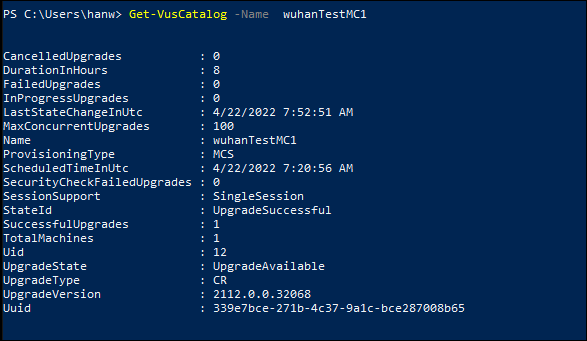
Manage Machine Catalogs Citrix DaaS

Het Vinden Van Active Directory wachtwoorden Die Nooit Verlopen
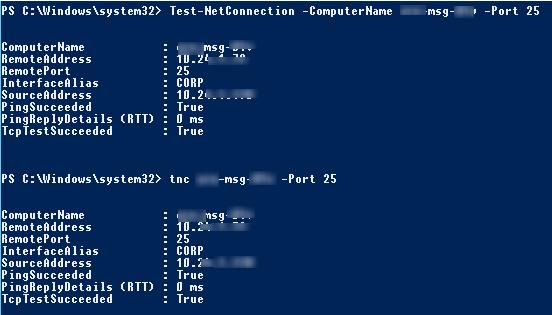
How To Check If Port Is Open On Remote Server

WEB Jan 28 2016 nbsp 0183 32 I have built a small powershell script to check if a service is started If it is not started try to start it then wait one minute and check again Keep repeating this process until the service start successfully
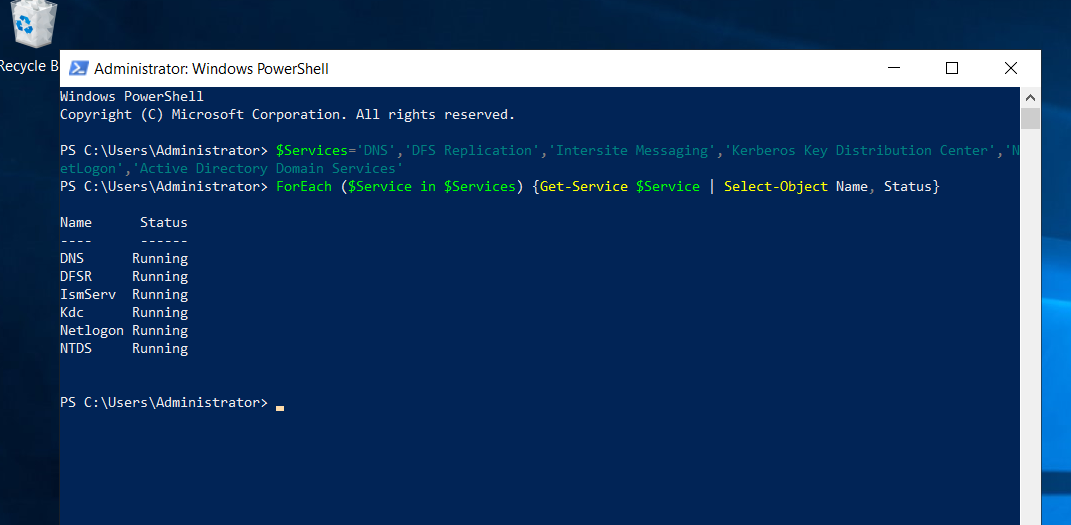
WEB The Start Service cmdlet sends a start message to the Windows Service Controller for each of the specified services If a service is already running the message is ignored without error You can specify the services by their service names or display names or you can use the InputObject parameter to supply a service object that represents the

WEB Nov 29 2010 nbsp 0183 32 Once you ve upgraded to PowerShell version 5 you can get the startup type To check the version of PowerShell you re running use PSVersionTable The examples below are for the Windows Firewall Service For the local system Get Service Select Object Property Name Status StartType where object Name eq quot MpsSvc quot

WEB Jan 9 2017 nbsp 0183 32 The easiest way to find your service s most recent start time is to use a specially crafted PowerShell command to search the System event log For example the following line will return the last time the Print Spooler service was started

WEB Nov 18 2012 nbsp 0183 32 How can I see the name and the start time of each process on my system Start Windows PowerShell with admin rights Use the Get Process cmdlet and select name and starttime as shown here
WEB May 13 2024 nbsp 0183 32 open PowerShell ISE and copy this code modify the service variable this is a keyword which is a substring from Details when viewed in Windows Event Log and the Message WEB Jan 17 2019 nbsp 0183 32 Powershell Basics Start Service Stop Service and Restart Service How to start Windows services how to stop them and if necessary how to restart them
WEB Apr 3 2017 nbsp 0183 32 Do you want to Start or stop Windows service using Powershell This post explains how to manage any Windows service with the help of the PowerShell cmdlets Start Service Stop Service and Restart Service