Powershell Bulk Change Extension Powershell Bulk Convert And Resize Images With A Script And How It Bulk Import Contacts To Office 365 Using PowerShell Powershell Tip 109 Bulk Get The Filename Without Extension How To Bulk Change Teams Upgrade Policy Via PowerShell ICT Fella Use PowerShell To Bulk Change Contacts WEB Jul 3 2023 nbsp 0183 32 In PowerShell we can use the Rename Item cmdlet to rename files and registry items The cmdlet only requires a path and a new file name to work In this article Rename Files with PowerShell Ask for Confirmation before Renaming Renaming Hidden and Read Only files Rename Multiple Files with PowerShell Adding Prefix or Suffix to a
WEB Jul 20 2019 nbsp 0183 32 Get ChildItem Path Path 1 Filter quot b c txt quot Rename Item NewName System IO Path ChangeExtension Name quot csv quot WhatIf Remove the WhatIf switch if you are satisfied with the results WEB May 8 2017 nbsp 0183 32 Replace FileExtension with the extension corresponding to the filetype you want to add prefix to Or just remove FileExtension along with the quot quot to add prefix to all files in working directory
Use PowerShell To Bulk Change Contacts IT Pro How To Exclude Office365 Groups Using Powershell Bulk Bulk Change Attributes On AD With PowerShell ITPro Today IT News How To Change The OpenSSH Server Port In Windows Ebin Issac How To Bulk Add Members In Microsoft Teams Using Refined Microsoft How To Change The OpenSSH Server Port In Windows Ebin Issac Powershell create bulk users bulk users1 ps1 At Master BobbyVoychin Create Bulk AD Users From CSV Using Powershell Script Powershell Tip 107 Bulk Rename Files To Title Case Powershell Guru
Powershell Bulk Change Extension

https://lh3.googleusercontent.com/-Rnm4xLXClKQ/XFI-y5LNvkI/AAAAAAAAGz4/ANFtFr6dEy4wOBFCZEqv1Mlzmb2tUN-ZACHMYCw/woolly_by_mars_hill_dbcid6o-pre_thum?imgmax=800
WEB Jul 2 2024 nbsp 0183 32 PowerRename is a bulk renaming tool that enables you to Modify the file names of a large number of files without giving all of the files the same name Perform a search and replace on a targeted section of file names Perform a regular expression rename on multiple files
Templates are pre-designed documents or files that can be used for different functions. They can save time and effort by providing a ready-made format and layout for developing different kinds of material. Templates can be used for personal or professional projects, such as resumes, invites, flyers, newsletters, reports, presentations, and more.
Powershell Bulk Change Extension

How To Add The Bulk User Image To Respective Email Ids Using Powershell

IT Pro How To Exclude Office365 Groups Using Powershell Bulk

Bulk Change Attributes On AD With PowerShell ITPro Today IT News
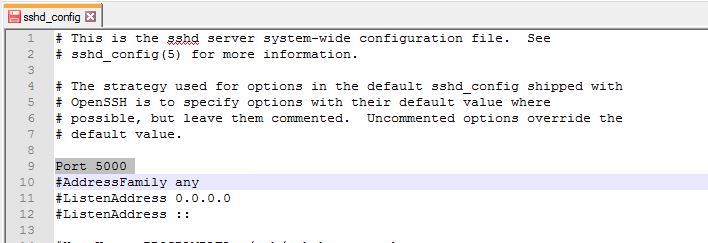
How To Change The OpenSSH Server Port In Windows Ebin Issac
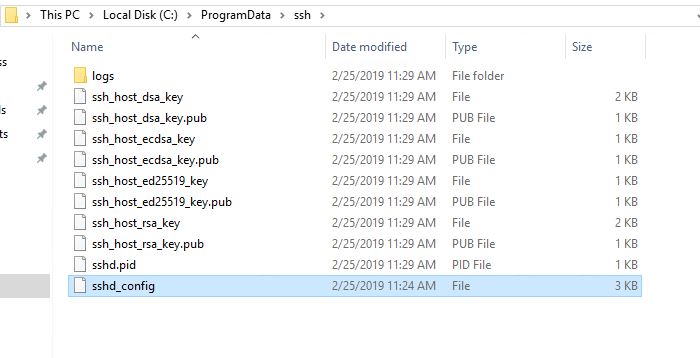
How To Change The OpenSSH Server Port In Windows Ebin Issac
Powershell create bulk users bulk users1 ps1 At Master BobbyVoychin

WEB Jan 9 2024 nbsp 0183 32 If I have a bunch of files with one file extension is there a way to quickly change them to another file extension without having to manually change one file at a time

WEB Apr 13 2014 nbsp 0183 32 To ensure the regex replace operator matches only an extension at the end of the string include the regex end of string character Get ChildItem txt Rename Item NewName Name replace txt log

WEB Aug 27 2020 nbsp 0183 32 An alternative for your case since the strings in the name are fixed you can use substring to easily compose the new name MOD15A2H A 2012001 h26v06 001 2015230181014 LAI500m tif L 10 07 tif
WEB In this post I will show you how to rename file extensions in Windows from the command line We re going to do this using the built in Command Prompt and Windows PowerShell No third party tools are required

WEB Feb 7 2022 nbsp 0183 32 To change multiple file extensions at once in all folders the command you use must recursively search for the target file type in all subfolders of the target folder and rename it In fact you don t even need to use a third party application
WEB Dec 7 2023 nbsp 0183 32 In this guide I ll outline how to rename one or many files in bulk using File Explorer PowerShell Command Prompt and PowerToys on Windows 10 WEB Aug 19 2013 nbsp 0183 32 If you mean documentation for bulk file renaming there isn t any because it s not really a discrete topic other than the basic idea of feeding the filenames to a loop using Rename Item Documentation for how to create the new name would be specific to whatever it is you want to do
WEB May 26 2021 nbsp 0183 32 If it finds files with the specified extension it renames them using the base file name you provided But here is where the starting number comes into play