Powerpoint Pdf Compression Settings Jpg Pdf Pdf Pdf Compression Settings Used In Audio Mastering YouTube The Perfect Compression Settings For Guitar Every Time How To Get Around The New WordPress Image Compression Settings Compression Settings How To Make Electronic Music Web Ensure the file is compressed to your liking If the compression does not meet your standards adjust the settings as needed Compress a PowerPoint file as a PDF An easier way to compress a PowerPoint is to first convert the PPT to a PDF using an online PDF editor like Adobe Acrobat online services PDF files are smaller and easier to share
Web If so PPT has compressed the image REGARDLESS of your settings It s a bug Try inserting the same image onto a blank slide AFTER setting the compression option Then make PDF and choose the Standard Publishing option in the PDF save dialog box Web Apr 18 2020 nbsp 0183 32 Hello when i try saving a pptx file in pdf through PowerPoint itself it compresses massively the images some of them have text and become just impossible to read I ve already tried changing some settings such as default image resolution to 330 ppi and activating quot do not compress images quot
Compression Settings How To Make Electronic Music How To Disable Image Compression In Microsoft Office PowerPoint The Best Compression Settings For Vocals To Use When Recording And PDF Compression Tool Download 7 zip best compression settings Media Addicted Media Addicted Compression Settings For Sound 2 How To Make Electronic Music Compression And Advanced Settings YouTube Download PDF Compression Settings Cheat Sheet pdf oq1z4y36zz02 How To Compress Images And PDF Using PHP Script
Powerpoint Pdf Compression Settings
 Powerpoint Pdf Compression Settings
https://www.ilovepdf.com/img/ilovepdf/social/th/pdfpowerpoint.png
Web The images themselves are at 300dpi at actual size and the compression settings are turned off on the PC all to no avail Screenshots below first one with smooth lines is a PDF created on the Mac version the second is a PDF created on a PC version of PPT showing the lines all jagged and compression artefacts around them
Pre-crafted templates offer a time-saving service for developing a varied range of documents and files. These pre-designed formats and designs can be utilized for various personal and professional tasks, including resumes, invites, flyers, newsletters, reports, discussions, and more, improving the content production process.
Powerpoint Pdf Compression Settings
Kick Drum Compression Settings Including Cheat Sheet
How To Disable Image Compression In Microsoft Office PowerPoint

The Best Compression Settings For Vocals To Use When Recording And
PDF Compression Tool Download

Compression Settings For Sound 2 How To Make Electronic Music

Compression And Advanced Settings YouTube
Web Jan 8 2016 nbsp 0183 32 Placed checkmark in quot Do not compress images in file quot checkbox and deleted amp re imported images after doing so In File Save As dialog selected quot Standard publishing online and printing quot and either Tools Compress

Web Set the print quality of the PDF Features such as saving notes saving slides as handouts including hidden slides in the PDF or setting the PDF to a smaller file size aren t available However you can set the print quality of a PDF to a higher or lower standard

Web May 15 2017 nbsp 0183 32 Choose the Adobe PDF settings tab Try switching from Standard to Press quality or similar wording or create your own copy of Standard then Edit and make sure that it s using ZIP rather than JPG compression for both BW and color images set it to a higher DPI and so on
Web Apr 22 2011 nbsp 0183 32 Is there a way to change the DPI settings or turn off the image compression Please note that the images in the PPTX file itself are not compressed in any way neither the text and shapes correctly configured
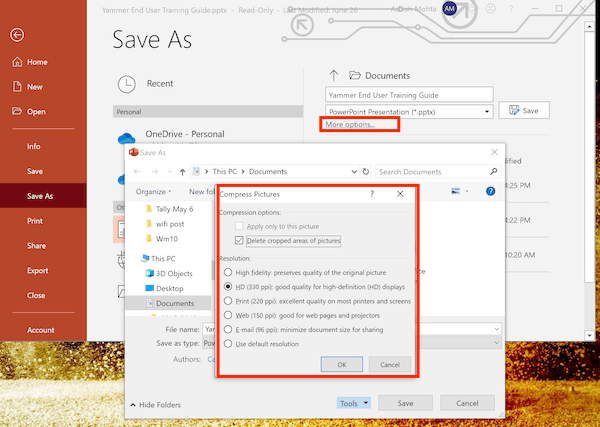
Web Under Compression options do either of the following Make sure that Apply only to this picture is not selected so that the changes you make here will apply to all pictures in the document Select Delete cropped areas of pictures
Web Aug 24 2017 nbsp 0183 32 From my tests on PowerPoint 15 37 the pdf you shared is 509KB After I drag it to a blank presentation and save the presentation the presentation is 227 KB The same result occurs to PowerPoint 15 36 So please make sure you have set the raster effect at 300 dpi on Illustrator and save the settings as you said Web Oct 30 2023 nbsp 0183 32 Creates PDF files for displaying on the web or an intranet or for distribution through an email system This set of options uses compression downsampling and a relatively low image resolution It converts all colors to sRGB and for Adobe Acrobat Distiller based conversions does not embed fonts
Web Dec 8 2020 nbsp 0183 32 Assuming you re using PPT s own Save As choose PDF export rather than an add in from Adobe or other PDF printer driver supplier here are a few things that will have an effect Check File Options Advanced Scroll to Image Size amp Quality Put a check next to Do Not Compress If the checkmark s not already there any images you ve