Power Automate Email Csv Table Power Automate Email Body Administer Via A Microsoft List YouTube Power Automate Email To Excel Need To Pull Data From Email Into Tip Power Automate Using Create CSV Table Action In CDS Power Automate Create A CSV Table 7 Examples EnjoySharePoint Instantly Using Power Automate Create CSV File And Send Email The ability to send Power BI table data as a CSV file via email with Power Automate can be used in various industries Manufacturing The manufacturing sector can use this method to
When you export SharePoint list to a csv most of the columns will be exported as expected But some of them won t for example the Person or Group column with multiple selection enabled It works fine if you allow only a single user group then you can select which user property you want to export But with multiple selection it s not 1 You could use Encodian s Parse CSV connector it s free but you need to create a free account with them The one thing I ve noticed is that you might need to place the CSV Data value that it produces into an expression with a json function to ensure that it is properly read
Instantly Using Power Automate Create CSV File And Send Email Converter Um Arquivo CSV Em Uma Planilha Do Excel Power Automate Create CSV Table From Array With Custom Columns Power Platform Community Power Automate Create A CSV Table 7 Examples EnjoySharePoint Export Multiple Person Or Group Column Into csv Table In Power Automate Working With The SharePoint Send HTTP Request Flow Action In Power Power Automate Create CSV Table Excel File Not De Power Platform Survey123 Power Automate Email With Repeats Esri Community How To Convert CSV Files To Excel In Power Automate Flow Azure Logic
Power Automate Email Csv Table
 Power Automate Email Csv Table
https://i.ytimg.com/vi/4MRV3qnb2gE/maxresdefault.jpg
Get Demo Files herehttps ko fi s 6b7ebac252In this video were going to go through how you can use Power Automate to easily send Power BI tables via Ema
Templates are pre-designed documents or files that can be used for numerous functions. They can conserve time and effort by supplying a ready-made format and layout for developing various type of content. Templates can be used for personal or expert projects, such as resumes, invitations, leaflets, newsletters, reports, presentations, and more.
Power Automate Email Csv Table

Chuy n i B ng HTML Power Automate
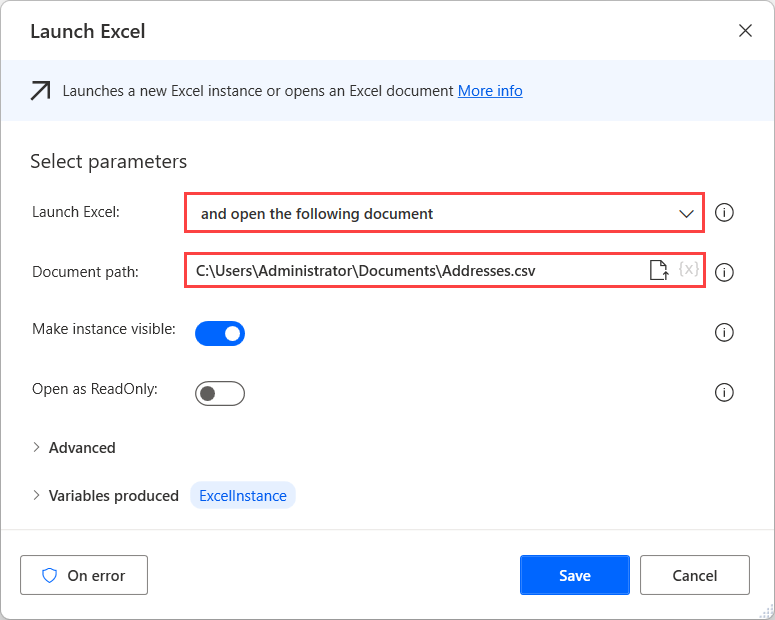
Converter Um Arquivo CSV Em Uma Planilha Do Excel Power Automate

Create CSV Table From Array With Custom Columns Power Platform Community

Power Automate Create A CSV Table 7 Examples EnjoySharePoint
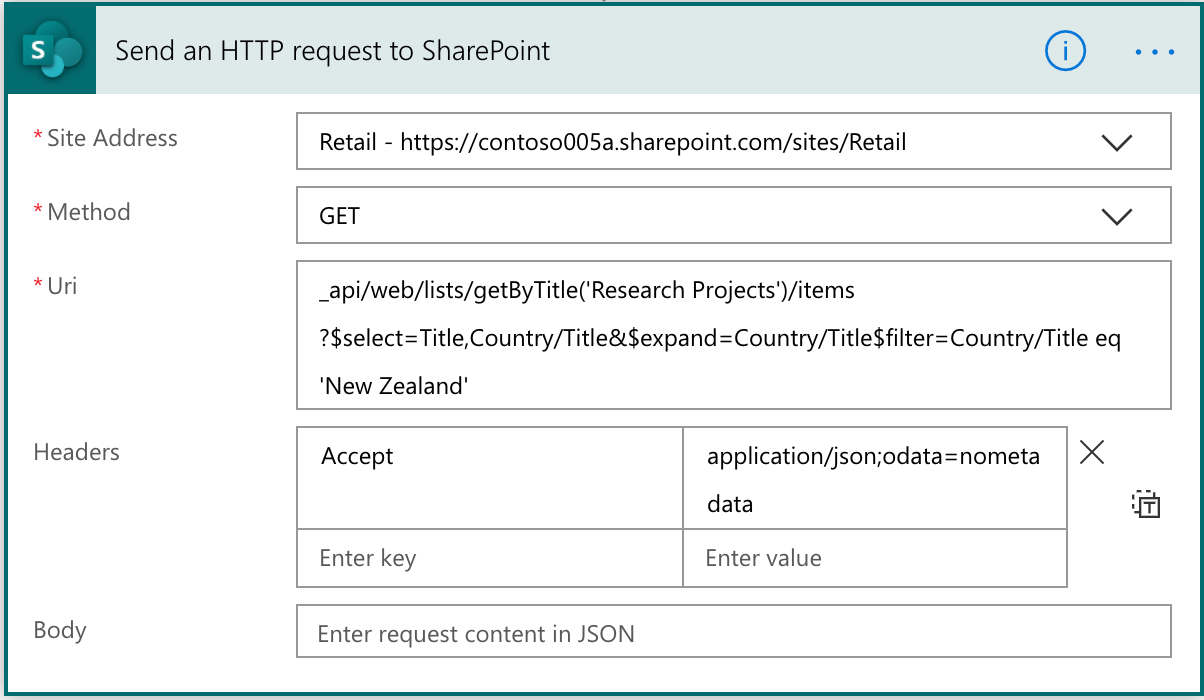
Working With The SharePoint Send HTTP Request Flow Action In Power

Power Automate Create CSV Table Excel File Not De Power Platform

EUR 2021 09 16 HUF 356 500528 EUR 2021 09 16 MYR 5 880332 Let s see how Power Automate creates a CSV table from JSON In Power Automate select the Manually triggered Flow then click on Next step Select Initialize variable action then provide the variable name and type as a string MS flow JSON to CSV

29th January 2023 In this post I ll show you how to create HTML CSV tables in Power Automate from an array or some data from a previous action Why You might wonder why would I need to create a HTML or CSV table in Power Automate Well here s some use cases

For example Power Automate can read the contents of a csv file that is received via email There are multiple steps to get this to work Here is the complete flow The first few steps are pretty straightforward They just involve a trigger for when an email arrives and then looping through each of the attachments within that email The CrLf

Step 1 Get all approved files from SharePoint Online document library Step 2 Send email attachments with files from the SharePoint document library Step 3 Approved Files Demo Send email with attachment in Power Automate Summary Using Power Automate create CSV file and send email with attachment using Power Automate

Access to Power Automate A tool such as PostMan to send HTTP POST requests with a JSON array to your flow Use the compose action Use the Data Operation Compose action to save yourself from having to enter the same data multiple times as you re designing a cloud flow
Creating the Power Automate flow to send the table details via email The final part for me was to now create a Power Automate flow in which I will create the schedule put in the DAX query create the CSV file and then send it out via email I created a new Scheduled cloud flow Paul Murana Microsoft Business Applications MVP walks you through how to process CSV files easily using Power Automate and Dataflows Connect with Paul Pow
Apr 18 2023 01 12 AM Script to convert CSV to table Hello I am trying to create a script that convert csv to an excel table to use in power automate to send emails from that script The emails need to be clickebale My csv example Sales Name First Name Email John Dow John email address removed for privacy reasons