Pivot Table Values As Text Excel Pivot Tables With Text Values Or Numbers Without Calculations How Do Pivot Tables Work Excel Campus How To Create Pivot Table With Values As Text with Easy Steps How To Create Pivot Table With Values As Text with Easy Steps How To Create Pivot Table With Values As Text with Easy Steps Text values in a pivot table Ask Question Asked 12 years 4 months ago Modified 9 years 2 months ago Viewed 17k times 2 I have a table in MySQL with 3 columns Location Category Supplier A Computers Company X A Printers Company Y B Computers Company X B Printers Company Y B Software Company Y C Computers Company Y C
Here are a few techniques to effectively show text in pivot table values A Using custom calculations for text Create a new column One way to display text in a pivot table values area is to create a new column in the source data that contains the desired text By default text fields are added to the Row Labels area numeric fields are added to the Values area and Online Analytical Processing OLAP date and time hierarchies are added to the Column Labels area
How To Create Pivot Table With Values As Text with Easy Steps How To Create Pivot Table With Values As Text with Easy Steps How To Create Pivot Table With Values As Text with Easy Steps How To Create Pivot Table With Values As Text with Easy Steps How To Create Pivot Table With Values As Text with Easy Steps How To Create Pivot Table With Values As Text with Easy Steps Excel Show Text And Number In A Pivot Table Values Area Stack Overflow Pivot Table Latest Values Exceljet Microsoft Excel Text Values In A Pivot Table Super User
Pivot Table Values As Text
 Pivot Table Values As Text
https://www.danbp.org/p/sites/default/files/styles/large/public/pivot_title_power_query.PNG?itok=TMqz0dPi
Follow the below steps in sequence to achieve the result of having Text values in Pivot area Step 1 Create a Table from the data set Download the file with the dataset for ready reference Place your cursor on any one cell in your data set and then Go to Insert Tab and choose Table
Pre-crafted templates offer a time-saving service for developing a diverse variety of documents and files. These pre-designed formats and designs can be used for different personal and professional jobs, including resumes, invitations, leaflets, newsletters, reports, discussions, and more, streamlining the material development process.
Pivot Table Values As Text

How To Create Pivot Table With Values As Text with Easy Steps

How To Create Pivot Table With Values As Text with Easy Steps

How To Create Pivot Table With Values As Text with Easy Steps

How To Create Pivot Table With Values As Text with Easy Steps

How To Create Pivot Table With Values As Text with Easy Steps

Excel Show Text And Number In A Pivot Table Values Area Stack Overflow

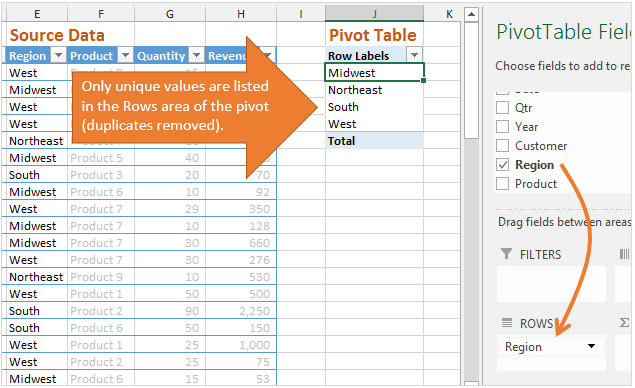
Pivot Table Text Values Introduction In Microsoft Excel usually you can only show numbers in a pivot table values area even if you add a text Region Data In this example there is food sales data from 3 regions A pivot table was created from that data Show Region Numbers When the
Https www mrexcel excel tips pivot table with text in values area Traditionally you can not move a text field in to the values area of a pivot table However if you use the Data Model you can write a new calculated field in the DAX language that will show text as the result Create a Pivot Table from Text file in Excel

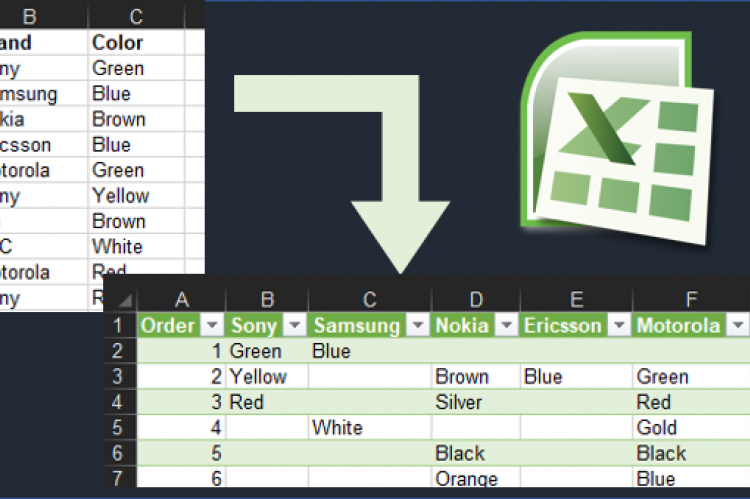
Show Numbers as Text in Pivot Table Values In an Excel pivot table you can add text fields to the Row and Column areas and in the Report Filters However pivot table Values area will only show numbers so if you add a text field there Excel shows a count of those text items

Traditionally you can not move a text field in to the values area of a pivot table Typically you can not put those words in the values area of a pivot table However if you use the Data Model you can write a new calculated field in the DAX language that will show text as the result

On the Design tab use Grand Totals Off For Rows and Columns In the Pivot Table Fields panel right click the Table name and choose Add Measure The formula for the measure is CONCATENATEX Values Table1 Code Table1 Code The VALUES function makes sure that you don t get duplicate values in the answer
[desc-11] [desc-12]
[desc-13]