Pip Install Upgrade All How To Upgrade Pip AskWael Pip Upgrade To 22 3 Windows10 4 By Datafiend Packaging python m Pip Install upgrade Pip python Sklearn Installation Via Pip In Python 3 10 Linux ubuntu 20 04 Dist Pip Install upgrade Pip DEV Install a package from local or GitHub Update a package pip install upgrade Update pip itself Uninstall a package pip uninstall Check for dependencies pip check Install pip When you install Python using the standard python installer pip is automatically installed Usually pip is automatically installed if you are
To upgrade every python package you d need to follow the given command pip3 list outdated format freeze grep v e cut d f 1 xargs n1 pip3 install U The above command utilizes xargs First it will grab the packages that are needed to be updated and then perform pip3 install U command over each package See pip list h and pip install h for a full overview of the options Check All Package Versions with pip review Sometimes you d just want to check if there are any updates before committing to a potentially long update list
Pip Install upgrade Pip DEV pip python m Pip Install upgrade Pip PIP Upgrade Pip Upgrade Package The 16 Correct Answer Brandiscrafts pip Install upgrade Pandas Cientistas De Dados Ancient Aliens Python m Pip Install upgrade Pip 1024 pip Install upgrade Pip How To Upgrade Your Pip In Mobile As Well Pip Install upgrade Pip pip SEO You Should Consider Upgrading Via The python m Pip Install upgrade
Pip Install Upgrade All
 Pip Install Upgrade All
https://askwael.com/wp-content/uploads/2021/12/how-to-upgrade-pip-1024x536.jpg
Upgrade all packages in Python using pip Studytonight This article shows different commands to upgrade python packages using pip python package manager 3rd BatchFullstack Development Course Weekend batch starting 6th Jan 2024 Apply now FREE ReactJS Video SeriesStart Learning FLAT 75 OFFAll Interactive courses at flat 250 3 25only
Pre-crafted templates use a time-saving option for creating a diverse range of documents and files. These pre-designed formats and layouts can be utilized for numerous individual and expert projects, consisting of resumes, invitations, flyers, newsletters, reports, presentations, and more, simplifying the material creation process.
Pip Install Upgrade All
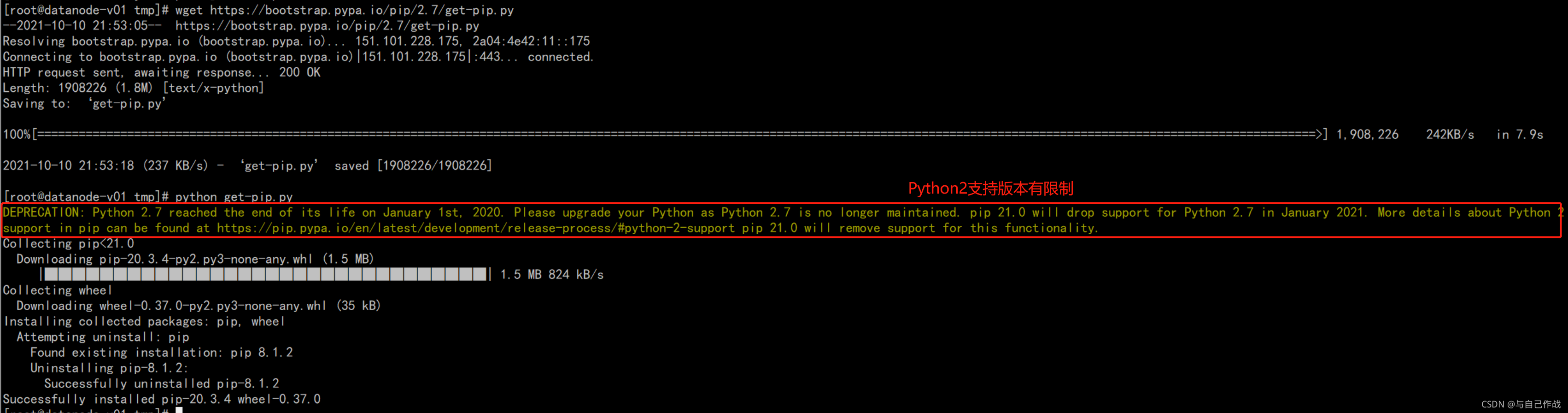
Python Pip Install upgrade Pip CSDN pip Install

pip python m Pip Install upgrade Pip

PIP Upgrade
Pip Upgrade Package The 16 Correct Answer Brandiscrafts

Python m Pip Install upgrade Pip 1024

pip Install upgrade Pip How To Upgrade Your Pip In Mobile As Well

The easiest way to update all packages in a Windows environment is to use pip in conjunction with Windows PowerShell Open a command shell by typing powershell in the Search Box of the Task bar Enter pip freeze split 0 pip install upgrade

Pip install has several stages Identify the base requirements The user supplied arguments are processed here Resolve dependencies What will be installed is determined here Build wheels All the dependencies that can be are built into wheels Install the packages and uninstall anything being upgraded replaced
The easiest way to update all packages in a Windows environment is to use pip in conjunction with Windows PowerShell Open a command shell by typing powershell in the Search Box of the Task

Run the following command to upgrade all packages to the latest available versions pip install r requirements txt upgrade This will upgrade all of the packages listed in the requirements file to the latest available versions Watch a video course Python The Practical Guide

Pip install upgrade now has a upgrade strategy option which controls how pip handles upgrading of dependencies There are 2 upgrade strategies supported eager upgrades all dependencies regardless of whether they still satisfy the new parent requirements only if needed
Python How do I update upgrade pip itself from inside my virtual environment Stack Overflow I m able to update pip managed packages but how do I update pip itself According to pip version I currently have pip 1 1 installed in my virtualenv and I want to update to the latest version Stack Overflow About Products For Teams Pip install package name This command is used to install any Python package or module python m pip install upgrade pip Used to upgrade pip to a new version With Python3 you can run the following command Copy to clipboard python m pip install upgrade pip See the output below
One of the easiest ways to update Python and Pip on Mac is by downloading the package from the Python official website When you update Python the Pip version that comes with it is also updated First check the versions of Python and Pip you have by running python3 version and pip3 version