Phone Number Format On Google Sheets 3 Ways To List Your Phone Number On Your Business Card FIND SVP A Complete Guide To The Google Sheets Custom Number Format Google Sheets Phone Number Format How To Format Phone Number Data On Best Phone Number Format For A Resume Resume Gallery The Japan Phone Number Code Explained 1 Formatting Phone Numbers as Text One way to format phone numbers in Google Sheets is to treat them as regular text By selecting the desired range of cells
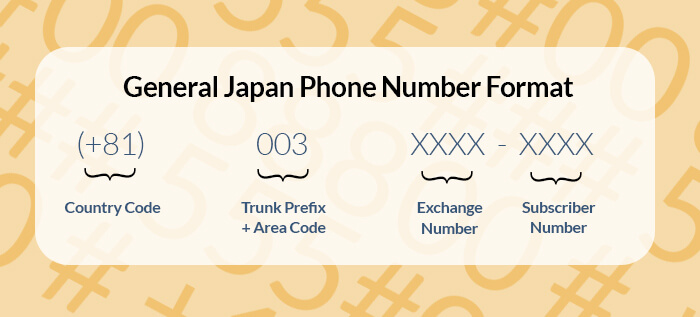
United Kingdom 44 1234 567890 Australia 61 12 3456 7890 Japan 81 12 3456 7890 These examples demonstrate the variations in country codes area codes and the Open your Google Sheets document and select the cell or range of cells containing the phone numbers you want to format 2 Look for the Format option in the top menu
The Japan Phone Number Code Explained Sheets Phone Number Format How To Format Cells On Google Sheets On How To Format A Pivot Table In Google Sheets The Format Of International Telephone Numbers How To Add Angular Phone Number Format Edupala What Is The Valid Phone Number Format On WD Warranty Registration Page Auto Phone Number Format With Country Code In Excel Number Main Google Sheets Phone Number Format Add Or Remove Leading Zeros In Elfrieda Archer
Phone Number Format On Google Sheets
 Phone Number Format On Google Sheets
https://data.findsvp.com/1663902568919.jpg
19 5K subscribers Subscribed 498 48K views 3 years ago Spreadsheet Tutorials Custom Number Formatting allows you to make many different alterations to your spreadsheet In this video we
Pre-crafted templates use a time-saving option for developing a varied variety of documents and files. These pre-designed formats and designs can be utilized for numerous personal and expert tasks, including resumes, invitations, flyers, newsletters, reports, discussions, and more, improving the material production procedure.
Phone Number Format On Google Sheets

Phone Number Format SmartWiki

Sheets Phone Number Format How To Format Cells On Google Sheets On

How To Format A Pivot Table In Google Sheets

The Format Of International Telephone Numbers

What Is The Valid Phone Number Format On WD Warranty Registration Page

Auto Phone Number Format With Country Code In Excel Number Main

Formatting Phone Numbers in Google Sheets Using Apostrophe If you just need to format a phone number or two in Google Sheets quickly the easiest
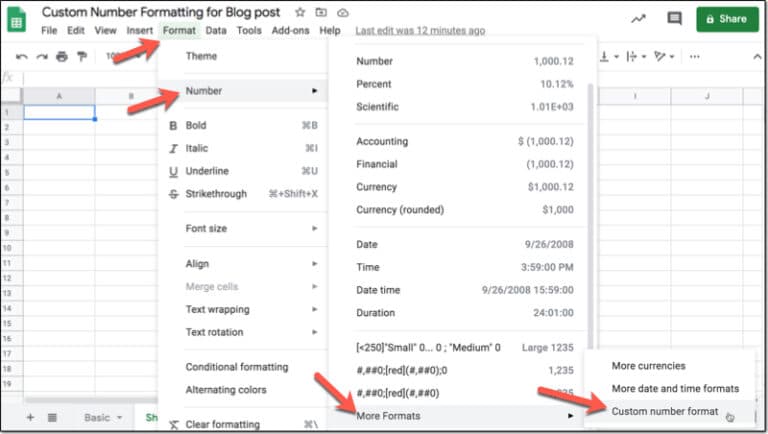
Step 1 Select the phone number range and open the Format menu hover over Number then over More Formats at the bottom and choose Custom Number

Go to the Format menu at the top of the screen and select Number More Formats Custom number format In the Custom number format dialog

Google Sheets custom number format rules are used to specify special formatting rules for numbers These custom rules control how numbers are displayed in your Sheet without changing the number
Step 1 Open your Google Sheet Access the Google Sheet that contains the phone numbers you want to format Opening your Google Sheet is of course the
REGEXEXTRACT function extract all the different fields according to the phone number entries and then combine them all into the desired format Here s an Format Phone Numbers in Google Sheets To format numbers as phone numbers with dashes in Google Sheets first select the list of numbers you want to
INTRODUCTION WHY TO FORMAT THE PHONE NUMBERS IN GOOGLE SHEETS EXAMPLE HOW TO FORMAT THE GIVEN NUMBER INTO AMERICAN STYLE