Percentage Difference Between Two Numbers Formula Excel Calculate Excel Percentage Difference Between Two Numbers Using Formula Excel Difference Between Two Numbers Positive Or Negative How To Calculate Percentage Difference Between Two Numbers In Power Bi Percent Difference Calculator With Step by Step Guide Inch Calculator How To Find Percentage Difference Between 2 Numbers Ethnic design 5 1 100 40 200 100 2 If you follow this formula you should obtain the result we had predicted before 2 is 5 of 40 or in other words 5 of 40 is 2 If you like you can now try it to check if 5 is 20 of 25
Percentage difference in Excel is a formula that calculates the percentage change between two numbers The formula typically enables users to compare two values and determine how much they have increased or decreased concerning each other It is commonly used to analyze changes in values such as sales profits or expenses over a while The Difference Formula allows us to find the percentage difference between two numbers with either of the numbers used as the base number The difference formula takes as input two numbers the base number and the new number and gives as output the percentage difference between the new number and the base number
How To Find Percentage Difference Between 2 Numbers Ethnic design How To Find Percentage Between Two Numbers In Excel ExcelDemy How To Create A Formula In Excel To Calculate Percentage Increase How To Calculate Difference Between Two Dates In Excel Riset Download How To Calculate Percentage Between Two Numbers In Excel Top 10 Percentage Difference Between Two Numbers Excel Riset Excel Formula Value Is Between Two Numbers Exceljet Excel Formula To Find Difference Between Two Numbers Calculate Percentage Increase In Excel Calculate Percentage Increase
Percentage Difference Between Two Numbers Formula Excel
 Percentage Difference Between Two Numbers Formula Excel
https://www.exceldemy.com/wp-content/uploads/2018/07/4-3-1030x1030.png
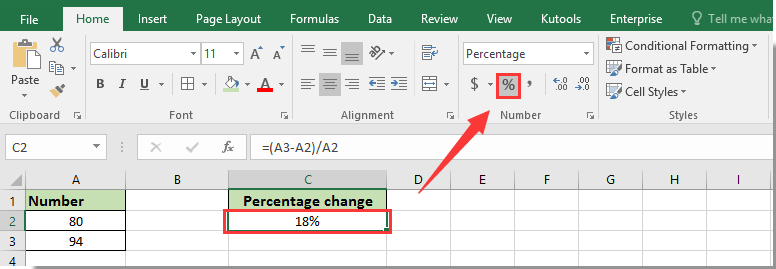
How to calculate percentage change or difference between two numbers in Excel 1 Select a blank cell for locating the calculated percentage change then enter formula A3 A2 A2 tab to format the cell as percentage See screenshot Combine Columns or Cells without Losing Data and more
Pre-crafted templates offer a time-saving solution for producing a diverse series of files and files. These pre-designed formats and designs can be utilized for various personal and professional jobs, including resumes, invites, flyers, newsletters, reports, presentations, and more, improving the content development procedure.
Percentage Difference Between Two Numbers Formula Excel

How To Calculate Percent Difference Between Two Numbers Modeladvisor

How To Find Percentage Between Two Numbers In Excel ExcelDemy
How To Create A Formula In Excel To Calculate Percentage Increase

How To Calculate Difference Between Two Dates In Excel Riset
Top 10 Percentage Difference Between Two Numbers Excel Riset
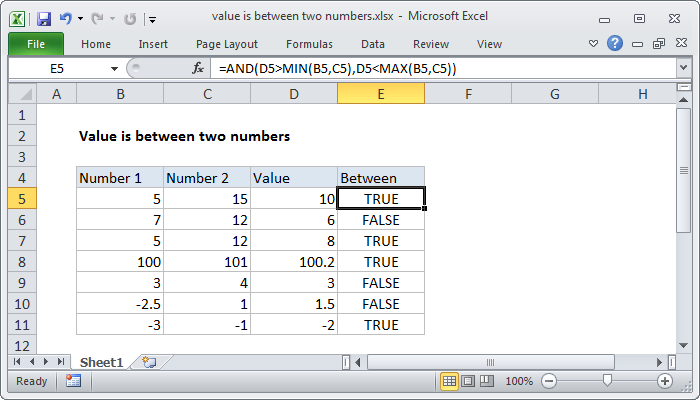
Excel Formula Value Is Between Two Numbers Exceljet

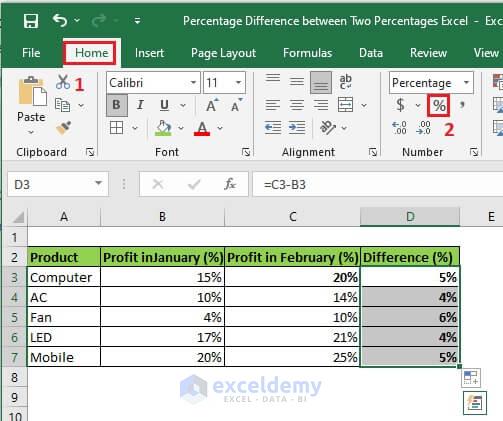
Type the following formula and then press Enter F3 E3 E3 The result will appear in the cell It is not formatted as a percentage yet To do that first select the cell containing the value In the Home menu navigate to the Numbers menu
Let Excel do the work for you simple formulas can help you find the percentage of a total for example or the percentage difference between two numbers Find the percentage of a total Let s say that you answered 42 questions out of 50 correctly on a test What is the percentage of correct answers Click any blank cell
In this tutorial I will show you four ways to find the percentage difference between two numbers in Excel I ll also show you how to use custom functions in Google Sheets The four techniques and one bonus we ll use are Using a Formula lvl 1 easy mode Using the LAMBDA FUNCTION Name Manager lvl 2 normal mode
1 Calculating Percentage Difference Between Two Numbers Manually in Excel 2 Applying Percentage Number Format to Compute Difference Between Two Numbers 3 Using Excel Format Cells Dialog Box to Get Percentage Difference 4 Using Keyboard Shortcut to Get Percentage Difference in Excel Between Two Numbers Conclusion Related Articles 1
To calculate the percentage change between two values in Excel you can use a formula that divides the difference between two values by the old value In the example shown E6 contains this formula D6 C6 C6 When formatted as a percentage with zero decimal places the result is 7
Learn how to calculate the percent change or difference between two numbers in Microsoft Excel Using the formula percent difference new value old value The percentage between the two values is simply calculated by taking the difference between two numbers and dividing it with the original number new value original value original value
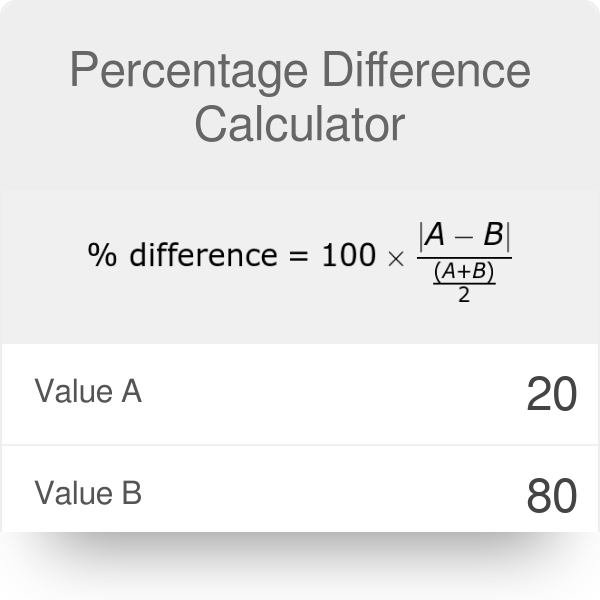
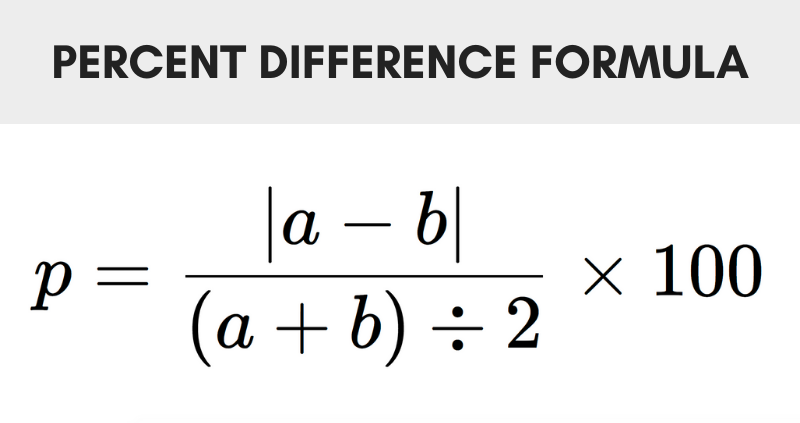
Percentage difference equals the absolute value of the change in value divided by the average of the 2 numbers all multiplied by 100 We then append the percent sign to designate the difference Percentage Difference Percentage Difference V V 2 100 V V 2 100