Pdf To Default Size Pdf Default Size Designer Default Size For Windows Pre V2 Archive Of Affinity On Databases Changing The Default Size And AutoGrowth Settings For New Default Size Templates Adobe Community 14078354 Change The Default Uploaded Image Size Unifying or adjusting the page sizes in a PDF is very easy with PDF24 Simply select the PDF file via the file box above set the new page size and start the process PDF24 will then go through all pages and adjust the page size according to your specifications so that in the end all pages have the same size At the end you can save the new
To access printing preferences Open the Printers window from the Start menu Right click the Adobe PDF printer and choose Printing Preferences In an authoring application such as Adobe InDesign choose File Print Select Adobe PDF as the printer and click the Properties or Preferences button In some applications you may need to click Drag the corner of the box to decrease or increase the view of the page adjusting the size according to your preference If necessary hover the pointer over the zoom box frame within the thumbnail until it changes into a Hand icon Then drag the frame to explore a different area of the page within the document By default the PDF opens
Change The Default Uploaded Image Size Solved How To Change The Default Paper Size In print Adobe Default Letter Template Default Font Size Not Set When Copy Content From Google Doc Voters Solved Does Anyone Know The Default Mark Size For A 9to5Science Best Default Combination View Image Full Size Entry Default Judgment Form Fill Out And Sign Printable PDF Template It to do list updated
Pdf To Default Size
 Pdf To Default Size
https://www.roseindia.net/tutorialfiles/2/18376.pdf-default-size-950x650.webp
In the first subsection the text Opens with indicates which PDF viewer is set as your default Click the Change button Select Adobe Acrobat DC or Reader from the list as your default Click OK to save and apply changes Change from Preview to the Acrobat PDF viewer Right click on the thumbnail of any PDF file On the menu click Get Info
Pre-crafted templates use a time-saving service for developing a diverse series of files and files. These pre-designed formats and layouts can be used for different personal and expert jobs, consisting of resumes, invitations, leaflets, newsletters, reports, discussions, and more, enhancing the content creation process.
Pdf To Default Size
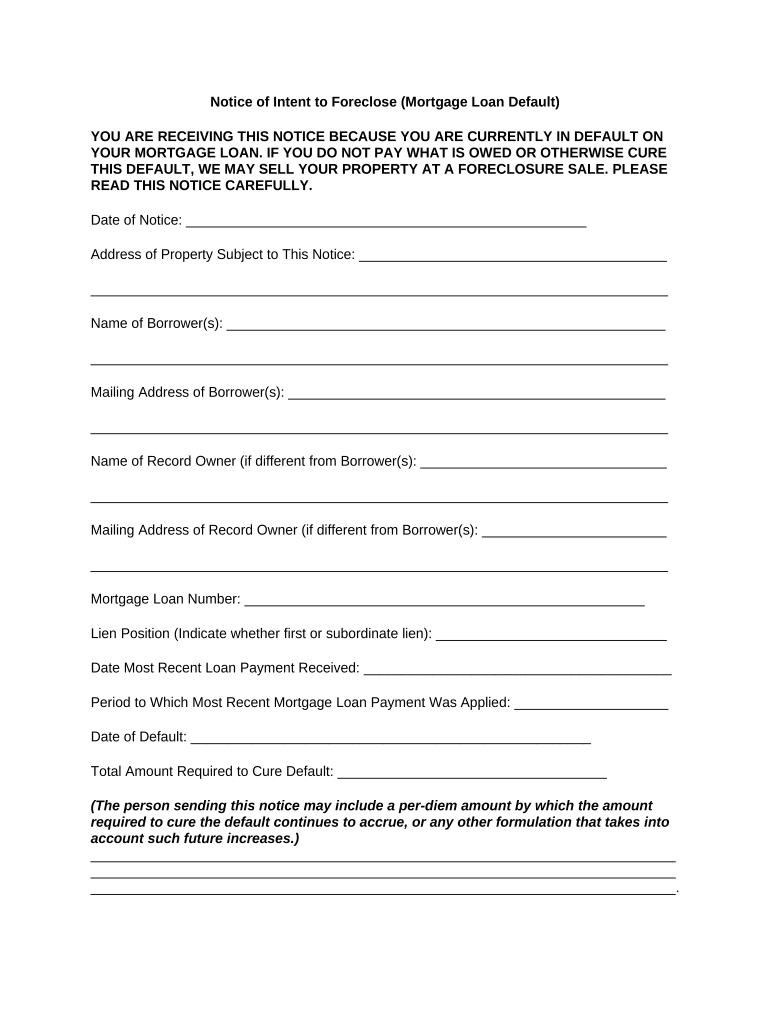
Notice Mortgage Default Form Fill Out And Sign Printable PDF Template

Solved How To Change The Default Paper Size In print Adobe

Default Letter Template
Default Font Size Not Set When Copy Content From Google Doc Voters

Best Default Combination

View Image Full Size

Acrobat can size the pages of a PDF to fit the selected paper size Choose File Print From the Page Scaling pop up menu select one of the following options Fit To Printable Area Scales small pages up and large pages down to fit the paper Shrink To Printable Area Resizes only large pages to fit the paper and prints small pages as they are
Always reduce size for files more than 10MB Reduces the size of the PDF automatically if the file size is greater than 10MB PDF A View Mode Select As Default PDF Handler Windows only Specifies which application Reader or Acrobat is used to open PDFs This setting applies if you have both Acrobat and Reader installed on your computer

How to Resize your PDF First Upload your file from your computer or a cloud or drag and drop it into the field above Then Choose the aspect ratio for your PDF file We support the most common and widely spread ones Now All you have to do is click on the Save Changes button and wait

Does PDF documents have a standard size Almost all PDF s i have seen has A4 Size is this the standard size if not what is the most common size in pixels for PDF document pdf documents dimensions Share Improve this question Follow edited Sep 18 2017 at 20 37 fixer1234 27 2k 61 76 119 asked Dec 13 2013 at 6 42 user281536 21 1 1 2

Windows font subsets are not embedded by default PDF files created with this settings file can be opened in Acrobat and Reader 6 0 and later About PDF X PDF E and PDF A standards Embeds a thumbnail preview for each page in the PDF increasing the file size Deselect this setting when users of Acrobat 5 0 and later will view and print
Step 1 Click the Tools option on the Adobe Acrobat DC or the Acrobat Reader DC menu bar Follow by clicking Preferences to bring up the application s Preferences panel Step 2 Switch to the Steps to make Acrobat Reader or Acrobat your default PDF program Right click the thumbnail of a PDF file and then choose Properties In the file s Properties dialog box click Change Note If your computer settings are managed by a system administrator you may not see the Change button
1 Correct answer George Johnson LEGEND Sep 06 2017 File Properties Initial View Magnification 150 4 Upvotes Translate Jump to answer 21 Replies Jump to latest reply AnandSri Adobe Employee Sep 06 2017 Hi Rigger PJ As per the description above you want to open a PDF to 150 zoom Is that correct