Pdf Hyperlinks Not Working In Edge How To Fix Hyperlinks Not Working In Onenote Or Outlook How The Heck Solved WORD Hyperlinks Not Working In PDF Adobe Community 12322373 Solved WORD Hyperlinks Not Working In PDF Adobe Community 12322373 PDF Hyperlinks Not Working How To Fix Solved WORD Hyperlinks Not Working In PDF Adobe Community 12322373 Hi all I encountered a problem when trying to open hyperlinks from a pdf document to other pdf s in Chrome Edge and Firefox The hover state of the button wont even appear in IE and the Reader itself however it does Does anybody know which setting has to be changed either in the browser or t
Solved Web Browser Adobe I can t find an answer anywhere for this I have tried the link in a pdf as follows HTML C Program Files x86 Microsoft Edge Application msedge exe https www google and HTML A HREF microsoft edge https www google Google A Neither work when I click the link Nothing happens Show activity on this post On the new Edge with ocean colors icon go to the top right three dots menu Cookies and site permissions PDF Documents All permissions and select Always download PDF files PDF files will now auto download but still need to be opened manually Share Improve this answer
Solved WORD Hyperlinks Not Working In PDF Adobe Community 12322373 PDF Hyperlinks Not Working How To Fix Pdf Hyperlinks Not Working On Iphone Pdf Convert Enuance Ca Fix Hyperlinks Are Not Working In Outlook In Windows 10 Hyperlinks Not Working In Outlook This Operation Has Been Cancelled PDF Hyperlinks Not Working When Using Custom WD ENV File Autodesk Fixed Hyperlinks In Excel Not Working After Saving 5 Solutions Easy Steps To Make Excel Hyperlinks Working The Easiest Way On How To Convert Word To PDF Hyperlink
Pdf Hyperlinks Not Working In Edge
 Pdf Hyperlinks Not Working In Edge
https://i0.wp.com/howtheheck.co/wp-content/uploads/2017/09/pexels-marek-levak-2265488-scaled.jpg?fit=2560%2C1707&ssl=1
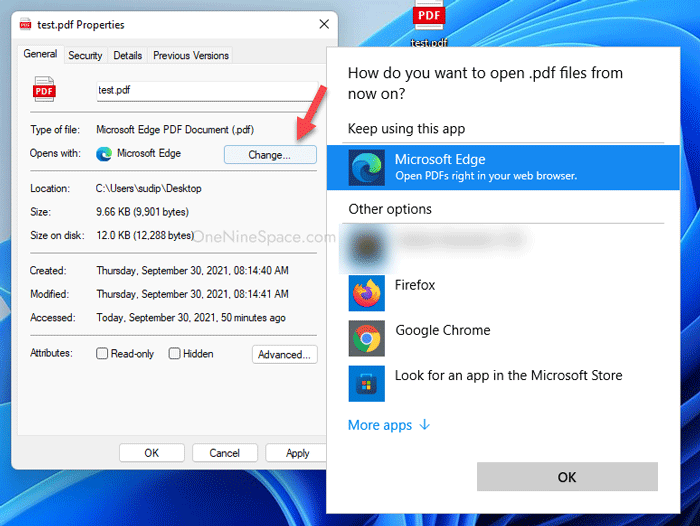
If PDF hyperlinks are not working follow these steps Use another PDF viewer Copy the link manually Check if the links are broken or incorrect Set default PDF viewer Create a copy of the PDF Upload PDF file to Google Drive To learn more about these steps in detail you need to continue reading 1 Use another PDF viewer
Pre-crafted templates use a time-saving service for producing a diverse range of documents and files. These pre-designed formats and layouts can be made use of for numerous personal and professional jobs, consisting of resumes, invitations, leaflets, newsletters, reports, discussions, and more, streamlining the content development procedure.
Pdf Hyperlinks Not Working In Edge

Solved Hyperlinks From MS Word Not Working In PDF Adobe Support
PDF Hyperlinks Not Working How To Fix

Pdf Hyperlinks Not Working On Iphone Pdf Convert Enuance Ca

Fix Hyperlinks Are Not Working In Outlook In Windows 10

PDF Hyperlinks Not Working When Using Custom WD ENV File Autodesk

Fixed Hyperlinks In Excel Not Working After Saving 5 Solutions

PDF hyperlinks aren t working in Edge I have created a pdf document with 2 hyperlinks to websites in it These links work fine when I open the pdf with acrobat safari Firefox and chrome but when my client tries to open them with Edge they don t work Why is this Reply I have the same question 8 Subscribe Report abuse Replies 4

Why Are the PDF Links Not Working The PDF Links may not work in case they run into the following You have entered inaccurate URLs The anchor links are broken You have converted the PDF file to a minimum size The PDF file is corrupted PDF viewer lacks an automatic link detection feature Cache files of web browser are interrupting

PDF Links Do Not Work In Edge I create publications for internal and external use Using Adobe Acrobat Pro I create links from a landing page pdf to open specific publications for viewing From a publication pdf you can click a bookmark and return to the landing page
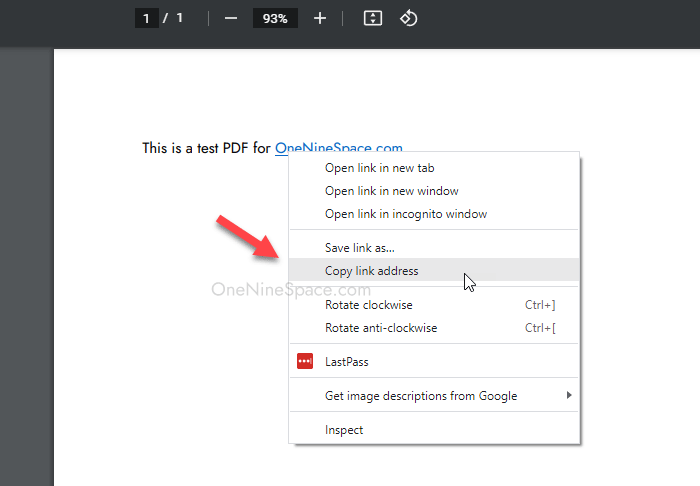
31 6 Do you mean that a link button in PDF can t open the link in Edge Which version of Edge and Chrome do you use Have you tried to disable Adobe extension and use Edge inner PDF viewer to see if it can open the link And if possible you can provide a sample pdf file so that we can have a test Yu Zhou Dec 8 2022 at 9 15

You can open pdf files without downloading them in Microsoft Edge Your pdf file is getting downloaded because the link is a download link and not directly a pdf file 1 Like Reply RNalivaika replied to TheShaunSaw Jul 14 2020 11 51 PM TheShaunSaw Hello and thank you
Many factors can be the reason why hyperlinks not working in PDF Incorrect URL path An incorrect path will render the PDF hyperlink not working Missing http or https Missing http or https will make the hyperlink not work in PDF PDF won t open in Edge after clicking on the PDF file link Sam Mah 1 Dec 16 2022 3 35 PM My company site is hosted in an Azure cloud server My link is correct in Acrobat It is Edge since it works properly in other browsers I won t show my exact domain but I will display my relative link path here OPERA FIREFOX CHROME display my URL path
Without making any changes to the web site and all its files when the same setup is used in MS Edge ver 88 705 68 none of the embedded links would appear in the same master PDF Only the internal links would work and all the external links are vanished the text are there but not the links