Pdf File Not Opening Properly How To Fix Adobe Reader PDF File Not Responding Or Not Opening File How To Fix PDF File Not Opening Issue Techuda Cant Open PDF Files On Windows 10 Quick Fix Fix PDF Files Not Opening Correctly Strawberry7 Fix PDF Files Not Opening Correctly Strawberry7 Web Jul 28 2016 nbsp 0183 32 2 Correct answers graffiti LEGEND Jul 29 2016 You can quot try quot to save the pdf attachment first before opening it in Reader but most of the time that doesn t make a difference It will confirm that the file is being corrupted by the email though and not by some process involved in opening it from your email client Upvote Translate
Web Jan 4 2022 nbsp 0183 32 This might happen because your browser has accumulated a lot of cache data incorrect browser settings or another PDF viewer is obstructing Microsoft Edge If your browser can t open PDF files keep reading as we ll walk you through the troubleshooting process 1 Open the PDF File With Another App Web Apr 29 2024 nbsp 0183 32 Step 1 Right click on the PDF file and select Properties Step 2 Under the General tab check the box for Unblock Step 3 Apply the changes and when you open the file it should not
Fix PDF Files Not Opening Correctly Strawberry7 Fix PDF Files Not Opening Correctly Strawberry7 FIX CANNOT OPEN PDF FILES IN WINDOWS 7 8 1 10 PDF File Not Opening Here Are 6 Top Solutions For You Fix PDF File Not Opening In Chrome Adobe Reader 2023 Microsoft Edge Discover Why PDF File Not Opening In Edge Microsoft Edge Discover Why PDF File Not Opening In Edge How To Fix Microsoft Edge Not Opening PDF Files PDF Files INET E Fix PDF File Not Opening In Windows 10 Apps For Windows 10
Pdf File Not Opening Properly
 Pdf File Not Opening Properly
https://www.itsmarttricks.com/wp-content/uploads/2018/09/How-To-Fix-Adobe-Reader-PDF-File-Not-Responding-Or-Not-Opening-File.png
Web Dec 28 2023 nbsp 0183 32 1 Allow PDF Files to Open in Chrome Google Chrome has built in settings for managing PDF files If you have enabled the setting to download PDFs Chrome will download them instead of opening them in preview mode This setting is usually turned off by default but you may have enabled it accidentally or a third party app may have
Pre-crafted templates offer a time-saving solution for producing a diverse series of documents and files. These pre-designed formats and layouts can be used for different individual and expert jobs, consisting of resumes, invitations, flyers, newsletters, reports, discussions, and more, simplifying the material production process.
Pdf File Not Opening Properly

Fix PDF Files Not Opening Correctly Strawberry7

Fix PDF Files Not Opening Correctly Strawberry7
FIX CANNOT OPEN PDF FILES IN WINDOWS 7 8 1 10

PDF File Not Opening Here Are 6 Top Solutions For You
Microsoft Edge Discover Why PDF File Not Opening In Edge
Microsoft Edge Discover Why PDF File Not Opening In Edge
Web Apr 8 2024 nbsp 0183 32 Can t open PDF on your computer If your PDF file is corrupt or damaged and won t open you cannot directly repair it You can recreate it with the original source file using Adobe Acrobat or Photoshop Elements If you cannot open a PDF follow the troubleshooting steps below in the order they appear

Web Aug 19 2023 nbsp 0183 32 The common issues are improper file saving crashing issues and software not properly loading all PDFs To make sure this isn t an issue repair Adobe Acrobat once This will repair any corrupt files and reinstall any missing files

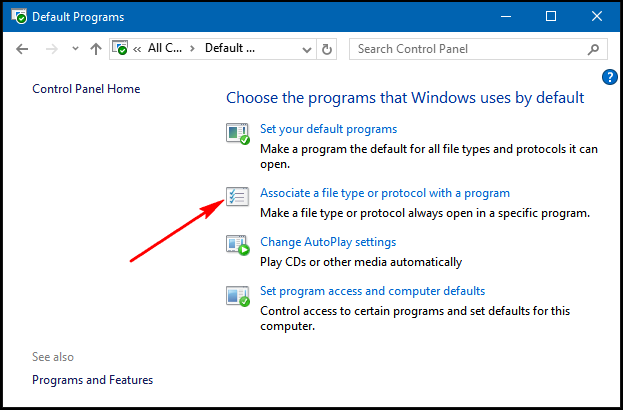
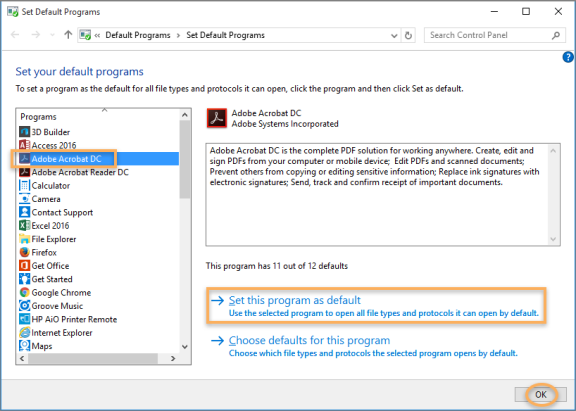
Web Jun 1 2023 nbsp 0183 32 On Windows navigate to the PDF file gt right click on it gt select Open with gt click Choose another app gt Choose Adobe Acrobat Reader DC or Adobe Acrobat DC gt check Always use this app to open pdf files gt click on the OK button On Mac open Finder gt locate and select your PDF file gt click File gt choose Get Info gt expand the

Web Here are some of the most common culprits to consider Your laptop doesn t have a PDF reader installed Your PDF reader or preferred program is out of date and needs an update Your PDF application is potentially damaged or needs to be rebooted The PDF is potentially damaged or tampered with

Web Nov 20 2023 nbsp 0183 32 Reset the Display PDF In Browser preference Acrobat Reader X or earlier Try resetting the display preference in your browser to clear up the viewing issue In Reader or Acrobat right click the document window and choose Page Display Preferences From the list at left select Internet
Web Feb 8 2021 nbsp 0183 32 1 Restart Before you start fiddling with various settings you should restart the Edge browser and your computer First close the Edge browser and re launch it See if you can open PDF files Web May 23 2023 nbsp 0183 32 Many factors can affect the display of a PDF on the web including damage to the PDF how the website displays the PDF the version of Acrobat Reader or the browser security and cookie settings or the status of the server on which the PDF resides Try the suggestions below as your first troubleshooting steps
Web Oct 30 2017 When I try to open a PDF Acrobat opens but does not display a window I ve tried uninstalling and reinstalling but same issue It shows up in the menu at the top so I know it s open and I can print the pdf I opened just can see the actual document which is very frustrating for me Any idea what I can do 39 7K Translate Report