Pandas Could Not Convert String To Float Comma Valueerror Could Not Convert String To Float Fasrsonic Carbon Model ValueError Could Not Convert String To Float NatCap Solved ValueError Could Not Convert String To Float Solution ValueError Could Not Convert String To Float In Python Its Linux FOSS How To Fix ValueError Could Not Convert String To Float In Python 2 Answers Sorted by 7 You could use str replace to change to nothing and then convert column to float with astype method df VotesPerYear df Votes str replace astype float df Years Share Improve this answer Follow answered Dec 25 2015 at 12 03 Anton Protopopov 30 7k 13 90 95 Add a comment
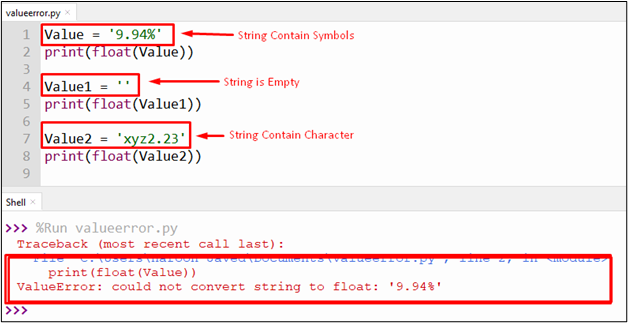
The pandas ValueError occurs when you use the float function to convert a string to a float but the string contains characters that cannot be interpreted as a float For example if the string includes commas or special characters it can t be directly converted to a float 2 apply Another method to convert string data to float is by using the apply function We can define our custom function using the lambda function that will convert the data type of each element in the dataframe Here is an example of how we can use the apply method python def custom float converter x try
How To Fix ValueError Could Not Convert String To Float In Python Python ValueError Could Not Convert String To Float Fix Valueerror Could Not Convert String To Float Hugefasr SelectKBest With Chi2 Throws ValueError Could Not Convert String To ValueError Could Not Convert String To Float In Python Its Linux FOSS Troubleshooting ValueError Could Not Convert String To Float Error Python ValueError Could Not Convert String To Float Fix ValueError Could Not Convert String To Float In Python Bobbyhadz Code ValueError Could Not Convert String To Float no pandas
Pandas Could Not Convert String To Float Comma
 Pandas Could Not Convert String To Float Comma
http://fasrsonic406.weebly.com/uploads/1/2/4/1/124145729/383264341.png
3 Answers Sorted by 0 You can check column dtypes using hp train dtypes Subset the dataframe for only the desired columns before calling corr For example if you only want float64 cols dtype df hp train dtypes float cols dtype df iloc dtype df float64 values index hp train float cols corr Share Improve this answer Follow
Pre-crafted templates offer a time-saving solution for producing a diverse variety of documents and files. These pre-designed formats and layouts can be utilized for numerous personal and expert jobs, including resumes, invites, flyers, newsletters, reports, presentations, and more, simplifying the material production procedure.
Pandas Could Not Convert String To Float Comma

Python ValueError Could Not Convert String To Float ItsMyCode

Python ValueError Could Not Convert String To Float Fix

Valueerror Could Not Convert String To Float Hugefasr

SelectKBest With Chi2 Throws ValueError Could Not Convert String To

Troubleshooting ValueError Could Not Convert String To Float Error

Python ValueError Could Not Convert String To Float Fix

This error usually occurs when you attempt to convert a string to a float in pandas yet the string contains one or more of the following Spaces Commas Special characters When this occurs you must first remove these characters from the string before converting it to a float The following example shows how to resolve this error in practice

1 db posiciones Id Pos values index is the wrong way to try to slice your data Just do db posiciones Id Pos loc 91 AGSACB 08 or iloc Please read the pandas Getting Started doc about how to slice properly with loc iloc asnd string integer row labels

To convert string to float we can use the function astype float If we try to do so for the column amount df amount astype float we will face error ValueError could not convert string to float 10 00 Step 2 ValueError Unable to parse string 10 00 at position 0
1 The proper locale way is also a very good way to shoot you in the foot if you plan to use your program on several operating systems like Windows and flavors of Linux which have different locale formats or even might need you to install a locale that supports your chosen format 576i Feb 23 2021 at 20 30

2 Answers Sorted by 5 Need replace first print merged platnosc total replace regex True astype float 0 0 00 1 4 50 2 0 00 3 0 00 4 0 00 5 4 50 6 6 10 7 7 99 8 4 00 Name platnosc total dtype float64 Share Follow answered Jul 7 2017 at 8 52 jezrael 834k 100 1358 1268 1 Thanks
Method 1 Using DataFrame astype The method is used to cast a pandas object to a specified dtype Syntax DataFrame astype self FrameOrSeries dtype copy bool True errors str raise Returns casted type of caller Example In this example we ll convert each value of Inflation Rate column to float Python3 import pandas as pd You can use the fillna method to replace missing values with a default value such as zero df column name df column name fillna 0 astype float Correct Data Type Mismatch If the column has an incorrect data type assigned you can use the to numeric method to convert it to float
Alternatively you can use the str replace method Python Convert string with comma separator and dot to float using replace This is a two step process Use the str replace method to remove the commas from the string Use the float class to convert the string to a floating point number