Outlook Rules Not Working Mac Outlook Search Not Working On Mac How To Fix The Issue MacSecurity Fix Outlook Rules Are Not Supported For This Account Error Mac 8 Ways How To Fix Outlook Rules Not Working EaseUS Troubleshooting Steps To Deal With Outlook Mac Rules Not Working Fix Outlook Rules Not Working Issue Web Apr 30 2022 nbsp 0183 32 Any of these may be the culprit Rules exceed the rules quota established for your mailbox Corruption in send receive settings file Rules set to run on one computer only Corruption using a POP3 or IMAP account Lost Co Unsplash How to Fix Outlook Rules Not Working
Web Apr 17 2024 nbsp 0183 32 Why Outlook rules are not working 10 common causes There are different factors why Outlook rules might not work as expected Let s look at the common cases when a rule does not run and how to fix it Outlook Web Mar 8 2023 nbsp 0183 32 Table of Contents 1 Ensure Your Outlook Rules Are Enabled 2 Fix Outlook s Corrupt SRS File 3 Reduce the Space Used by Your Outlook Rules Shorten Your Rule Names Delete Old Outlook Rules Combine Multiple Outlook Rules 4 Turn Off Outlook s Stop Processing More Rules Option 5 Repair Outlook s Corrupt OST or
Fix Outlook Rules Not Working Issue How Do I Troubleshoot Outlook Rules Malfunction How To Fix Outlook Rules Not Working Issue Step By Step How To Fix Outlook Rules Not Working On Windows ITNETI Outlook For Mac Search Function Not Working Tidemu How To Resolve MS Outlook Rules Not Working Error Outlook Rules Not Working Troubleshooting Guide To Fix It Run Rule Microsoft Outlook Mac Tagmertq Microsoft Outlook For Mac Rules Authorityrenew
Outlook Rules Not Working Mac
 Outlook Rules Not Working Mac
https://macsecurity.net/storage/1085/outlook-mac-no-results.png
Web Yoshi Ouchi 1 Sep 5 2022 6 58 PM I have recently moved from the old Outlook for Mac to the new version In the old version I had set up all the rules under Client Rules in Exchange When I moved to the new Outlook I first noticed that the rules to move to a different folder do not work at all
Pre-crafted templates use a time-saving service for developing a varied range of documents and files. These pre-designed formats and layouts can be made use of for numerous personal and professional jobs, including resumes, invitations, leaflets, newsletters, reports, presentations, and more, streamlining the material production procedure.
Outlook Rules Not Working Mac
Using Rules In Outlook Information Technology Division

How Do I Troubleshoot Outlook Rules Malfunction
How To Fix Outlook Rules Not Working Issue Step By Step

How To Fix Outlook Rules Not Working On Windows ITNETI

How To Resolve MS Outlook Rules Not Working Error

Outlook Rules Not Working Troubleshooting Guide To Fix It

Web Apr 17 2024 nbsp 0183 32 Did you recently update your Outlook for Mac application Based on the article below looks like the new Outlook Mac does not support Outlook account for rules Please read the article below for more information Workaround provided was to turn off the quot New Outlook quot switch to use the old version

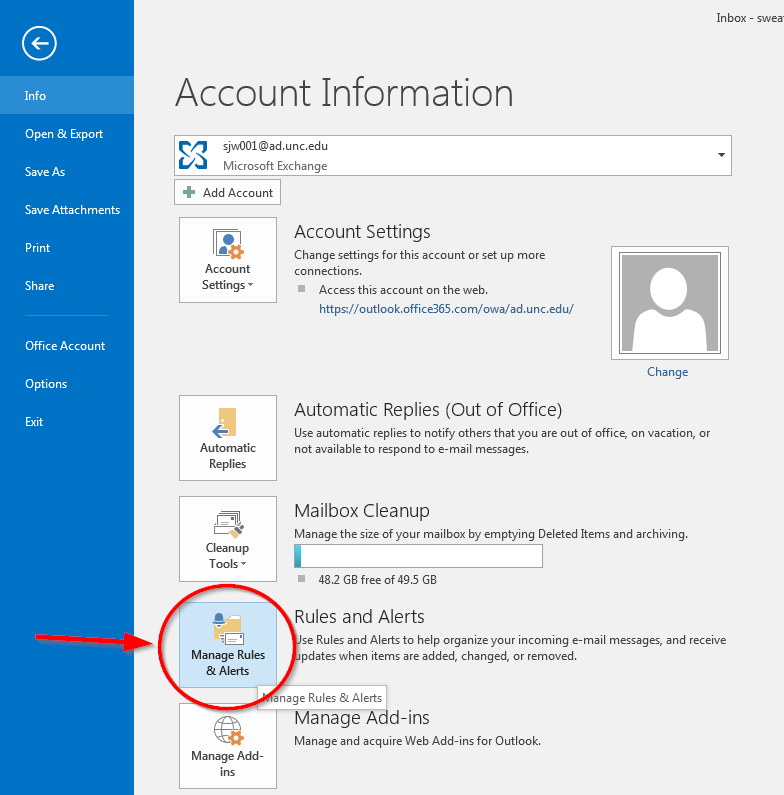
Web Important In the new Outlook for Mac as of October 2020 only server rules are available client rules are no longer supported Note Click the expanders gt to view the content for each heading below

Web Oct 20 2019 nbsp 0183 32 Office 365 for Mac Outlook rules don t work I setup a new computer with Office 365 Everything is new I create mail rules for Outlook but none of theme are working Those are very easy rules Any suggestion

Web May 18 2016 nbsp 0183 32 Rules for Outlook for Mac don t run when manually applied I m using Outlook for Mac 2016 I have created several rules The rules work fine on inbound email They are server side rules If I attempt to apply the rules on either the web based client or Outlook for Mac the rules will not manually run

Web 1 Switch Back to Legacy Outlook for Mac Microsoft no longer supports Client Rules on Outlook for Mac you can only use Server Rules However this change applies to the new version of the
Web Apr 19 2024 nbsp 0183 32 1 On the new Outlook version click on Outlook from the menu bar Switch to Old Outlook on Mac 2 Click on New Outlook 3 And from the prompt select Revert After this you will be navigated to the older outlook Revert to old Outlook app on Mac 4 From there select Tools Choose Rules Create a New Rule in Web Last updated March 2024 Outlook for Mac features add ins and known issues FIXED Unable to add an account in new Outlook for Mac FIXED Microsoft 365 for Mac users in the Beta channel are not offered app updates BY DESIGN Follow Up flag does not work in outgoing emails in Legacy Outlook for Mac
Web How To Guide How to suppress Microsoft 365 AutoDiscover redirect warning Outlook 2016 for Mac crashes when a Proxy Auto Configuration file is used Documentation for troubleshooting common issues with Outlook for Mac