Openvpn Suddenly Stopped Working OpenVPN Docker ADT Pulse App Not Working Quick Ways To Fix Smart TechVille OpenVPN Xfinity TV And Internet Stopped Working Troubleshooting Guide Severed exe Has Stopped Working Fandom To remove the bootstrap account you can follow the steps below Comment out the bootstrap openvpn account from the as conf file boot pam users 0 openvpn Remove the bootstrap account from your operating system deluser openvpn Restart the Access Server service for the changes to take effect
Important If the connection is not working or if the remote machine is NOT configured to provide a ping response this often has to do with a firewall setting you will get request timed out response and 100 packet loss In that case proceed to method 2 below Method 2 Reset the TAP Adapters Manually Introduction This document provides troubleshooting tips for the web services with OpenVPN Access Server For a detailed reference guide on how the web services work refer to OpenVPN Access Server Web Services which details the difference between the Admin Web UI and Client Web UI We recommend reading through that first to understand how the web services work and how you reach them
Severed exe Has Stopped Working Fandom Thursday 24 November 2022 12 05 PM Kwabs Breaks Down As He Reveals His OpenVPN Service Page Says Stopped OpenVPN WebIf Say Running OpenVPN RPi PIA VPN How to HomeNetworking Was Ist OpenVPN AWARE7 GmbH The View s Sunny Hostin Gets Stopped And Abruptly Told Off By Producers I Got Rugged On A Couple NFT Projects how Do I Show This On My Taxes OpenVPN OpenWrt ITDog info How To Install Setup Openvpn On Windows 10 Youtube Vrogue
Openvpn Suddenly Stopped Working
 Openvpn Suddenly Stopped Working
https://s3.blog.amd-nick.me/2020/02/sergey-zolkin-192937-unsplash.jpg
Open the Firewall network protection app on your Windows 11 PC and click the below option Allow an app through firewall 2 On the next screen click the Change settings button and then Allow another app button 3 In the Add an app window click Browse and move to the location where the VPN is saved 4
Pre-crafted templates use a time-saving solution for creating a varied variety of files and files. These pre-designed formats and layouts can be utilized for various individual and expert tasks, including resumes, invites, leaflets, newsletters, reports, presentations, and more, enhancing the material development process.
Openvpn Suddenly Stopped Working

OpenVPN Router Speeds Review

Thursday 24 November 2022 12 05 PM Kwabs Breaks Down As He Reveals His
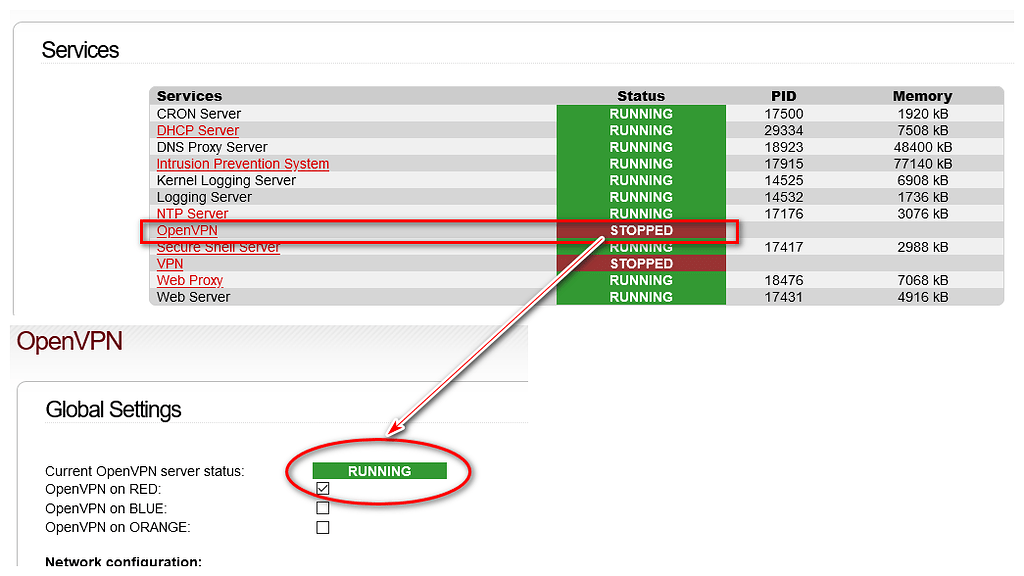
OpenVPN Service Page Says Stopped OpenVPN WebIf Say Running OpenVPN

RPi PIA VPN How to HomeNetworking

The View s Sunny Hostin Gets Stopped And Abruptly Told Off By Producers

I Got Rugged On A Couple NFT Projects how Do I Show This On My Taxes

Re OpenVPN client randomly disconnects Hi TinCanTech thanks for the reply host ifconfig lo Link encap Local Loopback inet addr 127 0 0 1 Mask 255 0 0 0 inet6 addr 1 128 Scope Host UP LOOPBACK RUNNING MTU 65536 Metric 1 RX packets 0 errors 0 dropped 0 overruns 0 frame 0 TX packets 0 errors 0 dropped 0 overruns 0 carrier 0 collisions 0

OpenVPN stopped working what could have happened Ask Question Asked 10 years 11 months ago Modified 10 years 11 months ago Viewed 3k times 1 I have Openvpn and it worked great when I used it on PC Windows 8 then I copied all files Certificates and config to an Android 4 phone to use them Now Openvpn works on the phone but not the PC

The solution to this particular problem is to upgrade the client software to the latest version Another possible explanation is that the settings regarding TLS minimum requirement level have been altered but the OpenVPN client is using an older copy of the connection profile which has incorrect instructions

Updated If you are experiencing issues with the OpenVPN Connect Client not being able to establish a connection or losing connectivity the article may help you Troubleshooting Client VPN Tunnel Connectivity

What we found out 3 months back OpenVPN was our solution to everything even STEAM and Dota 2 What happened 2 nights ago Suddenly OpenVPN stops working and our of every 32 computers connected to the same LAN hub only 1 person can connect to OpenVPN If he shuts down then also no one can connect Only he and he can connect to OpenVPN
Openvpn client shows as still connected no new logs the icon is green the openvpn server shows that the connection is still established but cant ping the client either windows logs doesn t show any clue And from home i still connect through the VPN without problem I need clue for where to look on any other logs or tests Edit V viragomann Prez Mgmt Mar 21 2022 7 56 AM prez mgmt Seems the client cannot reach the server To investigate enable logging in the firewall rule which allow UDP port 1194 access to WAN try a connection from the client after and check if the rule was hit Or run a packet capture on WAN and filter the port while you try to connect
Jan 12 2020 4 49 PM No you wouldn t see it there if it was blocked A packet capture on the OpenVPN interface would show it But if you have a pass all rule on the OpenVPN interface that should be passed and open firewall states It sounds more like the client is not getting the correct routes to access the LAN subnet remotely