Open Visual Studio Code From Run How To Open Visual Studio Code From Terminal MAC How To Write Python In Visual Studio Code And Run It In Terminal Youtube Vrogue Cannot Run Code Javascript Microsoft Visual Studio Code Sexidallas MAC Visual Studio How To Open Visual Studio Code From Terminal MAC Quick Command line Shells Prompt For Developers Visual Studio Windows Microsoft Docs To get started go to https vscode dev in your browser VS Code for the Web has many of the features of VS Code Desktop that you love including search and syntax highlighting while browsing and editing along with extension support to work on your codebase and make simpler edits
How to Open Visual Studio Code From Your Terminal Madison Kanna In this tutorial we ll go over how you can open the VS Code text editor Visual Studio Code from your Mac terminal Opening your text editor from your terminal is a quick easy way to open up new projects and begin coding faster How to Download and Open VS Code Install VS Code and the WSL extension Visit the VS Code install page and select the 32 or 64 bit installer Install Visual Studio Code on Windows not in your WSL file system When prompted to Select Additional Tasks during installation be sure to check the Add to PATH option so you can easily open a folder in WSL using the code command
Command line Shells Prompt For Developers Visual Studio Windows Microsoft Docs How To Open Visual Studio Code From Your Terminal Open Code With Cmd How To Open Visual Studio Code With Cmd YouTube How To Open Folder In Visual Studio Code Using Ubuntu Radish Logic Integrated Terminal In Visual Studio Code 2023 Set Up GitLab With Visual Studio Code From Scratch GoLinuxCloud Run Open VSCode From Mac Terminal Gang Of Coders How To Open Visual Studio Code From Command Line Devdotcode Visual Studio Code Logo 640x480 Simplelas
Open Visual Studio Code From Run
 Open Visual Studio Code From Run
https://cdn.hashnode.com/res/hashnode/image/upload/v1663350438597/avLIwgU81.webp?w=1600&h=840&fit=crop&crop=entropy&auto=compress,format&format=webp
Microsoft Visual Studio Code is an open source code editor and it s one of the most popular apps of its kind on any platform in fact run a version of Visual Studio Code in your web browser
Templates are pre-designed files or files that can be used for different functions. They can save time and effort by offering a ready-made format and layout for creating different type of content. Templates can be used for individual or professional jobs, such as resumes, invitations, flyers, newsletters, reports, presentations, and more.
Open Visual Studio Code From Run
Visual Studio Code

How To Open Visual Studio Code From Your Terminal
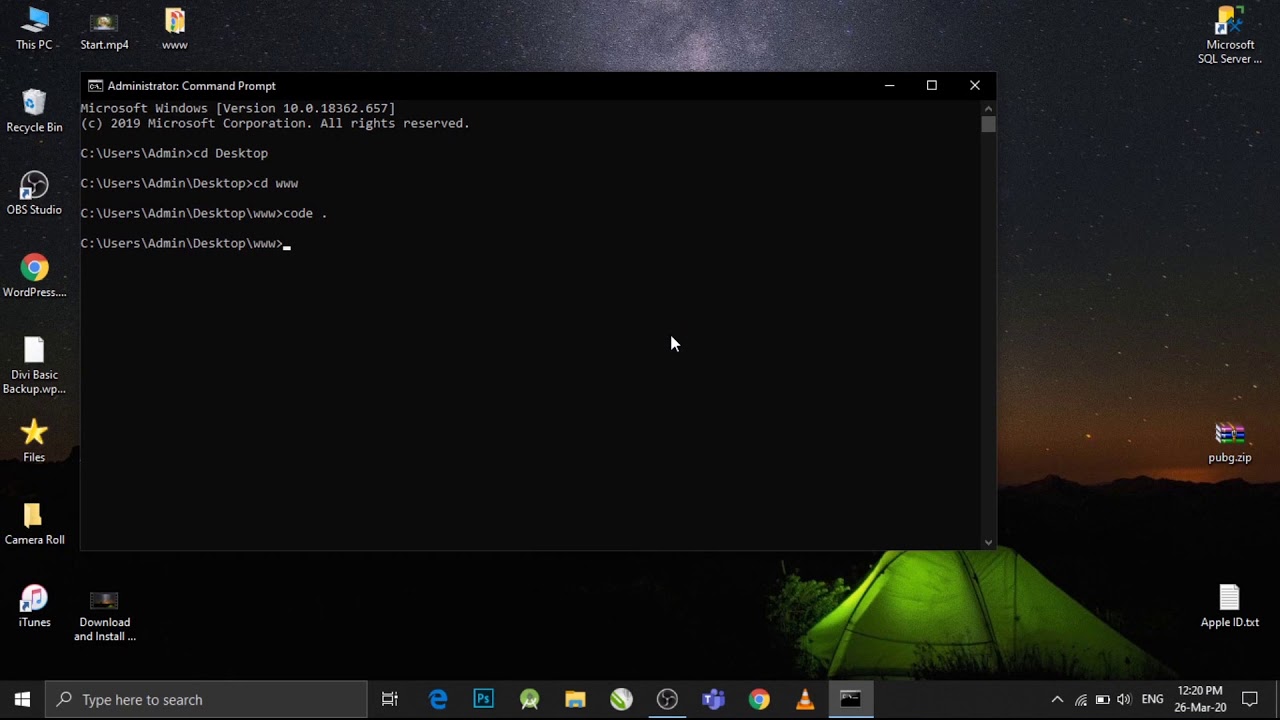
Open Code With Cmd How To Open Visual Studio Code With Cmd YouTube
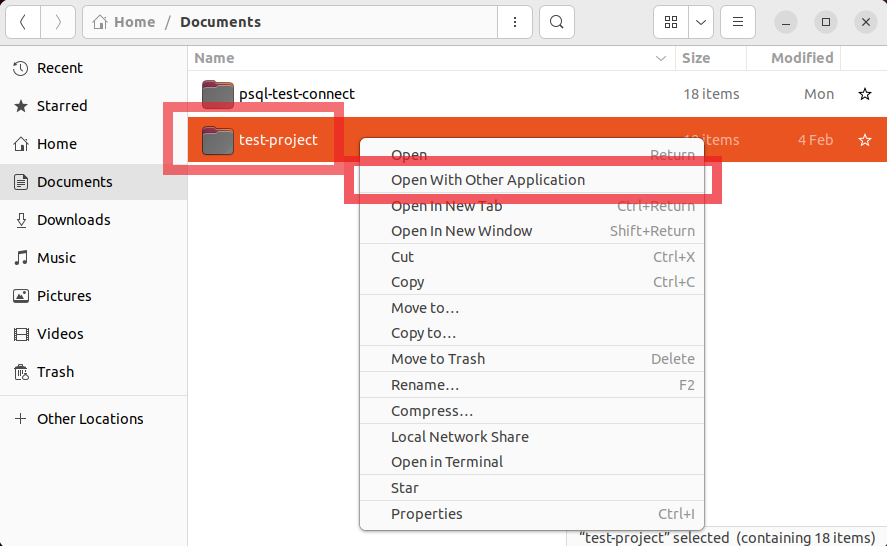
How To Open Folder In Visual Studio Code Using Ubuntu Radish Logic

Set Up GitLab With Visual Studio Code From Scratch GoLinuxCloud

Run Open VSCode From Mac Terminal Gang Of Coders

Launching from command line You can launch VS Code from the command line to quickly open a file folder or project Typically you open VS Code within the context of a folder To do this from an open terminal or command prompt navigate to your project folder and type code
Text editor Opening Microsoft Visual Studio Code from command prompt Windows Stack Overflow Opening Microsoft Visual Studio Code from command prompt Windows Asked 8 years 7 months ago Modified 4 years 5 months ago Viewed 29k times 24 Is there a way to launch Microsoft Visual Studio Code from the command line in windows

Download the Visual Studio Code installer for Windows Once it is downloaded run the installer VSCodeUserSetup version exe This will only take a minute By default VS Code is installed under C Users Username AppData Local Programs Microsoft VS Code Alternatively you can also download a Zip archive extract it and run Code from there

You can open code into Visual Studio in the following ways On the Visual Studio menu bar choose File Open Folder and then browse to the code location On the context right click menu of a folder containing code choose the Open in Visual Studio command Choose the Open Folder link on the start window Important

Visual Studio Code Tips and Tricks Tips and Tricks lets you jump right in and learn how to be productive with Visual Studio Code You ll become familiar with its powerful editing code intelligence and source code control features and learn useful keyboard shortcuts
654 7 22 1 code visualstudio docs editor tasks custom tasks Hans Passant Jun 26 2018 at 21 46 Have done some testing on this and it looks like a strong option to offload about 80 of the overhead of opening starting my project although not as completely passive as the custom extension option appears to have the potential to be Start from code If you start from a code listing code file or small number of files first make sure the code is a runnable program from a trusted source Any app with a Main method is probably a runnable program but with the current version of C programs without Main methods with top level statements can also run
The Shortcut to Run Code in VS Code In VS Code you only need to use a shortcut to run your code That shortcut is Ctrl Alt N There are a few more ways to run code Pressing F1 and