Office 365 Style Guide Heading Back To A Hybrid Office 365 Style Digital Marketing Plan Free Origin Graphing Clone Windows Lasopaaustralia Simplicontent Drago Pop up Brochure Designed For Drago Rome brochure graphic Microsoft Redesigns Power BI And Adds In New AI Analytics Tools Outlook for Microsoft 365 Outlook 2021 Outlook 2019 Outlook 2016 More Style Sets are groups of formatting options designed to help you quickly create personalized professional looking email messages in Microsoft Outlook Style Sets can also be used in Calendar appointments meeting requests task and Journal items and notes in contact forms
Top 10 tips for Microsoft style and voice Article 05 09 2023 7 contributors Feedback Use bigger ideas fewer words Our modern design hinges on crisp minimalism Shorter is always better To learn more see Brand voice Example Replace this If you re ready to purchase Office 365 for your organization contact your Microsoft account representative On the Microsoft 365 navigation bar at the top of the screen click the Settings icon Click a theme in the gallery to see it previewed on your screen Scroll down and click Save to set it as your theme Change Microsoft 365 notifications
Microsoft Redesigns Power BI And Adds In New AI Analytics Tools Office 365 Icon Ico Office 365 Icon Transparent Office 365 Png Exclaimer Tutorial Office 365 How To Configure The Client Side Studio Controls COM 6 0 0 Download Cannot Upload Files To Style Library Or Masterpage Gallery In Office 365 SharePoint 2010 Template Document Libraries For Business Intelligence Office 365 Outlook Yellow Icon R Office365 ADDriverStoreAccessNonLocalException In Outlook skowronski tech PowerMenu Pro Updates For PowerBuilder
Office 365 Style Guide
 Office 365 Style Guide
https://i.pinimg.com/736x/f5/47/dd/f547dddf00da725a7a5771ed32347694.jpg
Under Select styles to show click All styles All styles are displayed in the Styles pane Select text in your document in the style that you want to move and then click the style in the Styles task pane The style now appears in the Styles gallery Modify a style in the Styles gallery
Pre-crafted templates offer a time-saving solution for producing a varied range of documents and files. These pre-designed formats and layouts can be used for various personal and professional jobs, consisting of resumes, invites, flyers, newsletters, reports, discussions, and more, improving the material development process.
Office 365 Style Guide
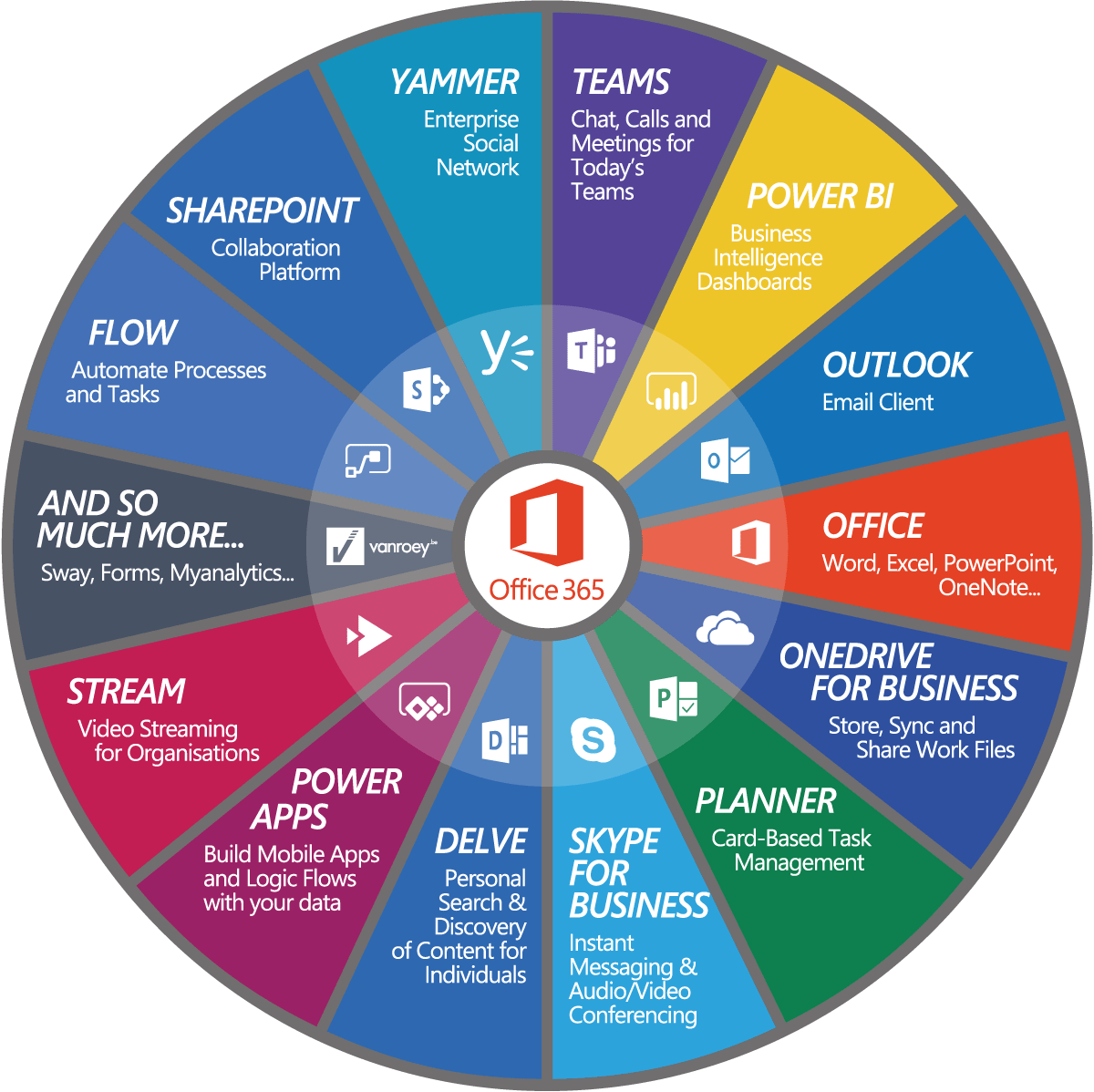
Vergelijk Office 365 E3 Vs Office 365 E5 Vs Microsoft 365 Business

Office 365 Icon Ico Office 365 Icon Transparent Office 365 Png

Exclaimer Tutorial Office 365 How To Configure The Client Side
Studio Controls COM 6 0 0 Download

SharePoint 2010 Template Document Libraries For Business Intelligence

Office 365 Outlook Yellow Icon R Office365

Select text in your document that has the style applied such as Heading 1 When you select text that has a style applied that style is highlighted in the Styles gallery Format the selected text with the new attributes that you want For example you might want to change the point size for the Heading 1 style from 16 points to 14 points

A one sentence instruction A numbered procedure which might include pictures videos and links or buttons that take customers where they need to go When a procedure is the best approach use the guidelines in this section to create consistent instructions that are easy to follow Writing step by step instructions describes several ways to

Under Select styles to show click All styles All styles are displayed in the Styles pane Select text in your document in the style that you want to move and then click the style in the Styles task pane The style now appears in the Styles gallery Modify a style in the Styles gallery

Tips for writing steps Simple instructions with right angle brackets Follow these guidelines to help you create clear easy to follow instructions whether you re writing simple single step procedures or complex procedures that consist of multiple steps See also Formatting text in instructions Formatting punctuation Complex procedures

Using Styles in Word Use Quick Styles Try it Transcript You might format a document while you type or change fonts for things like headings Here s a better way to get your document looking smart Quick Styles Don t change fonts use Quick Styles
Define a new list style Select the text or numbered list you want to change On the Home tab in the Paragraph group click the arrow next to Multilevel List and then click Define New List Style Specify a name for your new list style Choose the number to start the list at The default value is 1 Beyond the four major style guides there are other options including style guides focused on content marketing or technical writing The Microsoft Writing Style Guide provides writing guidance focused on computer technology If you aren t able to find a style guide that fits your needs you can also create your own to use for your brand
Collaborate with your designer and marketing manager or PM to develop the content strategy If you re working with a designer meet early and often Share your outline your preliminary drafts and this style guide Provide preliminary content early in the process so you can identify and solve issues in the design or content approach