Nginx Multiple Server Blocks Not Working How To Create An Nginx Virtual Host AKA Server Blocks KeyCDN Support How To Set Up Nginx Server Blocks On CentOS 8 Linux Nginx Centos Learn How To Configure Nginx Server Blocks In Ubuntu 22 04 20 04 18 04 Nginx Server Block How To Install And Configure Nginx Server Block Nginx documentation This is caused by SSL protocol behaviour The SSL connection is established before the browser sends an HTTP request and nginx does not know the name of the requested server Therefore it may only offer the default server s certificate Share Improve this answer Follow edited Jan 5 at 9 39 bfontaine 18 5k 13 73 110
Server name This directive is the other component used to select a server block for processing If there are multiple server blocks with listen directives of the same specificity that can handle the request Nginx will parse the Host header of the request and match it against this directive How To Set Up Nginx Server Blocks When using the Nginx web server server blocks similar to virtual hosts in Apache can be used to encapsulate configuration details and host more than one domain on a single server Ubuntu 16 04 How To Set Up Nginx Server Blocks Virtual Hosts on Ubuntu 16 04 By Justin Ellingwood 14 04
Nginx Server Block How To Install And Configure Nginx Server Block How To Set Up Nginx Server Block Ubuntu 18 04 Cloudbooklet AI How To Set Up Nginx Server Blocks On Ubuntu 22 04 Apache Vs Nginx Which Web Server You Should Choose NGINX Server Blocks Host Multiple Websites On One Server With Single Debian 11 Nginx Myfreax File Multiple Server jpg Wikimedia Commons How To Set Up Nginx Server Blocks On Ubuntu 22 04 Enable Your Server Blocks And Restart Nginx Digitindo Tech
Nginx Multiple Server Blocks Not Working
 Nginx Multiple Server Blocks Not Working
http://www.keycdn.com/img/support/nginx-virtual-host.png
It should be stressed that each server configuration in Nginx can and should have only one webroot That being said these are your options Install phpMyAdmin in a directory under your webroot which in your case is var www phpmyadmin
Templates are pre-designed files or files that can be used for numerous functions. They can save effort and time by providing a ready-made format and layout for producing different type of content. Templates can be utilized for personal or professional projects, such as resumes, invitations, flyers, newsletters, reports, discussions, and more.
Nginx Multiple Server Blocks Not Working

Are My NGINX Server Blocks Set Up Improperly HTTPS 301 s And Assets

How To Set Up Nginx Server Block Ubuntu 18 04 Cloudbooklet AI

How To Set Up Nginx Server Blocks On Ubuntu 22 04
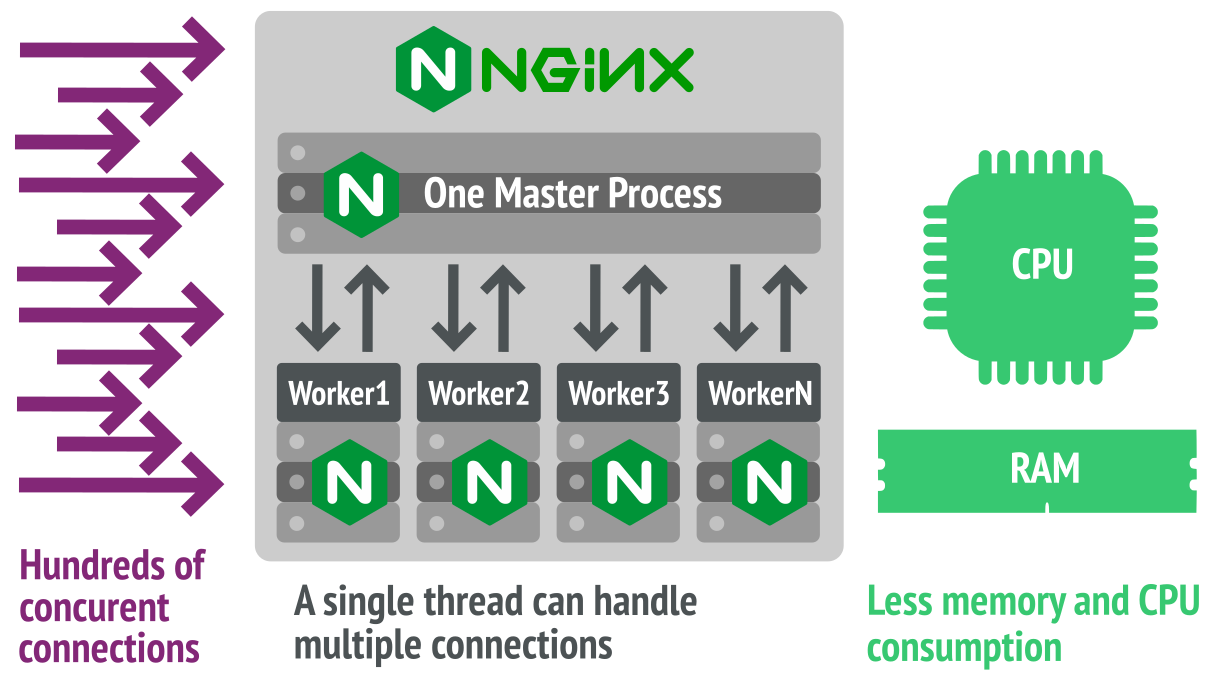
Apache Vs Nginx Which Web Server You Should Choose

Debian 11 Nginx Myfreax

File Multiple Server jpg Wikimedia Commons
When nginx receives a request it selects the virtual host to use based on the HTTP Host header in the request and port number Your current configuration would serve nextcloud if you accessed the service using http nextcloud nextcloud provided that you have DNS configured properly for nextcloud name

NGINX does not have Virtual hosts it has Server Blocks that use the server name and listen directives to bind to tcp sockets Two Server Blocks Serving Static Files
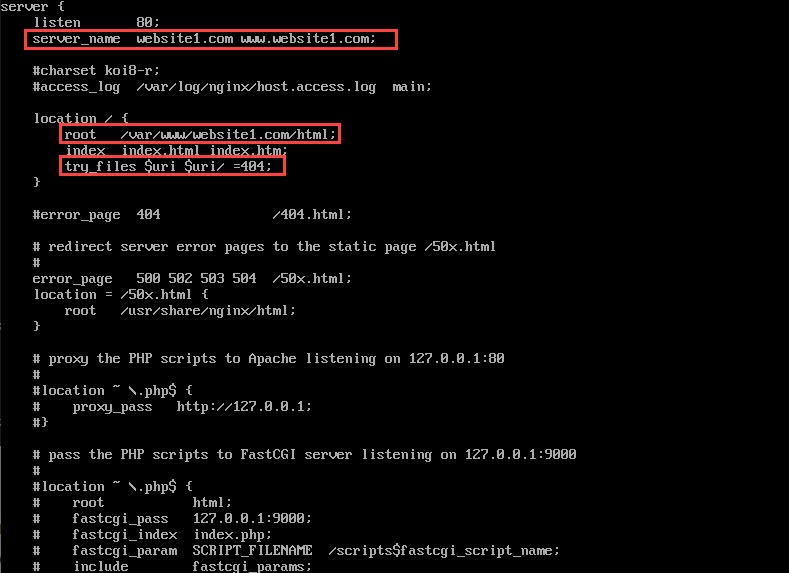
Nginx will first try to find a server block with a server namethat matches the value in the Hostheader of the request exactly If this is found the associated block will be used to serve the request If multiple exact matches are found the firstone is used

To avoid any permission issues change the ownership of the domain document root directory and all files within the directory to the Nginx user www data sudo chown R www data var www domain1 Creating a Server Block On Ubuntu systems Nginx server block configuration files are located in etc nginx sites available directory

Nginx multiple location blocks Ask Question Asked 4 years 10 months ago Modified 4 years 10 months ago Viewed 1k times 0 I would like to get nginx to redirect certain sub domains to specific server blocks to access services on various ports
The mistake is putting a server block inside a server block you should close the main server block then open a new one for the sub domains server server name example the rest of the config server server name sub1 example sub1 config server server name sub2 example sub2 config Share Improve this answer Follow 2 Answers Sorted by 0 Are you using php CGI or FPM You only need one fastcgi pass directive but both are uncommented Try making the index file index html and put such a file in the server root Reload nginx and see if it serves it
Dear community I am a beginner in the land of nginx and server administration From what I ve read so far setting up nginx to listen to two domains is fairly easy All it needs are two distinct server blocks listen to port 80 and with server name identical to the domains in question