Nested If Formula In Excel With Example Excel Nested Text Functions Lesson 1 Youtube Riset How To Use If Function In Excel With Multiple Criteria Part 2 Useful Excel Tips IF Formula Tutorial For Excel Everything You Need To Know Excel Campus 2022 Create If Formula In Excel Excelnays 19 Tips For Nested IF Formulas Exceljet Verkko Summary To evaluate several options with a nested IF statement one approach is to use a separate IF per line to show the result of each set of logical tests By adding line breaks after each IF function the formula
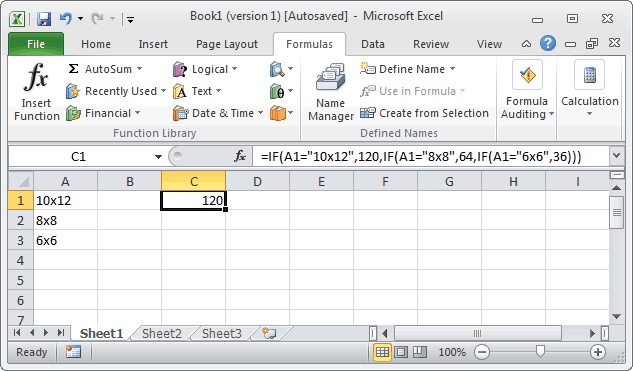
Verkko 17 lokak 2023 nbsp 0183 32 Our Excel nested IF formula goes as follows IF B2 gt 249 quot Excellent quot IF B2 gt 200 quot Good quot IF B2 gt 150 quot Satisfactory quot quot Poor quot And works exactly as it Verkko Following are examples of some common nested IF AND IF OR and IF NOT statements The AND and OR functions can support up to 255 individual conditions but it s not good practice to use more than a
19 Tips For Nested IF Formulas Exceljet If Excel Formula EtalaseMedia How To Use The SUMIF Function In Excel Chia S C ng Ngh How To Use Countif Astonishingceiyrs How To Use If And Nested If Statements In Excel Helpdeskgeek Nested IF Formula In Excel LaptrinhX Excel Formatting Formula If Multiple Conditions Firstkurt How To Write An If Statement In If Then Formula In Excel With Multiple Conditions Porsunshine
Nested If Formula In Excel With Example
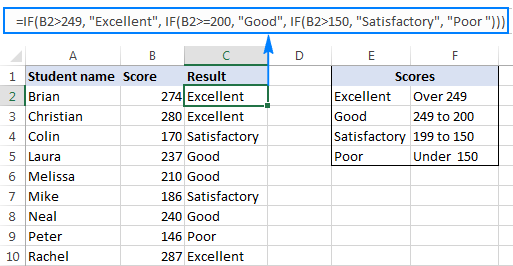 Nested If Formula In Excel With Example
https://cdn.ablebits.com/_img-blog/nested-if/excel-nested-if-formula.png
Verkko What nesting means Nesting simply means to combine formulas one inside the other so that one formula handles the result of another For example here s a formula where the TODAY function is nested
Pre-crafted templates offer a time-saving service for producing a diverse range of files and files. These pre-designed formats and designs can be made use of for various personal and expert projects, consisting of resumes, invites, leaflets, newsletters, reports, presentations, and more, enhancing the content creation process.
Nested If Formula In Excel With Example

How Do I Do An If Then Formula In Excel Dadskin

If Excel Formula EtalaseMedia
How To Use The SUMIF Function In Excel Chia S C ng Ngh
How To Use Countif Astonishingceiyrs
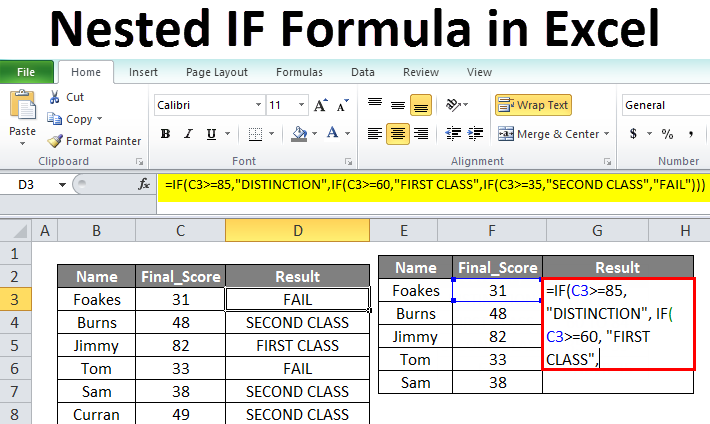
Nested IF Formula In Excel LaptrinhX
Excel Formatting Formula If Multiple Conditions Firstkurt
Verkko 6 kes 228 k 2018 nbsp 0183 32 Though very popular the nested IF statement is not the only way to check multiple conditions in Excel In this tutorial you will find a handful of alternatives
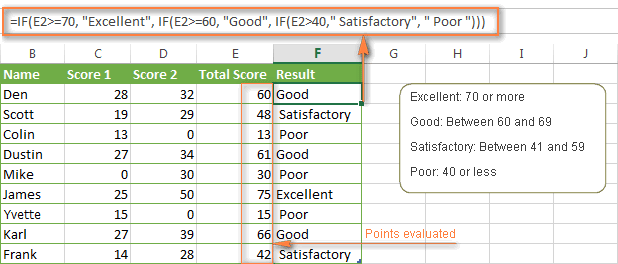
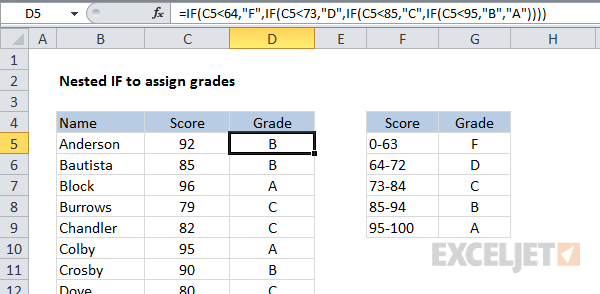
Verkko Following is an example of a relatively standard nested IF statement to convert student test scores to their letter grade equivalent IF D2 gt 89 quot A quot IF D2 gt 79 quot B quot IF

Verkko The general syntax for nested IF statements is as follows IF Condition1 Value if true1 IF Condition2 Value if true2 IF
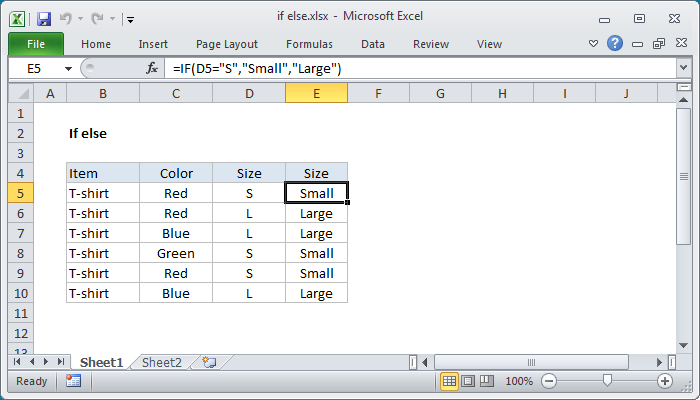
Verkko 17 lokak 2018 nbsp 0183 32 For example IF AND B2 quot delivered quot C2 lt gt quot quot quot Closed quot quot Open quot The modified formula outputs quot Closed quot if column B
Verkko For example by nesting the AVERAGE and SUM function in the arguments of the IF function the following formula sums a set of numbers G2 G5 only if the average of
Verkko IF function The IF function is one of the most popular functions in Excel and it allows you to make logical comparisons between a value and what you expect So an IF Verkko Nested If The IF function in Excel can be nested when you have multiple conditions to meet The FALSE value is being replaced by another IF function to make a further
Verkko 14 toukok 2021 nbsp 0183 32 Excel IF Function Example Suppose you work at a jewelry store where you record the sales and revenue generated by each of seven workers working at the