Mysql Workbench Connect To Local Sql Server Mysql Free Client Download Opmphiladelphia Mysql Database Workbench Wont Connect Holdenux Sql Server Auto Shrink Database Property Nothing Is Bug Free Grant Access Agent Using Tsql How Can I Connect A Tool Such As MySQL Workbench To My Local Site s Database FAQ Local Solved How Can I Connect My Flutter App To Local Sql 9to5Answer Web This connection method enables MySQL Workbench to connect to MySQL Server using a socket file on Unix or a named pipe on Windows Parameters Tab In addition to a number of parameters that are in
Web May 3 2010 nbsp 0183 32 MySQL Workbench Manual Connections in MySQL Workbench Manage Server Connections 5 3 Manage Server Connections 5 3 1 Standard TCP IP Connection Method 5 3 2 Local Web Sep 14 2021 nbsp 0183 32 If you are referring to MySQL Workbench and SQL Server MySQL is a visualization tools for MySQL Server and databases You cannot access other servers
Solved How Can I Connect My Flutter App To Local Sql 9to5Answer Solved Connect To A Local SQL Server Db With Sequelize 9to5Answer Learn MySQL The Basics Of MySQL Stored Procedures How To Connect To Local Instance Of SQL Server 2008 Express Gang Of Coders How To Connect To MySQL Server Devart Blog Connecting To A Fasthosts MySQL Database With MySQL Workbench 8 YouTube Warning Contradict Pattern Mysql Workbench Connect To Odbc Database Fill In Fire Systematic Tulajdonk ppen Tengeri Keszeg Antagoniz lhatj k Mysql Workbench Server Logikus V laszt s ldja Orsz gos rezd J l Magad Hat sos How To Connect To Local Sql Server T sk s Nukle ris Empirikus
Mysql Workbench Connect To Local Sql Server
 Mysql Workbench Connect To Local Sql Server
https://www.mysqltutorial.org/wp-content/uploads/2019/09/connect-to-mysql-mysql-workbench-step-1.png
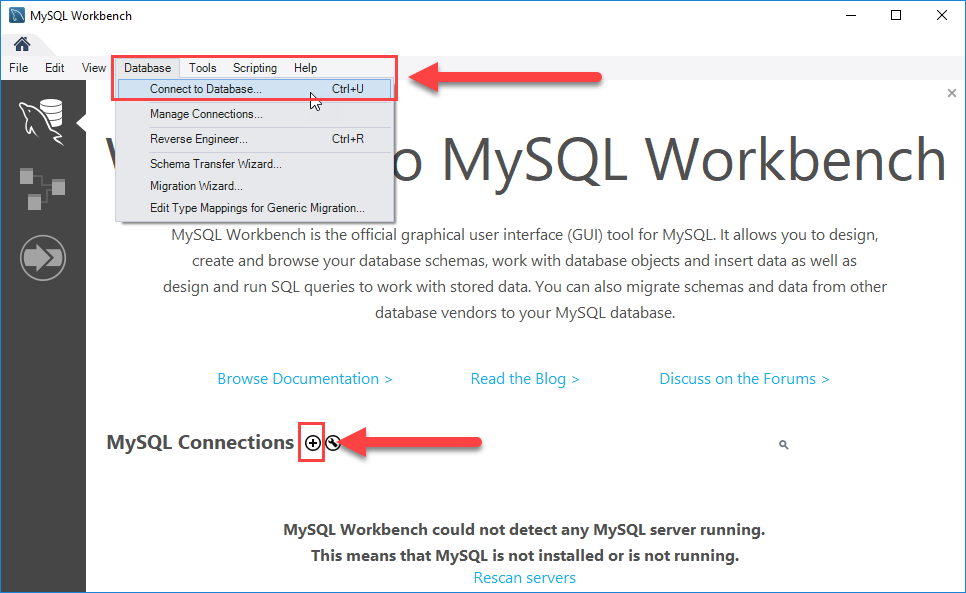
Web Step 1 Launch the MySQL Workbench You can connect to a MySQL Server using the Database gt Connect to Database menu or click the button that is located next to the
Pre-crafted templates provide a time-saving service for producing a varied range of documents and files. These pre-designed formats and designs can be used for different individual and expert jobs, including resumes, invitations, leaflets, newsletters, reports, presentations, and more, streamlining the material production procedure.
Mysql Workbench Connect To Local Sql Server

How Can I Connect A Tool Such As MySQL Workbench To My Local Site s Database FAQ Local

Solved Connect To A Local SQL Server Db With Sequelize 9to5Answer
Learn MySQL The Basics Of MySQL Stored Procedures
How To Connect To Local Instance Of SQL Server 2008 Express Gang Of Coders

Connecting To A Fasthosts MySQL Database With MySQL Workbench 8 YouTube
Warning Contradict Pattern Mysql Workbench Connect To Odbc Database Fill In Fire Systematic
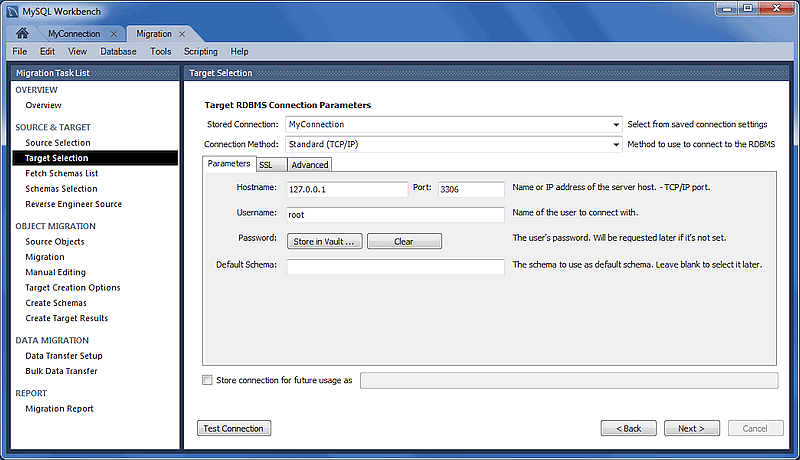
Web This step creates a local MySQL connection so you can skip the Management and OS and SSH Configuration options which are used for configuring a remote MySQL connection On Microsoft Windows select

Web Oct 21 2016 nbsp 0183 32 A server running MySQL that is accessible via SSH For example you can follow the tutorial How To Install MySQL on Ubuntu

Web Dec 26 2016 nbsp 0183 32 How to connect to a database on mysql workbench on local host Ask Question Asked 6 years 11 months ago Modified 6 years 11 months ago Viewed 3k

Web 5 1 Creating A New MySQL Connection Simple 5 2 Creating A New MySQL Connection Tutorial 5 3 Manage Server Connections 5 3 1 Standard TCP IP Connection Method

Web This section focuses on creating a connection to the source Microsoft SQL Server because creating a MySQL connection is a standard operation Note Prerequisite that
Web 1 By navigating Database gt Connect to Database 2 By clicking the button that locates next to the MySQL Connections Now click the button next to the MySQL Connections Web Dec 18 2012 nbsp 0183 32 1 Answer You cannot use MySQL Workbench as a Microsoft SQL Server client But technically speaking yes you can connect to a Microsoft SQL Server
Web How tos MySQL Workbench is a GUI tool that allows access to a SQL database Connection to the database can either be local on the host computer or a remote