Ms Word Macro Find And Replace Text How To Enable Macros In Microsoft Word 7 Steps With Pictures With Why We Use Macro In Ms Word Printable Templates Free Creating A Macro To Find And Replace Text In Word Printable Templates How To Find And Replace Text In Word For Mac How Do I Type Fractions VBA Macro Find And Replace YouTube VBA Find and Replace provides a method for finding and replacing text anywhere in a document or collection of documents using single user defined find and replace variable pairs or a user defined list of find and replace pairs It also provides a method to find text and replace found text with a user defined AutoText or Building
Windows macOS Web Go to Home Replace Enter the word or phrase you want to replace in Find what Enter your new text in Replace with Choose Replace All to change all occurrences of the word or phrase Or select Find Next until you find the one you want to update and then choose Replace To delete the text specified by the Find argument use an empty string You specify special characters and advanced search criteria just as you do for the Find argument To specify a graphic object or other nontext item as the replacement move the item to the Clipboard and specify c for ReplaceWith Replace
VBA Macro Find And Replace YouTube How To Find And Replace Words In Microsoft Word Documents Simul Docs How To Find And Replace In Word File In 2023 Word Find Word File Words Download Find And Replace Text In Multiple Ms Word Documents Files Riset How To Change Formats Using Replace Or By Modifying A Style In How To Ignore Paragraph Marks When Pasting In Excel Pixelated Works Normalising Your Manuscript Using Microsoft Word Evelyn Chartres Tutorial How To Create A Macro In MS Word Solved How To Do Search and replace In A Macro 9to5Science
Ms Word Macro Find And Replace Text
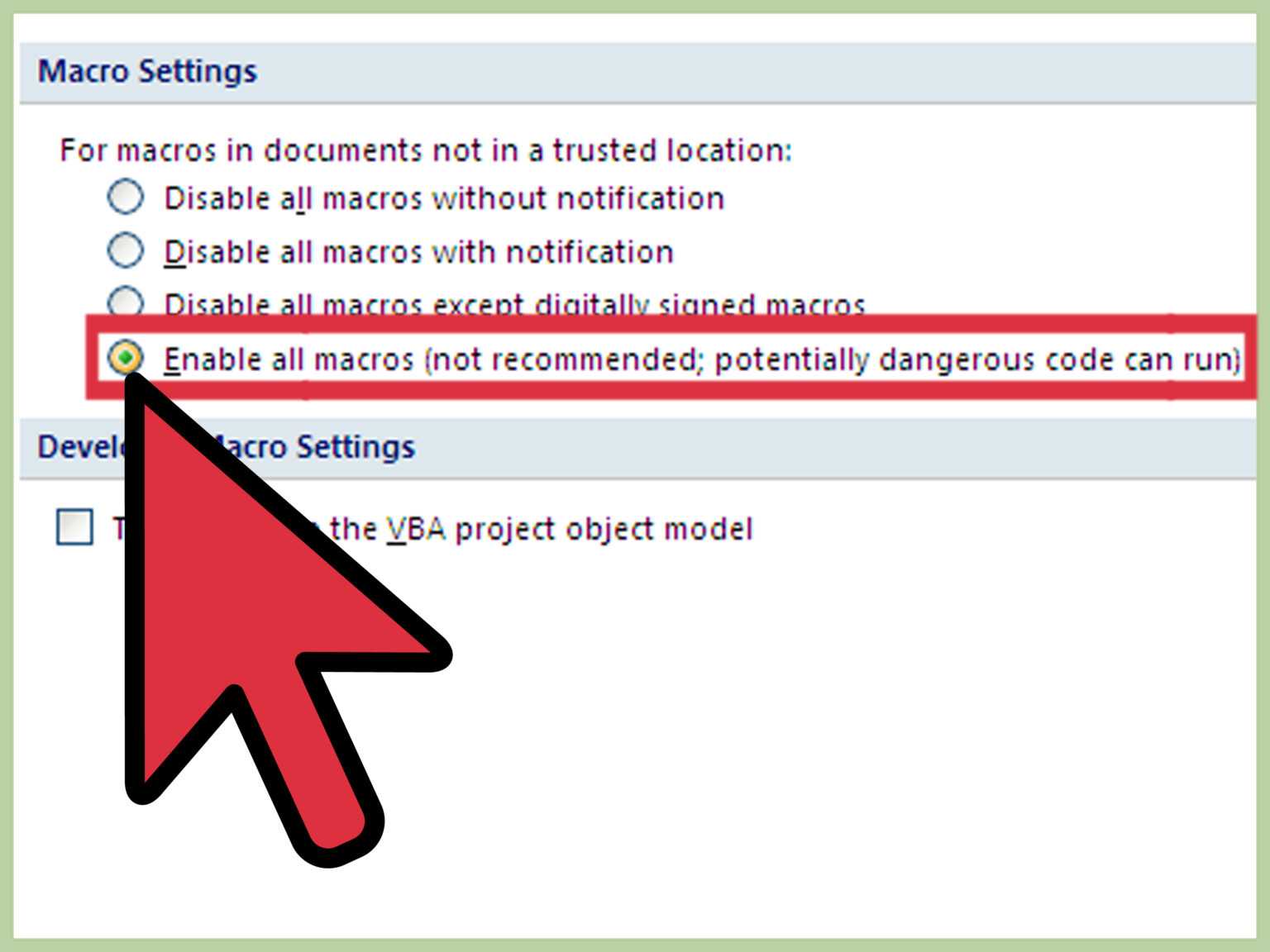 Ms Word Macro Find And Replace Text
https://douglasbaseball.com/wp-content/uploads/2019/11/how-to-enable-macros-in-microsoft-word-7-steps-with-pictures-with-word-macro-enabled-template-1536x1152.jpg
Published Aug 29 2018 Have you ever finishing typing a letter report or presentation only to discover that you misspelled a person s name or had the wrong company listed multiple times throughout your document No worries it s an easy fix Readers like you help support How To Geek
Templates are pre-designed files or files that can be used for numerous purposes. They can save time and effort by providing a ready-made format and design for developing various type of material. Templates can be used for individual or expert jobs, such as resumes, invites, leaflets, newsletters, reports, discussions, and more.
Ms Word Macro Find And Replace Text
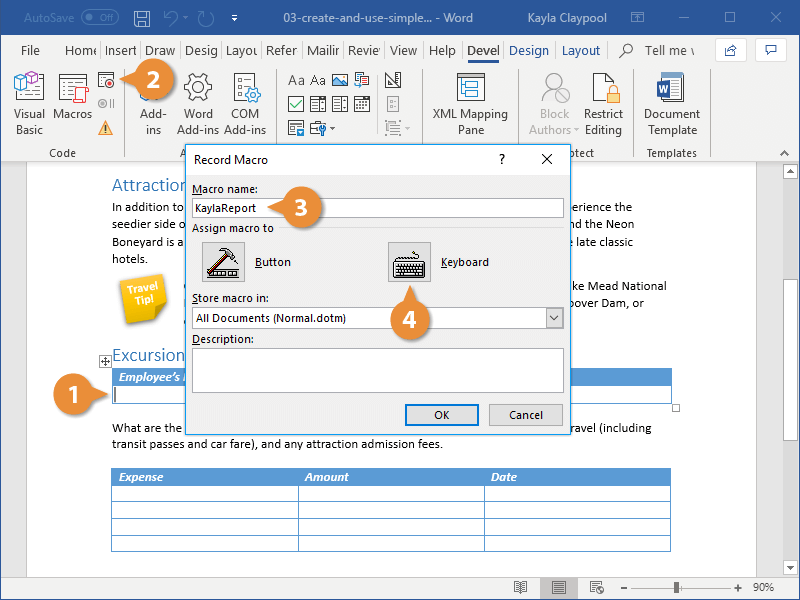
How To Create Macros In Microsoft Word The Tech Edvocate
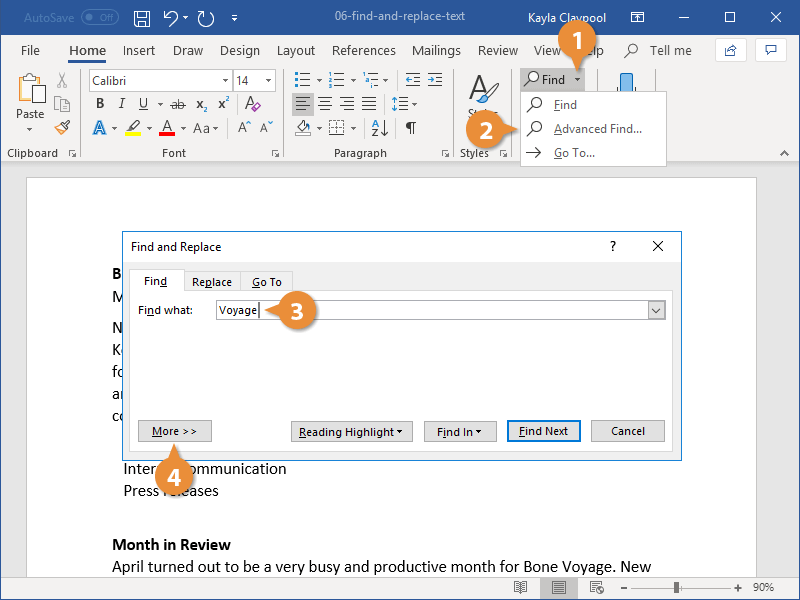
How To Find And Replace Words In Microsoft Word Documents Simul Docs

How To Find And Replace In Word File In 2023 Word Find Word File Words

Download Find And Replace Text In Multiple Ms Word Documents Files Riset

How To Ignore Paragraph Marks When Pasting In Excel Pixelated Works

Normalising Your Manuscript Using Microsoft Word Evelyn Chartres
MS Word macro find replace based on a list I m needing a macro that will simply find and replace like this The text is in a long MS Word doc Besides I have a long Excel sheet with the list of changes I wish to make The Excel sheet looks like this Column A contains phrases that I wish to remove These are all unique of course

This VBA macro will find and replace text in a selection It will also italicize the replaced text

A working solution is below vba ms word Share Follow edited Mar 6 2022 at 21 51 asked Mar 6 2022 at 15 54 Lindylead 87 1 14 This forum expects that you will have a macro written that you need help with not that you will expect someone else to write one for you stackoverflow help how to ask Charles Kenyon Mar 6 2022 at 16 24

Start by choosing Tools Macro Record Macro Name your macro ReplaceSpaces or whatever you want the macro s name cannot contain spaces Hit OK This is the part where you would do

T he purpose of this Microsoft Word Tips Microsoft Word Help page is discuss and provide a VBA solution to find and replace text wherever it may appear in a document This content is a modified version of my article on the same topic previously published at the Word MVP FAQ website Acknowledgments to Doug Robbins Peter Hewett and Jonathan West for their contributions to that article
Method 1 Find and Replace a Text String in Word Document Using Excel VBA Method 2 Find and Replace a Text String in a Word Document with Change of Formatting Method 3 Find and Replace Text Strings from a Certain Paragraph in Word Document Method 4 Find and Replace a Range of Text Strings in Word Document with the Help of InputBox File Size How to Search and Replace Text in a Word Document 271 33 KB Microsoft Word allows you to search and replace text in a document with little effort If you have a word that may have been used often in a document and you would like to replace it with another word you can quickly change the word using the search and replace shortcut
Select the replace button to navigate to the Find and Replace pane Source 2 Type the text you would like to locate in the Find text entry field 3 Type your new text in the Replace text entry field 4 Click the Find Next button until you locate the text that needs to be replaced