Ms Excel Hyperlink Cannot Open Specified File How To Create Hyperlink In MS Excel MS Excel Hyperlink Bangla File Open PDF From Excel Hyperlink png Simple Wiki Excel 2022 Hyperlink Not Working Cannot Open Specified File How To Solve Cannot Open The Specified File Error In Excel Hyperlink How To Solve Cannot Open The Specified File Error In Excel Hyperlink Web Feb 15 2022 nbsp 0183 32 To ensure our links are updated on saving we need to go to the File tab gt gt Options gt gt Advanced Once there we will scroll to the General tab and click on the Web Options When we click on it a new window appears On this window we need to go to the Files tab and select the option Update Links on save
Web Oct 7 2010 nbsp 0183 32 EXCEL HYPERLINK Cannot open specified file When I moved an XL spreadsheet w hyperlinks from one folder on a shared drive to another folder on the same shared drive the hyperlinks in the spreadsheet did not work same spreadsheet in the new folder Message said Cannot open the specified file Web Jun 7 2023 nbsp 0183 32 Excel Hyperlink function not working anymore quot cannot open specified file quot Ask Question Asked 5 months ago Modified 5 months ago Viewed 61 times 1 I had a hyperlink function the worked perfectly but once excel updated its stopped working It would use two inputs to search for a cell on another worksheet on the same workbook
How To Solve Cannot Open The Specified File Error In Excel Hyperlink How To Solve Cannot Open The Specified File Error In Excel Hyperlink How To Solve Cannot Open The Specified File Error In Excel Hyperlink HYPERLINK Function Returns Cannot Open Specified File Microsoft Hyperlink Cannot Open Specified File In Excel Excel Tutorial Hyperlink Cannot Open Specified File In Excel Excel Tutorial Hyperlink Cannot Open Specified File In Excel Excel Tutorial MS Excel Hyperlink To Sheet YouTube Excel
Ms Excel Hyperlink Cannot Open Specified File
 Ms Excel Hyperlink Cannot Open Specified File
https://i.ytimg.com/vi/el6vU7xGnTQ/maxresdefault.jpg
Web Nov 13 2018 nbsp 0183 32 Re HYPERLINK function returns quot Cannot open specified file quot If all the jpgs are in the same folder you could set a hyperlink base in advanced properties Creating the links with HYPERLINK would be easier and the links less likely to break
Pre-crafted templates use a time-saving service for creating a diverse variety of documents and files. These pre-designed formats and layouts can be utilized for various individual and professional tasks, including resumes, invitations, flyers, newsletters, reports, discussions, and more, simplifying the material creation process.
Ms Excel Hyperlink Cannot Open Specified File

How To Solve Cannot Open The Specified File Error In Excel Hyperlink

How To Solve Cannot Open The Specified File Error In Excel Hyperlink

How To Solve Cannot Open The Specified File Error In Excel Hyperlink

HYPERLINK Function Returns Cannot Open Specified File Microsoft
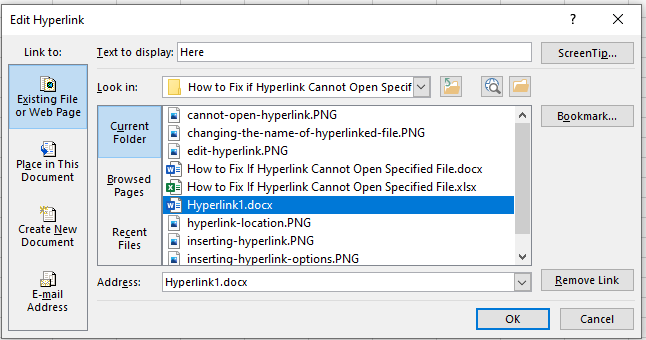
Hyperlink Cannot Open Specified File In Excel Excel Tutorial
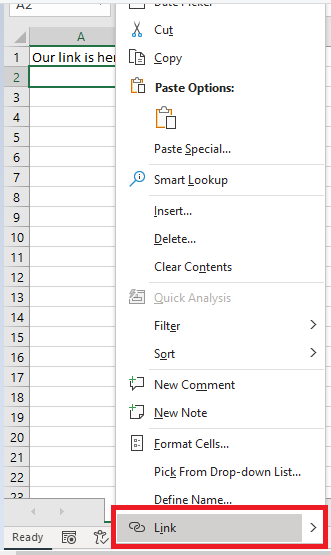
Hyperlink Cannot Open Specified File In Excel Excel Tutorial

Web Fix 1 Verify the Existence of the Target File When you create a hyperlink Excel needs to know where the destination file or website is located If the path is incorrect Excel cannot open the specified file To fix this issue simply double check the

Web Dec 3 2016 nbsp 0183 32 1 Quit any programs that are running 2 Click Start and then click Run Type regedit in the Open box and then click OK 3 In Registry Editor browse to one of the following subkey create the keys when they do not exist For a 32 Bit version of Office on 64 bit version of Windows

Web Nov 13 2018 nbsp 0183 32 Re HYPERLINK function returns quot Cannot open specified file quot Willy Lau I tried the formulas but can t seem to get it to work in Office 365 What I am trying to do is create a hyperlink to a changing cell in the next screen

Web Aug 2 2013 nbsp 0183 32 Excel amp Hyperlinks Can not open the specified file I have one master copy excel document on our J Drive I have created hyperlink in many cells to other documents xfdl files again on our J Drive Looked a little foolish when teaching the new kid how to insert hyperlink to discover quot Cannot open specified file quot Yet the path is

Web May 29 2023 nbsp 0183 32 To insert hyperlinks in Excel you can click on the Insert gt Link option and then enter the address of the target file folder You can also press the Ctrl K hotkey by selecting the target
Web Nov 1 2023 nbsp 0183 32 Part 1 Reasons for Hyperlinks Not Working in Excel Issue Part 2 Fix Excel Hyperlink Cannot Open the Specified File by Disabling quot Update Links on Save quot Part 3 Fix Excel Hyperlink Errors By Repairing Corrupted Excel Files HOT Video Turorial How to Fix Hyperlink Not Working in Excel in Windows 10 11 Conclusion Word Recovery amp Fix Web Jul 6 2023 nbsp 0183 32 How do I fix the quot Cannot open the specified file quot error with hyperlinks in Excel for Mac Ask Question Asked 3 months ago Modified 3 months ago Viewed 251 times 0 Since 2016 Microsoft Excel has run in an App Sandbox on macOS
Web Oct 26 2021 nbsp 0183 32 You need to specify a protocol specifically file Changing your link to file C file xlxs would likely solve your problem Non excel files would be opened with the default program for that file type e g txt would open notepad