Modify Sources List Debian Debian Vs Ubuntu Welche Linux Distribution How To Enable Non Free Packages On Debian 11 How To Install Steam On Debian 11 Bullseye Or Buster 10 Linux Linux Shout Debian 8 7 0 Disponibile Al Download OCULUS IT Debian 8 11 Jessie Debian 8 Debian Sources List Generator Include source Contrib Non Free Security Source List Sources List Generator for official Debian repositories
1 51K subscribers Subscribe 6 3K views 1 year ago Linux Configuration Linux Terminal Command Line and more Tutorials for Beginners Debian Ubuntu Arch Manjaro linux In this video I The etc apt sources list d directory provides a way to add sources list entries in separate files Two different file formats are allowed as described in the next two sections Filenames need to have either the extension list or sources depending on the contained format
Debian 8 11 Jessie Debian 8 How To Set Up WiFi In Debian With The Command Line Mengenal Debian Linux Pengertian Dan Cara Kerjanya How To Install The Latest AMD Drivers On Debian 10 Buster Linux Sources list Completa Para O Debian 10 Buster Useful Tips For Debian Based Distros MyBlueLinux COM Understanding And Using Debian Sources list Biohackathon GNU Linux Debian Join Hands To Fight COVID 19 Debian 11 Bullseye Linux
Modify Sources List Debian
 Modify Sources List Debian
http://www.sysadminslife.com/wp-content/uploads/2009/03/debian_ubuntu.png
The etc apt sources list d directory provides a way to add sources list entries in separate files Two different file formats are allowed as described in the next two sections Filenames need to have either the extension list or sources depending on the contained format The filenames may only contain letters a z and A Z digits 0 9
Templates are pre-designed documents or files that can be used for different functions. They can save time and effort by providing a ready-made format and design for producing various kinds of material. Templates can be used for personal or professional projects, such as resumes, invites, flyers, newsletters, reports, presentations, and more.
Modify Sources List Debian
Setup Debian 11 Official Repository In Sources list etc apt sources list

How To Set Up WiFi In Debian With The Command Line
Mengenal Debian Linux Pengertian Dan Cara Kerjanya

How To Install The Latest AMD Drivers On Debian 10 Buster Linux
Useful Tips For Debian Based Distros MyBlueLinux COM
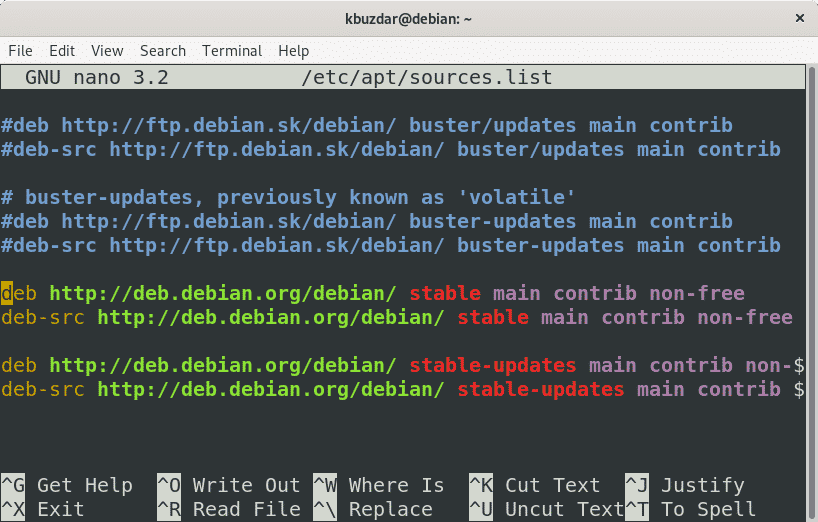
Understanding And Using Debian Sources list
The file etc apt sources list in Debian contains the list of the sources from which the packages can be obtained sources list file can vary depending on various factors from which medium the Debian was installed was it updated from previous release etc This is the list we want on our system
How to edit sources list as root under Debian 9 Ask Question Asked 6 years 5 months ago Modified 4 years 9 months ago Viewed 20k times 2 So I just installed Debian 9 0 0 on my PC and now I can t download packages with the Synaptic packet manager as the sources list file under etc apt has only the DVD set

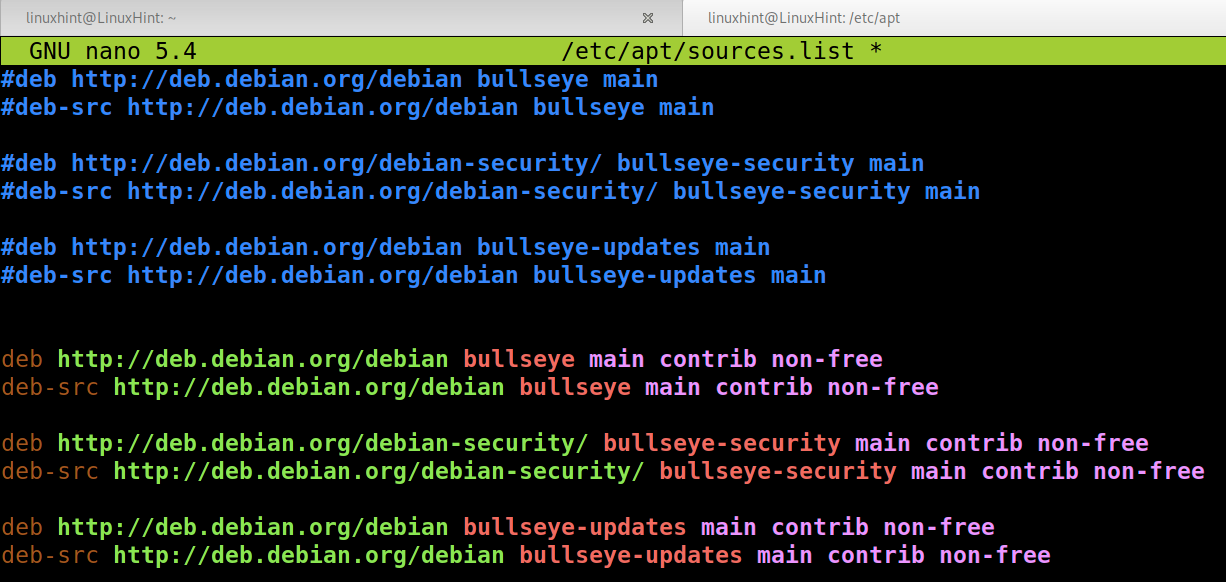
To edit the sources list file you need to open it with a text editor You can use the following command to open the file in the Nano text editor a beginner friendly command line text editor with administrative privileges sudo nano etc apt sources list

Step 1 Open the Root Terminal To make changes in the configuration files it is recommended to open the root terminal sudo su If you do not want to open the root terminal then use the sudo command after ensuring the user is in the sudoers file Step 2 Create a Backup

Debian users can modify the sources list file according to their choice by adding or removing repositories enabling or disabling any repository in the system and more It will help users install a specific package version on the system You can check the sources list in Debian 11 by executing the following command cat etc apt sources list
2 Modifying etc apt sources list After a Debian version has reached EOL end of life its repositories go to the Debian archive Therefore we can use this archive to get packags for our distribution The syntax for our etc apt sources list is as follows So for Debian Etch you d comment out all other repositories in etc apt sources list Sources List Generator for official Debian repositories Debian Sources List Generator Fork Mirror Releases Arch Include source Contrib Non Free Security Backports Source List Make it so
DebianRepository A Debian repository is a set of Debian binary or source packages organized in a special directory tree and with various infrastructure files checksums indices signatures descriptions translations added Client computers can connect to the repository to download and install the packages using an Apt based