Menu Bar Icons Mac Mac Menu Bar Icons Download Yellowmodels Managing Menu Bar Icons Woodbury Mac IT The MacGuys How To Add Remove And Rearrange Menu Bar Icons In MacOS Mojave How To Arrange Menu Bar Icons Mac YouTube Mac Menu Bar Icons
Mac Menu Bar Icons Mac 101 Meet The Finder Hide Your Mac Menu Bar Icons With Vanilla Designing MacOS Menu Bar Extras How To Hide Menu Bar Icons On Mac With Vanilla A Simple Introduction To Mac Menu Bar Menu Bar Button PNG 512x512px Menu Bar Area Black Black And White MacOS Big Sur How To Add Remove Or Hide Status Icons From Menu Bar Depth Powerful Submerged Macbook Menu Bar Disappeared Sea Bream Opaque
Menu Bar Icons Mac
 Menu Bar Icons Mac
https://yellowmodels586.weebly.com/uploads/1/2/6/8/126865995/917109559.png
Templates are pre-designed documents or files that can be utilized for different purposes. They can conserve time and effort by supplying a ready-made format and layout for producing different kinds of material. Templates can be utilized for personal or expert projects, such as resumes, invites, leaflets, newsletters, reports, discussions, and more.
Menu Bar Icons Mac

Put An Icon Menu On Your Mac OS X Menu Bar Macro Library Keyboard
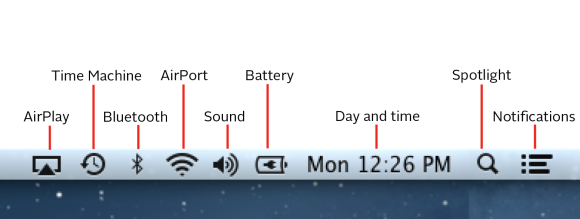
Mac 101 Meet The Finder

Hide Your Mac Menu Bar Icons With Vanilla

Designing MacOS Menu Bar Extras
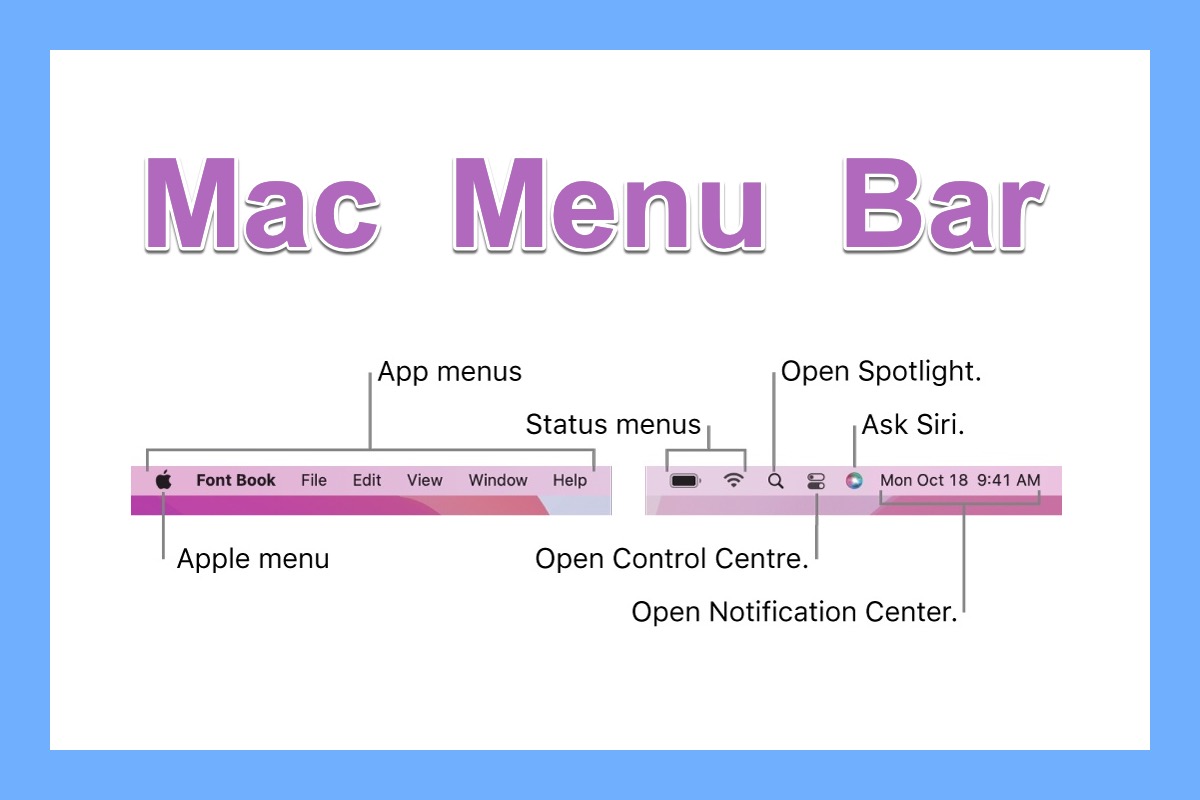
A Simple Introduction To Mac Menu Bar

Menu Bar Button PNG 512x512px Menu Bar Area Black Black And White


1000 menu


On Drive for desktop at the top right in the menu bar you can find the Drive for desktop menu To add Drive to your Dock In the Applications folder drag the Drive app to the left side of the
[desc-11] [desc-12]
[desc-13]