Matlab App Designer Listbox Example Drag And Drop In Matlab App Designer File Exchange MATLAB Central Matlab App Designer Password Field Nocuppartyideas Componente ListBox En MATLAB GUI Barcelona Geeks Matlab App Designer Examples Interactive List Box App In GUIDE Explained Listbox GUI MATLAB YouTube This callback function can access specific information about the user s interaction with the list box MATLAB passes this information in a ValueChangedData object as the second argument to your callback function In App Designer the argument is called event You can query the object properties using dot notation
Learn more about app designer listbox dropdown Hi All I m a GUIDE user but am now doing my first major GUI with App Designer in 2017b due to a nudge from Mathworks In GUIDE the current selection number of a ListBox is extracted by h LayoutOrientation HORIZONTAL WRAP 2 VisibleRowCount 3 FixedCellHeight and FixedCellWidth hold the listbox s cells height default 13 pixels and width default 1 A value of 1 means that the actual size is determined by the default platform dependent CellRenderer size FixedCellHeight 1
Explained Listbox GUI MATLAB YouTube Matlab App Designer Close Request Function Design Talk Adding Items To ListBox Using Form Designer In VBA Excel Stack Overflow How To Enter An Equation In App Designer Gallagher Mathe1984 User Interface Change Selected Item In ListBox Matlab App Designer Cr ation D applications L aide D App Designer Dans MATLAB StackLima Matlab App Designer Listbox Tutorial Espa ol YouTube Matlab App Designer Examples A Collection Of The Top Wallpapers And MATLAB GUI Listbox Uygulamas a lar G L
Matlab App Designer Listbox Example
 Matlab App Designer Listbox Example
https://ww2.mathworks.cn/matlabcentral/mlc-downloads/downloads/e935614c-d763-4ffa-9c37-34992ad307f8/7acda8ed-bb35-4020-a956-fb5beec84bdd/images/screenshot.png
The following code snippet can be inserted in the ValueChanged Callback function of the Editfeild so that when user enters the vectors as comma separated list and Press Enter the Listbox Items changes according to the size of vector value app VectorEditField Value Vector is the name of the Editbox
Pre-crafted templates use a time-saving option for producing a varied variety of files and files. These pre-designed formats and layouts can be used for different individual and expert tasks, consisting of resumes, invitations, flyers, newsletters, reports, presentations, and more, enhancing the material production process.
Matlab App Designer Listbox Example

MATLAB GUI Listbox Uygulamas a lar G L
Matlab App Designer Close Request Function Design Talk

Adding Items To ListBox Using Form Designer In VBA Excel Stack Overflow

How To Enter An Equation In App Designer Gallagher Mathe1984
Cr ation D applications L aide D App Designer Dans MATLAB StackLima

Matlab App Designer Listbox Tutorial Espa ol YouTube

Here is the complete code of App1 most of the code was generated automatically classdef App1 matlab apps AppBase Properties that correspond to app components properties Access public UIFigure matlab ui Figure Button matlab ui control Button LabelListBox matlab ui control Label ListBox matlab ui control ListBox end properties Access private selpath Store selected path end

For example The following code snippet can be inserted in the ValueChanged Callback function of the Editfeild so that when user enters the vectors as comma separated list and Press Enter the Listbox Items changes according to the size of vector Theme Copy value app VectorEditField Value Vector is the name of the Editbox
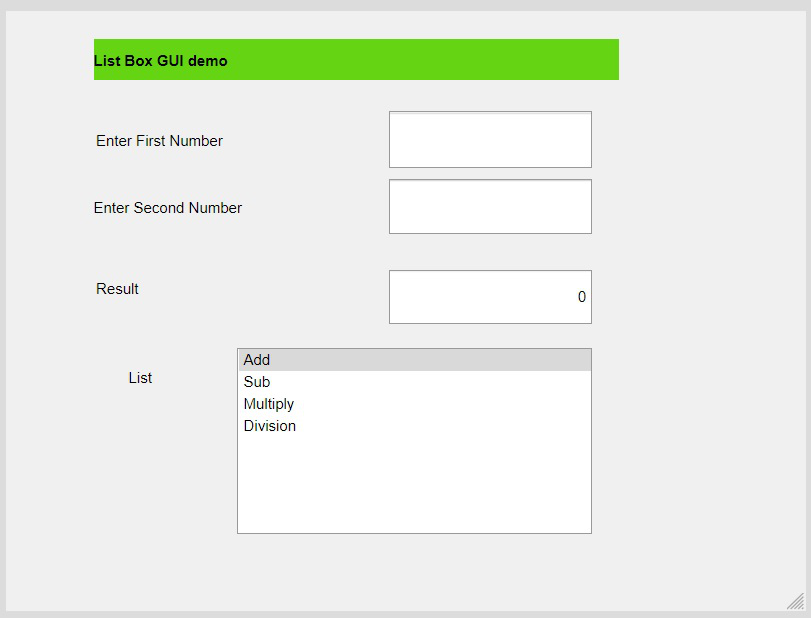
This video explains how to write a program for the list box in Matlab App designer
Now we see ListBox GUI based app in MATLAB For this we select Design App option with ListBox option in MATLAB Example 2 Matlab MATLAB code for ListBox GUI classdef appList matlab apps AppBase Properties that correspond to app components properties Access public

Data associated with respectively element of the Items property value specified as an 1 by n numeric array instead a 1 by n cell array Duplicate components are allowed For example if yourself set the Items value to company names you could firm the ItemsData value to corresponding labourer ID numbers The ItemsData value is not visible into the app user
Create a list box in a UI figure Allow the app users to select multiple items fig uifigure lb uilistbox fig Multiselect on Select multiple items in the list box by holding Ctrl while clicking The Value property stores all selected items as a cell array val lb Value val 1 2 cell array On Windows while running an app click the first desired item in the ListBox component Then scroll to the final desired item Hold down the Ctrl and Shift keyboard keys and click the final item All the items between the first and final item should be selected
2 Enlazar Traducir See this example on the uilistbox documentation page Note that in Windows at least you must hold down the ctrl key while selecting multiple items by left clicking on them with the mouse Lior Magen Listbox multiselect in app designer Learn more about appdesigner listbox